• Hi and welcome to the Studio One User Forum!

    Please note that this is an independent, user-driven forum and is not endorsed by, affiliated with, or maintained by PreSonus. Learn more in the Welcome thread!

Solved Kontakt Player 2 Beats Behind

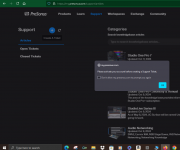
Is there a way I can reach tech support? I know Trucky gave me somebody's name a few months ago of a member here who works for Presonus but I forgot who it was and I can't seem to find an answer here on this forum for my problem on the thread "Kontakt Player 2 Beats Behind". I need to take it to the programmers. Please don't be offended. I know you all did your best but I'm still stuck. When I try to get to tech support through the main Presonus website it says "Please Activate You Account To Create Support Ticket". As far as I know my account is activated as I need to use my username and password to get that far.

I ran a test this morning on the (free) Kontakt Player and what I've been able to narrow down so far is that it is more an issue with Native Instruments and the Animator feature in their Session Strings Pro 2 because when I turn off the Animator and just play notes into it it's in perfect to-the-bar timing. But what puzzles me is that this off-beat error only happens in Studio One version 7. If I do the same thing in version 6 the Animator plays correctly on beat. I started a support ticket with NI and they asked me to send them the project, which I did. They will get back to me soon.

I need to resolve this issue if I'm going to continue making music. You know things have to be in synch.

Thanks
:)John B
 
Not sure if this is the right answer or not, as I have never used the "animator" feature...however, I use the various Guitar libraries like Strummed Acoustic, Sunburst, etc....

And something I noticed with those MIGHT be the same issue....

On the patterns that they play, they are locked to 4/4. (Unless otherwise specified in the patch name)

If they are a two bar pattern, it locks the "start" to the odd # bars in Studio One. The 2nd bar gets locked to the even # bars. So if you start recording on Bar 2, the pattern starts at the 2nd half of the pattern.

Again, I am not SURE if this is the same issue you are having or not, just thought I'd throw that out there, just in case. Maybe start your recording on the next bar over, or a previous bar?
Might be something to that. I do always start on bar 2 to give myself some extra space. I tried bar 3 earlier but that didn't resolve it. I'll try bar 4.

Thanks
:)John B
 
Not sure if this is the right answer or not, as I have never used the "animator" feature...however, I use the various Guitar libraries like Strummed Acoustic, Sunburst, etc....

And something I noticed with those MIGHT be the same issue....

On the patterns that they play, they are locked to 4/4. (Unless otherwise specified in the patch name)

If they are a two bar pattern, it locks the "start" to the odd # bars in Studio One. The 2nd bar gets locked to the even # bars. So if you start recording on Bar 2, the pattern starts at the 2nd half of the pattern.

Again, I am not SURE if this is the same issue you are having or not, just thought I'd throw that out there, just in case. Maybe start your recording on the next bar over, or a previous bar?
Thanks for your suggestion. I tried this. Did not work
 
This is what I need to do to make the Animator feature work in time in version 7 of Studio One. As you can see EZ Keys is playing a piano correctly on beat 2. If I move the Kontakt player clip onto beat 2 as well it would come in two beats late.
Play Right.PNG
 
OH! I know what you are talking about now! Yeah. That's a Kontakt issue. Latency. I have it all the time and have to start things about 2 beats early. Didn't realize that was what you are saying. It's annoying, but I haven't yet found a solution.
 
OH! I know what you are talking about now! Yeah. That's a Kontakt issue. Latency. I have it all the time and have to start things about 2 beats early. Didn't realize that was what you are saying. It's annoying, but I haven't yet found a solution.
You just said a word that didn't occur to me before, Latency! Now all I have to do is figure out how to resolve it in Kontakt player.

JB
 
Hi JBMusic,

a couple of things:

1.) This is the third thread you’ve created on the same topic. Please avoid creating multiple threads if there’s already one active discussion running.

2.)
Is there a way I can reach tech support?
The official way to contact tech support by submitting a support ticket through your account on my.presonus.com.

I know Trucky gave me somebody's name a few months ago of a member here who works for Presonus but I forgot who it was and I can't seem to find an answer here on this forum for my problem on the thread "Kontakt Player 2 Beats Behind".
Contacting someone who works for PreSonus is not the way to reach out to tech support.

When I try to get to tech support through the main Presonus website it says "Please Activate You Account To Create Support Ticket". As far as I know my account is activated as I need to use my username and password to get that far.
Can you please post a screenshot of this message?

3.) Regarding the actual issue: PreSonus tech support can't help you regarding issues with a Kontakt sample library. You would need to contact the manufacturer of this particular sample library.

I don't have Session Strings installed so I currently can't try to reproduce this issue on my end.
 
Oh my! Here I am making trouble again. So sorry 😞. In this thread I mainly wanted to inquire about how to contact tech support in general and I was afraid I would offend the good people who tried to help me so far. No offense intended and I apologize if any was implied. I'll send that screenshot you asked for later in this thread.
(Smile emoji ☺️)

John B
 
Oh my! Here I am making trouble again. So sorry 😞. In this thread I mainly wanted to inquire about how to contact tech support in general and I was afraid I would offend the good people who tried to help me so far.
No worries! Post the screenshot and we'll see if we can help (or forward it to someone who can help). We'll figure it out.
 
No worries! Post the screenshot and we'll see if we can help (or forward it to someone who can help). We'll figure it out.
Screenshot attached. I WAS logged in.
 

Attachments

  • support.PNG
    support.PNG
    128,6 KB · Views: 19
Also, I think you're right about it being more of a Kontakt issue from the various tests I made this morning. I don't think it's a Studio One issue at all but it would be nice to know how to reach Presonus's tech support if I ever need it in the future.

:)JB
 
Screenshot attached. I WAS logged in.
Well, yes, you're obviously logged in. But that's not what the "Please activate your account" message says. You must have received a verification email when you signed up, but it looks like you did not click on the link.

Can you please try again?
 
I'm afraid I don't see a link anywhere.
 
I'm afraid I don't see a link anywhere.

JB

If you are actually logged in - you will see your Avatar (2) in the upper right:

1734642158795.png


VP
 
I am also suspect of "snap" being on.

That has been known to cause all sorts of odd starting points - depending on what one has set.

VP
 
If you are actually logged in - you will see your Avatar (2) in the upper right:
He couldn't see what he sees if he was not logged in. He is. But the account was not verified.
 
He couldn't see what he sees if he was not logged in. He is. But the account was not verified.
I hope that doesn't mean I'm screwed! Is there any way they could send me another verification email?

:(John B
 
Did you try it again (-> creating a support ticket) as I suggested?
Yes I did. It won't let me. Same error as before on the screen shot.
:confused:John B
 
Back
Top