Vocalpoint
Well-known member
Lukas - I get this same screen (v6 and v7) . And no I did not purchase them.No, the question is: Did you purchase them?
VP

Lukas - I get this same screen (v6 and v7) . And no I did not purchase them.No, the question is: Did you purchase them?

Same issue for me as well. i just choose to ignore. and yes i did have a subscription at one time, but no longer.Lukas - I get this same screen (v6 and v7) . And no I did not purchase them.
VP

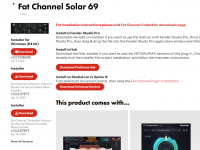
If you're entitled to them, you can search for them individually in MyFender.

PreSonus/Fender Hub is only for using these plug-ins in other DAWs.Alternatively, you should be able to download them from within the PreSonus (Fender?) Hub.


Thank you for your very informative postA few thoughts . . .

Lukas - if you can find out why these are connected to mine as well - I would appreciate it.I'm a PreSonus user, too, correct
But it's possible that this has to be figured out on the backend side. We have to collect feedback and see why these plug-ins are connected to your account.
I found a way of stopping Fender Studio Pro 8 bothering me with these bogus alerts. On macOS, in the folder `/Users/Shared/Library/Application Support/PreSonus/Extensions/presonus.fatchannelplugins.mac` there is a file called `products.json`. First make a backup, then use a text editor to delete the sections that correspond to the unwanted items. On mine, this involved changing...I'm a PreSonus user, too, correct
But it's possible that this has to be figured out on the backend side. We have to collect feedback and see why these plug-ins are connected to your account.
[ { "id": "presonus.fatcomp.britcomp", "name": "Brit Comp", "cid": [ "{FEF33155-7A9E-4F4E-B209-CFE86DDAFC8E}" ] }, { "id": "presonus.fatcomp.classiccomp", "name": "Classic Comp", "cid": [ "{C38F9E1A-0127-4BB8-9377-40C545A50328}" ] }, { "id": "presonus.fatcomp.comp160", "name": "Comp 160", "cid": [ "{F0BD22BB-5FE8-4279-8B05-D089B4D7B0BB}" ] }, { "id": "presonus.fatcomp.everest100", "name": "Everest C100A", "cid": [ "{23F9C088-08BE-4259-9DCE-38720AE5DE73}" ] }, { "id": "presonus.fatcomp.fc670", "name": "FC-670", "cid": [ "{85DD5632-A536-49FF-894A-9329FC1124E4}" ] }, { "id": "presonus.fatcomp.rc500", "name": "RC500 Comp", "cid": [ "{6A372968-AFA7-4A3F-805D-A09A4AE15777}" ] }, { "id": "presonus.fatcomp.thetubep1b", "name": "The Tube CB", "cid": [ "{C3C32BBC-42E2-41A7-99B5-EA1D62F897B5}" ] }, { "id": "presonus.fatcomp.vt1", "name": "VT1 Comp", "cid": [ "{AF35E448-40EC-4C5A-A05C-B40A5AC0A42F}" ] }, { "id": "presonus.fateq.alpine550", "name": "Alpine EQ-550", "cid": [ "{CBDD0DD3-C5EF-495A-B4C7-92EC5E8FE146}" ] }, { "id": "presonus.fateq.baxandall", "name": "Baxandall EQ", "cid": [ "{B4D3497E-4B1C-4CFA-B859-A918C17CDA03}" ] }, { "id": "presonus.fateq.rc500", "name": "RC500 EQ", "cid": [ "{63ADDF9B-0EC7-430A-AEBE-62B4CB5FBBD6}" ] }, { "id": "presonus.fateq.solar69", "name": "Solar 69", "cid": [ "{03819C3F-DC16-4B7B-B521-14B4042192F2}" ] }, { "id": "presonus.fateq.thetube", "name": "The Tube EQ", "cid": [ "{09B38119-3945-40D1-BA33-2FA19620DAB0}" ] }, { "id": "presonus.fateq.vintage3", "name": "Vintage 3-band", "cid": [ "{4635DE88-C3D2-4645-BC4D-8DFD116D6914}" ] }, { "id": "presonus.fateq.vt1", "name": "VT1 EQ", "cid": [ "{A0FAF452-D664-4BA2-90FC-6BD4AC469B29}" ] }][ { "id" : "presonus.fatcomp.rc500", "name" : "RC500 Comp", "cid" : [ "{6A372968-AFA7-4A3F-805D-A09A4AE15777}" ] }, { "id" : "presonus.fatcomp.vt1", "name" : "VT1 Comp", "cid" : [ "{AF35E448-40EC-4C5A-A05C-B40A5AC0A42F}" ] }, { "id" : "presonus.fateq.rc500", "name" : "RC500 EQ", "cid" : [ "{63ADDF9B-0EC7-430A-AEBE-62B4CB5FBBD6}" ] }, { "id" : "presonus.fateq.vt1", "name" : "VT1 EQ", "cid" : [ "{A0FAF452-D664-4BA2-90FC-6BD4AC469B29}" ] }]
Nice one.I found a way of stopping Fender Studio Pro 8 bothering me with these bogus alerts. On macOS, in the folder `/Users/Shared/Library/Application Support/PreSonus/Extensions/presonus.fatchannelplugins.mac` there is a file called `products.json`. First make a backup, then use a text editor to delete the sections that correspond to the unwanted items. On mine, this involved changing...
[
{
"id": "presonus.fatcomp.britcomp",
"name": "Brit Comp",
"cid": [ "{FEF33155-7A9E-4F4E-B209-CFE86DDAFC8E}" ]
},
{
"id": "presonus.fatcomp.classiccomp",
"name": "Classic Comp",
"cid": [ "{C38F9E1A-0127-4BB8-9377-40C545A50328}" ]
},
{
"id": "presonus.fatcomp.comp160",
"name": "Comp 160",
"cid": [ "{F0BD22BB-5FE8-4279-8B05-D089B4D7B0BB}" ]
},
{
"id": "presonus.fatcomp.everest100",
"name": "Everest C100A",
"cid": [ "{23F9C088-08BE-4259-9DCE-38720AE5DE73}" ]
},
{
"id": "presonus.fatcomp.fc670",
"name": "FC-670",
"cid": [ "{85DD5632-A536-49FF-894A-9329FC1124E4}" ]
},
{
"id": "presonus.fatcomp.rc500",
"name": "RC500 Comp",
"cid": [ "{6A372968-AFA7-4A3F-805D-A09A4AE15777}" ]
},
{
"id": "presonus.fatcomp.thetubep1b",
"name": "The Tube CB",
"cid": [ "{C3C32BBC-42E2-41A7-99B5-EA1D62F897B5}" ]
},
{
"id": "presonus.fatcomp.vt1",
"name": "VT1 Comp",
"cid": [ "{AF35E448-40EC-4C5A-A05C-B40A5AC0A42F}" ]
},
{
"id": "presonus.fateq.alpine550",
"name": "Alpine EQ-550",
"cid": [ "{CBDD0DD3-C5EF-495A-B4C7-92EC5E8FE146}" ]
},
{
"id": "presonus.fateq.baxandall",
"name": "Baxandall EQ",
"cid": [ "{B4D3497E-4B1C-4CFA-B859-A918C17CDA03}" ]
},
{
"id": "presonus.fateq.rc500",
"name": "RC500 EQ",
"cid": [ "{63ADDF9B-0EC7-430A-AEBE-62B4CB5FBBD6}" ]
},
{
"id": "presonus.fateq.solar69",
"name": "Solar 69",
"cid": [ "{03819C3F-DC16-4B7B-B521-14B4042192F2}" ]
},
{
"id": "presonus.fateq.thetube",
"name": "The Tube EQ",
"cid": [ "{09B38119-3945-40D1-BA33-2FA19620DAB0}" ]
},
{
"id": "presonus.fateq.vintage3",
"name": "Vintage 3-band",
"cid": [ "{4635DE88-C3D2-4645-BC4D-8DFD116D6914}" ]
},
{
"id": "presonus.fateq.vt1",
"name": "VT1 EQ",
"cid": [ "{A0FAF452-D664-4BA2-90FC-6BD4AC469B29}" ]
}
]
to
[
{
"id" : "presonus.fatcomp.rc500",
"name" : "RC500 Comp",
"cid" : [
"{6A372968-AFA7-4A3F-805D-A09A4AE15777}"
]
},
{
"id" : "presonus.fatcomp.vt1",
"name" : "VT1 Comp",
"cid" : [
"{AF35E448-40EC-4C5A-A05C-B40A5AC0A42F}"
]
},
{
"id" : "presonus.fateq.rc500",
"name" : "RC500 EQ",
"cid" : [
"{63ADDF9B-0EC7-430A-AEBE-62B4CB5FBBD6}"
]
},
{
"id" : "presonus.fateq.vt1",
"name" : "VT1 EQ",
"cid" : [
"{A0FAF452-D664-4BA2-90FC-6BD4AC469B29}"
]
}
]
Then just restart Fender Studio Pro 8. When you select the "Activate Purchased items", you should find that there is no mention of the missing items!
It goes without saying that this is clearly a very unofficial solution, but it seems to do the trick and hasn't affected the operation of the rest of Fender Studio 8. YMMV
I was able to track down the JSON file by using an invaluable tool called `Find any File` - https://apps.tempel.org/FindAnyFile/. It offer brute force searching of files by name and by content. By searching for "Everest CA100A" in file contents, it found the file within a minute!Nice one.
I am not ready to install 8 for a while yet but will flag this post just the same.
VP
I was able to track down the JSON file by using an invaluable tool called `Find any File` - https://apps.tempel.org/FindAnyFile/. It offer brute force searching of files by name and by content. By searching for "Everest CA100A" in file contents, it found the file within a minute!

Couple of points, but I'm sure SurfWhammy will be along to give a more comprehensive answer.Thank you for your very informative post
I am a new user to what was Studio one when I joined 2 weeks back, totally unaware of them about to change everything.
I have been a Notion 5 user since about 2010 before they became part of Presonus. So, when I baught the Studio One 7+ license getting Notion was a big consideration as it enabled me to read and open projects that was written in Notion. At that time my understanding was that the only way I could get my hands on the Notion software to open those old files was through the subscription, and the assumption was that after after a year I will once again loose that license as the “keep forever” part of the license only applied to the Studio One software, now Fender Studio. Having read through most of the whole thread I think I understood more or less what happens to my Stdio one subscription, i.e. nothing change except I do get all the shiny things that comes with Fender Studio, but nothing about Notion, until page 13 when your post clarified a few things.
If you do not mind, may I ask some more questions please.
Do I understand your post about Notion correctly that all the features in Notion regarding score writing is now integrated with Fender Studio? If so, I should not really need to use Notion for writing new scores and rather do it all in Studio?
Printing would understandingly still be a challenge ?
Can Studio one open legacy Notion files? If not, I assume I should still go through the tedious task of opening all legacy projects in Notion, then transfer them to Studio and save the song files for backup.
This process have proven more than tedious, as it seems like not everything transferred with the file -> transfer to Studio One transferred correctly over, especially any lyrics, chord symbols, text or expression markings.
Although Notion sounds are not as good as Vienna or other pricey software, it surely was good enough for the writing process. Writing score in Studio One however does not have the sounds library of Notion built in and requires a 3rd party Vst instrument library. Is this assumption correct or can I somehow use Notion sounds library in Studio?


It feels like some kind of dementia to me. The first thing I ask myself is always if it always has been that way.On a lighter note - How are folks getting on with the changes to single click/double click to open plugins in 'Studio Pro' ?
It is taking me a bit to get used to and have had to collapse ALOT of inserts...but I am into it! Think I will stick with it (I understand we can revert back if so desired).
That's a good way to put it! Feeling the same way. I just came across Joe's video and heard that -- which prompted my post.It feels like some kind of dementia to me. The first thing I ask myself is always if it always has been that way.
but Joe Gilder mensions that it cen be put back to original state somehow.
We use essential cookies to make this site work, and optional cookies to enhance your experience.