• Hi and welcome to the Studio One User Forum!

    Please note that this is an independent, user-driven forum and is not endorsed by, affiliated with, or maintained by PreSonus. Learn more in the Welcome thread!

Studio One 7.2.3 - Discussion Thread

Yes, the result is the same. But it is interesting that it depends on the distance of the END marker from the end of the Loop.
From what I could make out in the dropbox vid it looks like you are using Punch in Punch out...yes?
I'm sorry I don't quite understand. If you move the END marker a bar beyond the right hand loop brace does the recording fill the whole of the loop?

Regards
 
From what I could make out in the dropbox vid it looks like you are using Punch in Punch out...yes?
I'm sorry I don't quite understand. If you move the END marker a bar beyond the right hand loop brace does the recording fill the whole of the loop?

Regards
Yes, Punch In/Out is on, but the error occurs even when it is off. This way it is more clear. If I move the END mark one bar further (snap to grid), the loop fills in and everything looks correct. However, if I move the END mark just a few ms, the error still occurs. It seems like there is some distance from the END mark that causes the recording to stop.
Regards
 
Yes, Punch In/Out is on, but the error occurs even when it is off. This way it is more clear. If I move the END mark one bar further (snap to grid), the loop fills in and everything looks correct. However, if I move the END mark just a few ms, the error still occurs. It seems like there is some distance from the END mark that causes the recording to stop.
Regards
I wouldn't know why that happens, as I tend to leave a clear area to the end marker.

You may have discovered a minor glitch regarding the end marker, or there may be some obscure reason for that to happen.
It's good that you have noticed it tho, and to avoid doing that.

Kindest regards
 
I wouldn't know why that happens, as I tend to leave a clear area to the end marker.

You may have discovered a minor glitch regarding the end marker, or there may be some obscure reason for that to happen.
It's good that you have noticed it tho, and to avoid doing that.

Kindest regards
What are your snap/grid settings set to?
 
I'm not familiar with that one.
They talked about an upcoming new model that wasn't yet in production which got customers waiting for the new one instead of buying the one available.
 
They talked about an upcoming new model that wasn't yet in production which got customers waiting for the new one instead of buying the one available.
Ah yes - the BBC B+, which turned out to be far less of an upgrade than everyone expected.
 
Ah yes - the BBC B+, which turned out to be far less of an upgrade than everyone expected.
Man I feel old.

The RISC processor was used in the Archimedes box that was released about the same time as the BBC B+ was happening.
Both were suposedly BBC supported products...
If memory serves, the RISC processor was very good at Ray Tracing etc and was in competition with CISC processors.
Look up both acronyms (RISC CISC) if you need or want to understand why?

Regards folks.
 
Ah yes - the BBC B+, which turned out to be far less of an upgrade than everyone expected.
Tell that to the Master or Mr Archimedes.

Lol, don't want to make a RISCky comment, but most people outside the UK probably think we are speaking in tongues at this point.
 
Some strange behaviour in the MIDI Edit window whereby you can't return on screen to the start (or zero) - the screen is stuck further up the arrangement. It happens sometimes and not others. You sometimes have to shut the window and then re-open it. Seems to be some sort of bug but hard to pin down - I will do some more MIDI editing and see if I can re-enact the bug.
 
I've got this really annoying thing when i 'im cutting audio , it's doing something i guess it has something to do with the crossfade or something , because when i cut let's say a 4 bar loop into half , and remove the 2 bars it's leaving a really small small piece of audio. i've tried several option with the setting , my Snap is set to adaptive and also snap to grid , tried other setting but can't get rid of this.

I've never had this before and i'm a user since Studio one 3 .. what other setting can i look into ?
 
Hi, I noticed this problem (video link below). When the stop is set at the END marker and recording is in progress, the recording ends before it reaches the END marker. Do you have the same problem? Can it be solved somehow with the settings or is it a bug? Thank you

link: https://www.dropbox.com/scl/fi/8os1...ey=i0ty326fydoq255x4rvq9n9fm&st=5hc19a7a&dl=0
When recording with Auto Punch enabled it's normal behavior for Record to stop at the end of the loop (instead of the End marker).
So recording begins at the start of the loop and stops recording at the end of the loop, then continues in play mode and stops at the End marker (when "Stop at Marker" option is enabled).

Auto Punch.png
 
When recording with Auto Punch enabled it's normal behavior for Record to stop at the end of the loop (instead of the End marker).
So recording begins at the start of the loop and stops recording at the end of the loop, then continues in play mode and stops at the End marker (when "Stop at Marker" option is enabled).

View attachment 2324
Hi Trucky,
did you see the video in the attached link? The problem is that when the END mark is part of the Loop, the recording stops a bit before the end. And the loop moves forward somehow. The stop is set to the END mark.

Link: https://www.dropbox.com/scl/fi/8os1...0ty326fydoq255x4rvq9n9fm&e=1&st=5hc19a7a&dl=0
 
Hi Trucky,
did you see the video in the attached link? The problem is that when the END mark is part of the Loop, the recording stops a bit before the end. And the loop moves forward somehow. The stop is set to the END mark.

Link: https://www.dropbox.com/scl/fi/8os1...0ty326fydoq255x4rvq9n9fm&e=1&st=5hc19a7a&dl=0
Yes I did but it was difficult for me to see that the End marker matched the end of loop setting when I played it. I downloaded it now and imported into Camtasia so I could slow it down and zoom in to see all the details better.

I tested this on my computer and see that the issue relates to having the End marker match (or close to) the end of loop setting with the "Stop at Marker" option enabled. It works as expected with this option disabled.

I've reported the issue. In the meantime I'd recommend moving the End marker at least a quarter measure beyond the end of the loop when the "Stop at Marker" is enabled. Thanks!

End Marker Setting.png
 
This isn't new but thought I'd bring up midi quantization. It always seems a bit buggy to me. See the video for example. Quantize is set to 1/16. The notes that move when I press quantize shouldn't be moving.

To view this content we will need your consent to set third party cookies.
For more detailed information, see our cookies page.

I could set the quantize to 1/8 but still, it often catches me out when notes move in a quantize when they shouldn't.
 
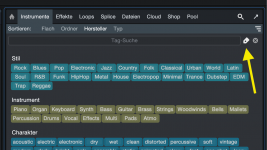
Die Tags-Suche würde ich gerne abschalten, brauche ich nicht und verbraucht Platz.
Ist das möglich, oder etwas für ein Update und dann bei "Anpassung"(Bild) unterbringen?

123.jpg
 
Die Tags-Suche würde ich gerne abschalten, brauche ich nicht und verbraucht Platz.
Ist das möglich, oder etwas für ein Update und dann bei "Anpassung"(Bild) unterbringen?

View attachment 2348
Why not just click on the tag-icon to hide it? If Presonus added more and more checkboxes, one day it would look like Cubase ;-)

Bildschirmfoto 2025-12-18 um 18.54.37.png
 
Back
Top