• Hi and welcome to the Studio One User Forum!

    Please note that this is an independent, user-driven forum and is not endorsed by, affiliated with, or maintained by PreSonus. Learn more in the Welcome thread!

New NI MKIII S-Series Firmware (v2.0.x) in Studio One 7

I can still think of about 18 things off the top of my head that I would like to see fixed/tweaked/added/considered for S1 that far outweigh any need to hold an emergency coding session for this new NI integration.
Oh, completely. I'm looking forward to whenever they call me in on that meeting as well.
Those items would be purely competitive, too long without, and implementing logical industry wide features, sorely missed.
I'll bring the doughnuts.
 
In that case, I'll have to up my end and bring NYC bagels. Nothing like em'. My friend ordered the Series III SE16. He wanted the 24, but he's distributing his expenses & budget across a good amount of gear. Mac Studio M4, Genelec's, etc. He gets a complimentary Studio One v7 in the deal. Even grown ups can be a kid in a candy store these days.

Hoping NI S1 MkIII users get their long awaited firm update. 🙏
 
Update:

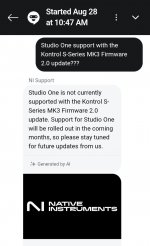
Studio One is "still" currently not on the list on NI website.
However, NI support chat bot "still" states that S1 support will be rolled out in the coming months.

Am i confused or am I just too impatient lol. 🤦🏽
What do yall think guys?
 

Attachments

  • Screenshot_20250828_105500_Chrome.jpg
    Screenshot_20250828_105500_Chrome.jpg
    37,7 KB · Views: 17
  • Screenshot_20250828_105235_Chrome.jpg
    Screenshot_20250828_105235_Chrome.jpg
    75,9 KB · Views: 15
Respectfully - continued posting/reposting/speculating or worrying about anything to do with this update AND S1 - from the NI site - is pointless.

NI has no knowledge, influence (and probably very little interest either) as to the inclusion of this update within S1.

When Presonus (and only Presonus) decides this update has a place in a future version of S1 - will it become relevant.

VP
 
I'm late to this discussion. I notice on the NI website that it now states that there is Studio One integration for the MK3 series. Just a quick check. Is everything hunky dory now? In other words are there no major issues and will the integration work as expected with Studio One? Thanks
 
I'm late to this discussion. I notice on the NI website that it now states that there is Studio One integration for the MK3 series. Just a quick check. Is everything hunky dory now? In other words are there no major issues and will the integration work as expected with Studio One? Thanks

The "basics" have always worked - as in getting your MKIII to work in v7.2.x like it always has.

The "fancy" integration stuff that the v2 firmware brings - is NOT available within v7.2.x of this writing.

That will only be possible when Presonus decides to add some new integration code in a future update to Studio One.

VP
 
The "basics" have always worked - as in getting your MKIII to work in v7.2.x like it always has.

The "fancy" integration stuff that the v2 firmware brings - is NOT available within v7.2.x of this writing.

That will only be possible when Presonus decides to add some new integration code in a future update to Studio One.

VP
Thanks for the quick reply. The thing that sparked my interest was the automatic assignment of third party plugin parameters for the control knobs. I guess that will fall under the moniker 'fancy integration'. There is probably no word from NI or Presonus about if or when this might happen, right? It feels risky to just buy one and hope for the best.
 
The thing that sparked my interest was the automatic assignment of third party plugin parameters for the control knobs. I guess that will fall under the moniker 'fancy integration'.

Correct you are. None of that stuff is possible on a MKIII right now - even with the new firmware installed.

All you get is a normal working integration via Komplete Kontrol etc - just like any other firmware.

And yes - Presonus never announces anything or reveals anything they are working on. And NI has nothing to do with this part of equation

This internal update is on the Presonus bench - where they need to write the code into Studio One that allows this firmware to do it's cool stuff.

They are however - a NI partner and have always been there for many other NI devices - so I really do not think this is a matter of "if" - it's more about "when".

VP
 

Attachments

  • IMG_8471.png
    IMG_8471.png
    283,9 KB · Views: 15
We discussed it earlier in the thread, a couple of months ago. As VP pointed out, several times, the implementation of the update in Studio One is down to PreSonus, and they obviously have other priorities just now. We can only assume that they asked NI to take Studio One off the list for now, and they will hopefully get it back on the list at some point in the future when it fits more comfortably in their 'to-do' list.

It's worth pointing out that, after a bit of a hiccup in the first few days after the update rolled out, NI S Mk3 keyboards work exactly as they did before, so no functionality has been gained or lost in S One - but if you have one of the supported DAWs as well in your studio, you can take advantage of the update's new features.

All that said, a number of recent factors are beginning to make me wonder if there aren't greater changes afoot for Studio One, and that - at some point in the not too distant future - we can expect an announcement from Fender/PreSonus on how the future will look.
 
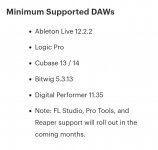
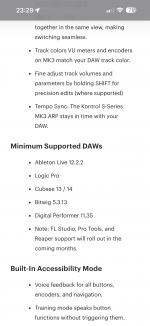
The thing about that that is actually concerning, Studio One is no longer on the list...anywhere...supported, minimum supported, rolling out soon...it's just...gone.
That is because it does not support the "fancy" stuff yet. And there is no need to over-analyze that goofy graphic on the NI site either.

It has no meaning for us until Presonus announces that Studio One fully supports this new firmware. Prettu sure that Ni has no knowledge of what Presonus is doing/not doing in this regard.

VP
 
The thing about that that is actually concerning, Studio One is no longer on the list...anywhere...supported, minimum supported, rolling out soon...it's just...gone.
A bit lower on the page it still says:

Note: FL Studio, Pro Tools, Studio One, and Reaper support will roll out in the coming months.

But that doesn't mean much. If higher on the page S1 was first mentioned and then removed it could also be that an editor overlooked the fact that it was mentioned again below. Pages like these are usually maintained by staff who don't have any factual knowledge about the requests (content updates) they process.
 
Exactly. S One was originally included in the 'coming soon' section I screenshotted, but was removed a couple of days after the firmware update went live.
 
I took a leap of faith and got a Kontrol s49 mk3. So far so good, without the fancy stuff, obviously. Hope that will happen soon. I also updated to Omnisphere 3, which is supposed to have built in integration for the whole Native Instruments keyboards range and certainly my model. I haven't been able to get it to work yet. No problem selecting the right keyboard on the Omnisphere side, but with the keyboard in the required midi mode no matter what knobs I turn nothing happens. In the automation pane top left in S1 I can see that the data is being received but nothing happens in Omnisphere. I've set the track to receive on all midi inputs and selected the keyboard as controller in the yellow selector in the instrument window.

Has anybody been able to get this to work? Hopefully this isn't part of the not yet available fancy integration. I would have thought not, given that the integration is built into Omnisphere, but no luck yet.
 
Has anybody been able to get this to work? Hopefully this isn't part of the not yet available fancy integration. I would have thought not, given that the integration is built into Omnisphere, but no luck yet.
Can I impose and ask if the NI Kontrol S49 works with Omnisphere in Stanalone outside of a Daw?

Kindest regards.
 
Can I impose and ask if the NI Kontrol S49 works with Omnisphere in Stanalone outside of a Daw?

Kindest regards.
That isn't imposing, but a smart suggestion. :-) I just tested that and it works immediately. I don't have to assign anything. Just pick the keyboard from the list of available controllers in in Omnisphere. So the problem lies with Studio One. It may still work. Possibly I overlooked something, but as it stands I'm stuck.
 
I think you will find that the DAW operation is not part of the equation...

That isn't imposing, but a smart suggestion. :-) I just tested that and it works immediately. I don't have to assign anything. Just pick the keyboard from the list of available controllers in in Omnisphere. So the problem lies with Studio One. It may still work. Possibly I overlooked something, but as it stands I'm stuck.
I expected it was the case, the DAW mode cannot work, as it is not a direct connection if that makes sense.
I could be completely wrong about that and it might be possible, but it is one of the questions I have about the H/W control mapping.

Just out of curiosity have you set up your MK 3 Keyboard as an MPE device in devices and on the Omni VST itself in SO1?

Kindest regards and thank you.
 
I think you will find that the DAW operation is not part of the equation...


I expected it was the case, the DAW mode cannot work, as it is not a direct connection if that makes sense.
I could be completely wrong about that and it might be possible, but it is one of the questions I have about the H/W control mapping.

Just out of curiosity have you set up your MK 3 Keyboard as an MPE device in devices and on the Omni VST itself in SO1?

Kindest regards and thank you.
No I haven't set it up as an MPE device. I'll try that. If it makes any difference I'll let you know, but I don't think so
 
Back
Top