

-
Hi and welcome to the Studio One & Studio Pro User Forum!
Please note that this is an independent, user-driven forum and is not endorsed by, affiliated with, or maintained by Fender. Learn more in the Welcome thread!
You are using an out of date browser. It may not display this or other websites correctly.
You should upgrade or use an alternative browser.
You should upgrade or use an alternative browser.
Midi Insert
- Thread starter tonelabaudio
- Start date


Skijumptoes
Member
The closest to MIDI Inserts are the "Note FX", but there's only a few (Arp, Chorder, FIlter etc.)
In regards to the transformer you can create macros in FSP and create buttons for them that sit above the piano roll, or main timeline. But the Cubase transformer goes much deeper and is in real-time. Macros are more similar to Cubase's Project Logical Editor (PLE).
Depends what kind of tasks you wanting to carry out really - presuming real-time manipulation of some sort?
In that case, there's a third method where you can use VST Midi plugins (Such as plugin boutiques "Scaler") that sit on one track, and their 'MIDI Out' can be routed out to other tracks 'MIDI In' projects in real-time.
This has the advantage of the generated/transformed MIDI being recorded on the target track. Basically any VST MIDI FX can be used routed in this way.
In regards to the transformer you can create macros in FSP and create buttons for them that sit above the piano roll, or main timeline. But the Cubase transformer goes much deeper and is in real-time. Macros are more similar to Cubase's Project Logical Editor (PLE).
Depends what kind of tasks you wanting to carry out really - presuming real-time manipulation of some sort?
In that case, there's a third method where you can use VST Midi plugins (Such as plugin boutiques "Scaler") that sit on one track, and their 'MIDI Out' can be routed out to other tracks 'MIDI In' projects in real-time.
This has the advantage of the generated/transformed MIDI being recorded on the target track. Basically any VST MIDI FX can be used routed in this way.
Last edited:
OP
OP
tonelabaudio
New member
Thank you both @sintil8 and @Skijumptoes for chiming in. My apologies for not providing more details. I use VE Pro to host my sample libraries and use the midi transformer feature to enable / disable instrument tracks at my discretion. Works as I expect it to in CB 15.x Pro but was hoping to do the same in FSP 8.x. I suppose that I will have to switch between both DAWS as the need / project demands it.
The Transformer in C/Base is a useful tool, the last time I used it, it was many moons ago.
Just a thought if you have time...
It might be worth running us through the process in case there is any alternative way to get the same outcome in SO1/FSP
Best regards
Just a thought if you have time...
It might be worth running us through the process in case there is any alternative way to get the same outcome in SO1/FSP
Best regards
Last edited:
Skijumptoes
Member
Are you using MIDI channels to switch instruments, or key switching via MIDI note/cc data?
Perhaps attach a screenshot the transform tool with an example you use, if you want to see if you can recreate in FSP?
Perhaps attach a screenshot the transform tool with an example you use, if you want to see if you can recreate in FSP?
OP
OP
tonelabaudio
New member
When I get back to my studio I will provide a few screenshots that should give you a pretty good idea of what I am doing. @Skijumptoes do you mean switching articulations
OP
OP
tonelabaudio
New member
My apologies for not responding sooner. Sady, life tends to get in the way. I load larger orchestral projects in bot VE Pro and 15.x disabled. Assigning controller values via the Midi Transformer allows me to enable / disable individual tracks / instruments that I plan to use in a session with basically the press of a key or pad on my controller. What I have done as well is to record a short single midi note eg. C1 onto every track which is muted by default. If for example I wish to record a midi flute part I would unmute that midi note which will then enable solo flute in VE Pro once the play head crosses that part. When I am done I can simply disable that track using C#1 for eg. I hope that what I am attempting to explain is making some sense. It does in my own head of course
Attachments

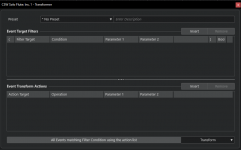
So to unpack this a little and make sure what you are looking to do. Ref: Midi Transformer picMy apologies for not responding sooner. Sady, life tends to get in the way. I load larger orchestral projects in bot VE Pro and 15.x disabled. Assigning controller values via the Midi Transformer allows me to enable / disable individual tracks / instruments that I plan to use in a session with basically the press of a key or pad on my controller. What I have done as well is to record a short single midi note eg. C1 onto every track which is muted by default. If for example I wish to record a midi flute part I would unmute that midi note which will then enable solo flute in VE Pro once the play head crosses that part. When I am done I can simply disable that track using C#1 for eg. I hope that what I am attempting to explain is making some sense. It does in my own head of course
CC 19 is a general purpose CC control number followed by a note number, either C1 or C#1
C1 sends 0 zero and C#1 sends 127 a switch for that articulation or channel to be on or off?
Transformer is responding to C1 or C#1 and transforming a musical note played on a keyboard to a Midi CC value.
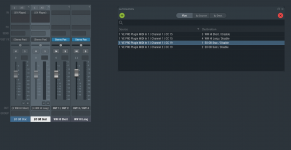
Is the intention that CC 19 is tied to a specific articulation or Channel in VE Pro?
I have minimal experience of VE Pro so I am not the best person to help here.
Ref: VE Pro pic.
It looks as though VE Pro is waiting for a midi CC instruction. The Transformer is taking a musical note and transforming to Midi CC controller data.
If you have a H'Ware controller that can be programmed to send Midi CC 19 from a toggle switch, so it sends 0 or 127 on midi channel 1 .
Would that work?
How you get to having a midi clip to do that might take further discussion
Kindest regards, hope this helps in some way.
Skijumptoes
Member
I would use Sound Variations for this in Studio Pro, and you can extend it to include other articulations within the instruments themselves too.My apologies for not responding sooner. Sady, life tends to get in the way. I load larger orchestral projects in bot VE Pro and 15.x disabled. Assigning controller values via the Midi Transformer allows me to enable / disable individual tracks / instruments that I plan to use in a session with basically the press of a key or pad on my controller. What I have done as well is to record a short single midi note eg. C1 onto every track which is muted by default. If for example I wish to record a midi flute part I would unmute that midi note which will then enable solo flute in VE Pro once the play head crosses that part. When I am done I can simply disable that track using C#1 for eg. I hope that what I am attempting to explain is making some sense. It does in my own head of course
You can get to the sound variation editor via the tab pull-down or via the piano roll:
Basically you just need to set up two entries as per the example above, so it's waiting for your Keys C1 or C#1 and then it will trigger the activation sequence of CC19:0 or CC19:127 accordingly.
You can then save that as a Sound Variation preset and simply apply it to any VE Pro track.
It also offers the advantage that you can enable or disable it across a MIDI clip timeline via the piano roll as so (Bottom of screenshot):
This means that you wouldn't need to manually enter C1 notes to wake the instance up, you can simply use the sound variations lane.
And as mentioned at the top, you can expand this out to include any other key switching or articulations within the instrument too, and build up specific variation presets to suit.
It's a little bit different to what you're used to, but i'd say it's a lot simpler once you get your head around it!

Something else you can do is that the sound variations (1,2,3... etc) can be applied via keyboard shortcuts which means that you could create a custom toolbar that sits at the top Studio Pro which contains buttons to enable or disable CC19 for selected tracks. So you could apply en masse if required.
Last edited:
OP
OP
tonelabaudio
New member
@sintil8 Thank you again fot chiming in. What I have done in CB has absolutely nothing to do with articulations. I use that setup to enable / disable the instrument track in VE Pro. This way I can load large projects in mere seconds as opposed to minutes. I place my articulations on individual tracks.
OP
OP
tonelabaudio
New member
@Skijumptoes Hmm. Interesting. Thank you for that information and for taking the time to upload those screenshots. That may very well be what I am looking to do in FSP 8.x Have a wonderful day folks.