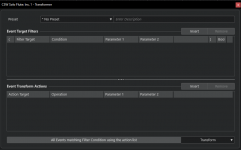
So to unpack this a little and make sure what you are looking to do. Ref: Midi Transformer picMy apologies for not responding sooner. Sady, life tends to get in the way. I load larger orchestral projects in bot VE Pro and 15.x disabled. Assigning controller values via the Midi Transformer allows me to enable / disable individual tracks / instruments that I plan to use in a session with basically the press of a key or pad on my controller. What I have done as well is to record a short single midi note eg. C1 onto every track which is muted by default. If for example I wish to record a midi flute part I would unmute that midi note which will then enable solo flute in VE Pro once the play head crosses that part. When I am done I can simply disable that track using C#1 for eg. I hope that what I am attempting to explain is making some sense. It does in my own head of course
I would use Sound Variations for this in Studio Pro, and you can extend it to include other articulations within the instruments themselves too.My apologies for not responding sooner. Sady, life tends to get in the way. I load larger orchestral projects in bot VE Pro and 15.x disabled. Assigning controller values via the Midi Transformer allows me to enable / disable individual tracks / instruments that I plan to use in a session with basically the press of a key or pad on my controller. What I have done as well is to record a short single midi note eg. C1 onto every track which is muted by default. If for example I wish to record a midi flute part I would unmute that midi note which will then enable solo flute in VE Pro once the play head crosses that part. When I am done I can simply disable that track using C#1 for eg. I hope that what I am attempting to explain is making some sense. It does in my own head of course
We use essential cookies to make this site work, and optional cookies to enhance your experience.