
-
Hi and welcome to the Studio One User Forum!
Please note that this is an independent, user-driven forum and is not endorsed by, affiliated with, or maintained by PreSonus. Learn more in the Welcome thread!
You are using an out of date browser. It may not display this or other websites correctly.
You should upgrade or use an alternative browser.
You should upgrade or use an alternative browser.
Major problems..
- Thread starter Arturo
- Start date
I've done everything the gentleman said from the video.. It will not allow me to download UC1.8, unfortunatelyMaybe a combination of both? Follow the video instructions until the blue light comes back, and then use UC1.8 (as per the PreSonus instructions) to update the interface. See if that holds.

SwitchBack
Well-known member
On the PreSonus Downloads page, when you select Windows 10 (64-bit) and scroll down it gives you UC v1.3 and UC v1.8 too.
Also, the page in the link I posted links to other pages on the subject 1818VSL. See if your situation fits one of those cases.
Also, the page in the link I posted links to other pages on the subject 1818VSL. See if your situation fits one of those cases.
Out of curiosity with everything connected can you take a screen grab of Device Manager and post it on here.Yes sir, it will not allow me to download UC v1.3, as it says that my interface needs to be connected first- which of course it is.
I am able to download UC v1.8, but that does nothing, and there is no firmware updating option either. I may just be SOL
Make sure the Sound Video and games tab is open and if any USB ports have a warning triangle, please.
But to be honest, you may need to contact Presonus for help or guidance.
Kindest regards
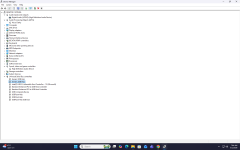
Out of curiosity with everything connected can you take a screen grab of Device Manager and post it on here.
Make sure the Sound Video and games tab is open and if any USB ports have a warning triangle, please.
But to be honest, you may need to contact Presonus for help or guidance.
Kindest regards
Attachments

Hiya again.
Looking at the image there are no drivers for that Presonus card installed?
I assume you have you removed the drivers you previously had installed?
I was hoping to see a USB device error, but it looks like there isn't even an "Unknown Device" which shows up when a Usb is active that needs a driver.
It might be best if you contact Presonus... @BobF has kindly offered the link in his sig.
Kindest of regards for now.
Hope you can get it fixed though !
Looking at the image there are no drivers for that Presonus card installed?
I assume you have you removed the drivers you previously had installed?
I was hoping to see a USB device error, but it looks like there isn't even an "Unknown Device" which shows up when a Usb is active that needs a driver.
It might be best if you contact Presonus... @BobF has kindly offered the link in his sig.
Kindest of regards for now.
Hope you can get it fixed though !