• Hi and welcome to the Studio One User Forum!

    Please note that this is an independent, user-driven forum and is not endorsed by, affiliated with, or maintained by PreSonus. Learn more in the Welcome thread!

Fix for a Note Data Quantization Gotcha

Craig Anderton

Well-known member
Maybe everyone knows this, but I didn't! The problem was note quantization behaving erratically, and quantizing to the wrong places. The fix was to choose Freeze Quantize before applying additional quantization.
 
Good to know. Thanks!
 
I'm going to try that, because I've really never found quantization ever usable with Studio One. While I still don't use Q much, it can be helpful so thanks for the tip! I'll report back when I notice the difference.
 
If you find out what causes the quantization to not be frozenis issue in the first place, that would be helpful. I think it might relate to notes that were adjusted via the chord track.
 
I just ran in to this issue and posted about it here and have been surprised at the lack of response of similar frustrations. So, I guess "freeze quantize" is a thing everyone understands or takes for granted here?! In my 30 years of MIDI editing I have never experienced such a protocol, whereby quantization acts on original positions of notes no matter how much time or previous editing has taken place beforehand unless a willful "Freeze Quantize" has been called for.
I too had kind of given up on understanding the experienced irregularities of Quantize in Studio One due to this until finding this thread. So thank you!
 
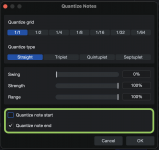
Another strange quantizing example: note ends can't be quantized at all without quantizing the start positions. The GUI suggests it's possible but it's not.
No end note changes without start changes.png
 
Another strange quantizing example: note ends can't be quantized at all without quantizing the start positions. The GUI suggests it's possible but it's not.
View attachment 3130
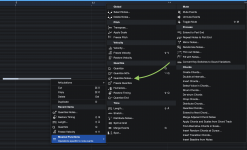
This might not be right place to quantize note start and end. But take a look at this context menu:
Bildschirmfoto 2026-02-14 um 23.59.18.png
It opens this window, where you can quantize the start and end of notes as you want:

Bildschirmfoto 2026-02-15 um 00.00.19.png
Also check out the Music Editing macro toolbar that comes with Studio One / Studio Pro. Here you can easily access these functions :

Bildschirmfoto 2026-02-15 um 00.07.40.png
 
Nhc, the note action (second image) doesn't work either. (I'm still using v6.6.4 but the later release notes never mentioned a bug fix). The start positions always change even if the option is not selected.
 
Back
Top