• Hi and welcome to the Studio One User Forum!

    Please note that this is an independent, user-driven forum and is not endorsed by, affiliated with, or maintained by PreSonus. Learn more in the Welcome thread!

Fender Studio Pro 8.0.1 - Discussion Thread

Long shot - Can you try the same thing you did last time turning off HDR and DPI scaling off?


I have DPI scaling off, actually it works fine with DPI scaling on (although it looks like crap), wasn't aware of the facility until now.

If I set DPI to "ON" in the VSTi GUI then I can confirm excess space either side in Battery's (latest version) GUI.
The HDR setting either off or on is not affecting the outcome. It would appear DPI setting in the VSTi Gui is tho'.

Hope that helps.

You really should have pulled this out into it's own thread, as requested ?

Regards
 
If I set DPI to "ON" in the VSTi GUI then I can confirm excess space either side in Battery's (latest version) GUI.
The HDR setting either off or on is not affecting the outcome. It would appear DPI setting in the VSTi Gui is tho'.

Hope that helps.

You really should have pulled this out into it's own thread, as requested ?

Regards

Are you talking about DPI scaling for the plugin as on or high DPI mode for Studio one as on? Let me know what they are both set at.

I repro for Studio One High DPI to on and 150%, and plugin DPI scaling to off.

"You really should have pulled this out into it's own thread, as requested ?" - absolutely my bad, I wasn't expecting the discussion to continue.
Happy to moderator to tear this out of the thread and throw it into a new one.
 
Are you talking about DPI scaling for the plugin as on or high DPI mode for Studio one as on? Let me know what they are both set at.

I repro for Studio One High DPI to on and 150%, and plugin DPI scaling to off.

"You really should have pulled this out into it's own thread, as requested ?" - absolutely my bad, I wasn't expecting the discussion to continue.
Happy to moderator to tear this out of the thread and throw it into a new one.

View attachment 3160
Setting as your attached image you inc.

I have confirmed on my computer that the settings can cause issue, it would be useful if you contact support to inform them, if you have a problem.
Hope you get it sorted to your satisfaction.

Kindest regards
 
After waiting until I needed something from FP8 that I couldn't get from SO7, I came up with a need today. I've heard some very good things about the audio to note conversion, and I need exactly that. We'll see later how it works out.

My initial impression of the interface is not a great deal has changed. There is now nothing delimiting the title bar from the menu bar from the toolbar below them, neither by line nor color. That toolbar used to have these buttons on the left side:
1771622836303.png

Looking at the UI overall, the small changes in color and decorations are negligible. The effect seems to me to be a softening and less clutter. And a bit easier on the eye.

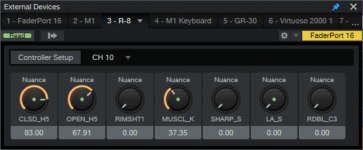
There is one change that is a small problem for me - the blank space above the macro controls in the External Devices window. I had these controls set up in SO7 for a Roland R-8 MkII:
1771624066942-png.3169


Here's what it looks like in FP8:
1771624224509.png


With the window enlarged to see the numbers:
1771624350459.png


That's quite a bit of waisted space. Now back to this audio to note conversion that I've heard so much about. - s
 

Attachments

  • 1771624066942.png
    1771624066942.png
    194,8 KB · Views: 235
So far FP8 is turning out to be quite familiar, and the changes that I see are easy to live with. As someone else pointed out, it's everything you had in S1P plus more.

I wanted to report back on a difficult test of the new Extract Notes function. It's an old recording of a crunchy electric rhythm guitar. This pic shows the audio at the top, followed by the extracted notes. The third track is he MIDI notes played by the organ as a reference. The Melodyne plugin is at the bottom.
ExtractNotesTest.jpg


Honestly, I did not expect it to do as well as it did, given the heavy distortion on the track. Compared to the Melodyne result, my initial impression is this: Where the Extract to Note function seemed to not quite catch some spots, the Melodyne result was getting a little too much. I have no idea if it's possible, but can some sort of sensitivity control be made for the Extract Notes function? - s
 
I agree Extract Notes function works quite well. I tried one real piano recording and it did quite good job. Tried also Extract Drums which did not result a usable outcome but of course it depends a lot on the quality of the recording.
 
So far FP8 is turning out to be quite familiar, and the changes that I see are easy to live with. As someone else pointed out, it's everything you had in S1P plus more.

I wanted to report back on a difficult test of the new Extract Notes function. It's an old recording of a crunchy electric rhythm guitar. This pic shows the audio at the top, followed by the extracted notes. The third track is he MIDI notes played by the organ as a reference. The Melodyne plugin is at the bottom.
View attachment 3184

Honestly, I did not expect it to do as well as it did, given the heavy distortion on the track. Compared to the Melodyne result, my initial impression is this: Where the Extract to Note function seemed to not quite catch some spots, the Melodyne result was getting a little too much. I have no idea if it's possible, but can some sort of sensitivity control be made for the Extract Notes function? - s
There's a free plugin called NeuralNote that does note extraction in a similar manner and it has sensitivity controls, so I don't think it would be an unreasonable ask.
 
There's a free plugin called NeuralNote that does note extraction in a similar manner and it has sensitivity controls
Fantastic! I installed it and will give it try. Thx - s
 
So far FP8 is turning out to be quite familiar, and the changes that I see are easy to live with. As someone else pointed out, it's everything you had in S1P plus more.

I wanted to report back on a difficult test of the new Extract Notes function. It's an old recording of a crunchy electric rhythm guitar. This pic shows the audio at the top, followed by the extracted notes. The third track is he MIDI notes played by the organ as a reference. The Melodyne plugin is at the bottom.
View attachment 3184

Honestly, I did not expect it to do as well as it did, given the heavy distortion on the track. Compared to the Melodyne result, my initial impression is this: Where the Extract to Note function seemed to not quite catch some spots, the Melodyne result was getting a little too much. I have no idea if it's possible, but can some sort of sensitivity control be made for the Extract Notes function? - s
I haven't tried this function, but just wondering aloud ... what if the highes were EQ'd out - like using a tuner?
 
I haven't tried this function, but just wondering aloud ... what if the highes were EQ'd out - like using a tuner?
Ah, yes. Giving it a better look at the fundamentals, I suppose. That makes sense.

The problem I'm having is I recorded it decades ago, and I don't remember how to play it. I know some parts and others not so much. I also have a couple of MIDI organ tracks and an audio bass guitar track that can help flesh it out.

At some point, I'm going to have to go through the results in detail. I will definitely try out both suggestions. Thank you.
 
I have a problem: when I open any plugin window through the mixer or inspector, there’s about a half-second delay. But when I add a plugin - either through the channel overview or by clicking the track number - it opens instantly, as it should. Where should I look, or is this a bug? And has anyone else experienced this?
 
Back
Top