
-
Hi and welcome to the Studio One User Forum!
Please note that this is an independent, user-driven forum and is not endorsed by, affiliated with, or maintained by PreSonus. Learn more in the Welcome thread!
You are using an out of date browser. It may not display this or other websites correctly.
You should upgrade or use an alternative browser.
You should upgrade or use an alternative browser.
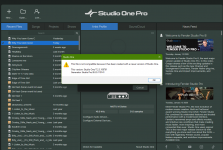
Warning- You can't Go Back to S1 7
- Thread starter John Vere
- Start date


Gerran
Active member
I think S1 toolbox from @Lukas might be of help as well, if you want to revert to an earlier installation..
Last edited:
Im fine I just thought people should realize that once you commit to the new version you are in with both feet.
I personally never revert back or roll back.
I ignored the warning because I’m used to seeing that in Sonar. But you can always return to the newer version.
You get that warning when you open projects that you created using Azslow’s CWP2song.
Probably he used version 6 or 5 to write the script.
I personally never revert back or roll back.
I ignored the warning because I’m used to seeing that in Sonar. But you can always return to the newer version.
You get that warning when you open projects that you created using Azslow’s CWP2song.
Probably he used version 6 or 5 to write the script.


TonalDynamics
Active member
Any version from V7 you open and re-save n V8 should be saved with V8 in the title. Then you will always have both.
This is the way.
Leave all existing v7 copies as they are, resave a whole new version with a (v8) prefix while you make your transition to the new full version.
Also leave the old version installed (they can be in parallel with each other) in case you need to go back.

Vocalpoint
Well-known member
Any version from V7 you open and re-save n V8 should be saved with V8 in the title. Then you will always have both.
Or for maximum safety - use safety copies.
If/when I am between versions - I would simply copy the entire song structure to a new parent folder and use those - and only those - if any actual saving is in the cards.
VP