• Hi and welcome to the Studio One User Forum!

    Please note that this is an independent, user-driven forum and is not endorsed by, affiliated with, or maintained by PreSonus. Learn more in the Welcome thread!

Track Channel Assignments

In either FP8 or S1P, I can't get the tracks associated with the mixer channels the way I want. I have 3 outs from a drum machine coming into 3 aux channels, numbers 8, 9, and 10. They feed into a drum bus, channel 7. So far, so good. The problem is that all the drum tracks are associated with channel 10, the hat. I thought I might be able to use the inspector to change the association, but the channel dropdown shows only the 2 bus channels, not the aux channels. What am I missing? Thx - SGW
1771717473898.png
 
Check out this video to see if it helps you.. you don't need to set up aux tracks, just activate your outputs and that should do the trick for you. ( Unless you're talking about a real drum machine :) )
To view this content we will need your consent to set third party cookies.
For more detailed information, see our cookies page.
 
Last edited:
Check out this video to see if it helps you.. you don't need to set up aux tracks, just activate your outputs and that should do the trick for you. ( Unless you're talking about a real drum machine :) )
To view this content we will need your consent to set third party cookies.
For more detailed information, see our cookies page.
Nice try, but the Roland R-8 is a real drum machine. It has 10 hard outputs. Thanks for the reply, though.
 
That's what I was afraid of!! See if this gives you any help and if not, hopefully somebody else will chime in!
To view this content we will need your consent to set third party cookies.
For more detailed information, see our cookies page.
 
The external device settings are working fine. The R-8 responds to the MIDI tracks and produces sound out of the correct outputs and the aux channels have the expected signals. All the dots are connected. I just want to associate each of these tracks with different mixer channels:
Track Channel Assignments.jpg

hopefully somebody else will chime in!
Or maybe I'm asking for something that doesn't make sense. - SGW
 
Those are instrument tracks so we're talking midi. Per the video you can have all of them go into one multi-output instrument plugin, and then set the instrument plugin to send output to individual channels in the console. Increase track height of the instrument tracks (at least to medium) to see where each midi track is sent to in the instrument. The video (also) shows how to configure the instrument plugin's outputs.

You can also (and at the same time) connect the r-8's 8 audio outputs to an 8+ channel audio interface to get those as audio inputs in S1/SP. An audio input always has a channel in the console.
 
Last edited:
you can have all of them go into one multi-output instrument plugin
Thanks for the try, but I don't think you understand the situation. The R-8 is not a plugin. It's a for real drum machine. 3 of its 10 audio outputs go into a Presonus Studio 1824c interface and into the 3 aux channels pictured below. Here's where it is in my External Devices:
External Devices.jpg

But that just gets the MIDI to right place. It works fine, as do the aux channels.

By rearranging the aux channels in the console:
Channels rearranged.jpg

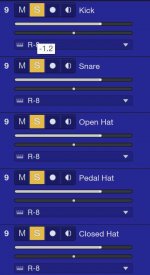
The tracks now reflect the difference in their associated channel numbers; all are set to 9. No matter what the order, the tracks' channel numbers all point to the Hat's channel. The number 10 in the previous screenshot was just a coincidence. It does not refer to the MIDI channel used to trigger the drum machine.
Track Instruments.jpg

Note that the Instrument Output setting for each is set to the R-8. I want the Kick track to be associated with the Kick channel, the Snare with the Snare, etc. - because that is where their associated signals are being processed. In other words, the Kick's mixer channel number should be 10. The Snare track's should be 8, and so on.

I would have expected the channel number to be editable in the track inspector, but the field isn't editable.
Track Inspector.jpg


It seems that there must be a way to accomplish this. If there is, it's eluding me. Cheers - SGW
 

Attachments

  • Track Instruments.jpg
    Track Instruments.jpg
    36,4 KB · Views: 1
On your external devices shot it looks like it's just set for channel 10.. if you set it to all does that make any difference?
Good idea! After opening it up to all MIDI channels, all of the channel number disappeared. So did the volume sliders, but I guess that should be expected. They didn't come back after resetting the channels to 10. Good try, though.
 
Back
Top