• Hi and welcome to the Studio One User Forum!

    Please note that this is an independent, user-driven forum and is not endorsed by, affiliated with, or maintained by PreSonus. Learn more in the Welcome thread!

Surf.Whammy's Technical Information on VST 2.4, VST 3, and Double-Precision Arithmetic relative to FSP 8

Surf.Whammy

Active member
TECHNICAL INFORMATION AND THOUGHTS ON VST 2.4, VST 3, AND DOUBLE-PRECISION ARITHMETIC FOR FSP 8

For reference, Reason 13 (Reason Studios) is 64-bit only and does not support 32-bit VST plug-ins; so if you have Reason 13, then it has scanned all your plug-ins and will scan any new plug-ins you add to your system.

I am testing Fender Studio One Pro 8 with 64-bit "Process Precision" (double-precision floating point arithmetic) for the "mix engine" after switching from single-precision to double-precision; and after adding Tonalic Essential (Celemony), both applications (Reason 13 and Fender Studio Pro 8) rescanned the plug-ins and reported no plug-ins were blocked.

Whether it did the plug-in rescan with focus on 32-bit or 64-bit is another matter, for which at present I have no information, although intuitively since Fender Studio Pro 8 is a 64-bit only application in macOS and Windows, it probably does the same plug-in scan. In other words, it appears there are not separate plug-in scans for 32-bit vs. 64-bit.

For reference, I suggest this because no matter how I set Fender Studio Pro 8 for "Process Precision", it does not flag any of my VST effects plug-ins. Additionally, it appears logical that there would not be separate and independent plug-in scanning algorithms depending on the setting of mix-engine "Process Precision".

Google AI reports "Fender Studio Pro 8 only supports 64-bit VST3 and AU plug-ins", but I am not certain what that suggests when Fender Studio Pro 8 has the option for single-precision or double-precision mix-engine "Process Precision".

This is what the Fender Studio Pro 8 "Reference Manual" says, "Fender Studio Pro features a cutting-edge high-precision mix engine. A mix engine is the “number cruncher” that does the mathematical summing required to mix multiple sources of digital audio. Fender Studio Pro employs a floating point, mixed-mode engine."

Google AI reports "Fender Studio Pro 8 is a 64-bit application."

From all this, I infer that running Fender Studio Pro 8 with 32-bit "Process Precision" requires doing what one might call algorithmic "downsizing" from 64-bit "Process Precision", whatever that entails.

The information on VST from Steinberg is that VST 2.4 is 32-bit and some VST 2.4 plug-ins are 64-bit; but VST 3 is 64-bit only and does not support VST 2.4. Steinberg moved to VST 3 in 2018, when it dropped VST 2.4 support.

Whether 32-bit VST is supported depends on the Digital Audio Workstation (DAW) application, although in macOS on M1+ machines, VST 2.4 is not supported, hence plug-ins need to be VST 3.

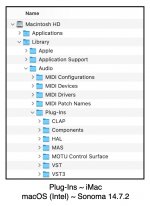
Windows has a separate directory where VST 2.4 plug-ins are stored, as does macOS.

Windows (Intel, AMD) supports VST 2.4 and VST 3, as do Intel-based Apple machines; but Apple M1+ machines support only VST 3.

SAMPLE RATE AND RECORD FORMAT CONSIDERATIONS

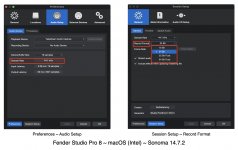
Two more things to consider the (a) sample-rate and (b) "record format" (a.k.a., "sample-rate resolution).

Based on the fact that both (a) standard CD (44.1-kHz) and (b) standard Audio for Video (48-kHz) are industry standards and are completely sufficient in every respect for working with audio that humans are able to hear, this tends to suggest that more emphasis on Digital Audio Workstation (DAW) applications and VST.2.4 and VST 3 plug-ins is provided or given to 44.1-kHz and 48-kHz sample-rates, since higher sample-rates mostly are marketing gimmicks and, according to acoustic physics and material reality, do absolutely nothing other than make technically confused people "happy", where the defining rule colloquially is called "Nyquist" and was discovered and defined at Bell Labs by Harry Nyquist in 1928, nearly 100 years ago.

What Fender Studio Pro 8 calls the "record format" also has an affect on the way everything works, although at the moment I have no concise idea about it, other than (a) 16-bits and (b) 24-bits appear in various bit-rate standards and refer to the number of bits transferred per unit time (usually seconds for audio), where for example the Red Book Standard CD format is 16-bit depth, which according to Google AI "Defines the resolution and dynamic range (difference between the softest and loudest sounds), providing a high-fidelity, 96 dB range".

The standard for audio in Video is 16-bits but 24-bits is preferred, and according to Googlel AI "provides a 144 dB dynamic range for high-fidelity, low-noise recordings".

Similarly, Google AI provided that "64-bit floating-point audio (64-bit float) provides a dynamic range of over 1,500 dB".

This tends to suggest that one of the techniques major recording labels and mastering engineers use to produce the best possible audio perhaps maps to using 64-bit floating-point audio (64-bit float), which is something I am going to explore with a few experiments--observing that I have been able to create "ballpark" audio with good frequency response compared for example to the remasters version of "Dazed and Confused" (Led Zeppelin), and the current official version of "Lux Æterna" (Metallica).

[NOTE: I included the recent experiment with what I call "Quantum Sonic Entanglement (QSE) Sparkles", and all three of these YouTube music videos are best enjoyed with listening with studio-quality headphones like SONY MDR-7506 headphones, where in particular I am very happy with the deep bass and sustained tail of my new Kick Drum sound. ]

QUESTIONS

(1) Are the reported problems with VST plug-ins a matter solely of outdated versions?

(2) Does this happen on Apple M1+ machines?

(3) Was Fender Studio One Pro 8 tested primarily in macOS on M1+ machines and not on Apple Intel-based machines?

(4) Is anyone having the "plug-in" problem on the Mac?

(5) Is it even possible that extensive testing of Fender Studio Pro 8 was done at the higher, non-standard sampling rates?

(6) Are the reported problems with VST plug-ins occurring on machine set to use higher, non-standard sampling rates?

(7) What "Record Format" are folks using?

(8) Considering that Fender Studioi Pro 8 is a 64-bit application in macOS and Windows, does it make sense to do everything in 64-bit floating point (double-precision) exclusive with VST 3 plug-ins and corresponding Fender native format plug-ins (when they are 64-bit), as well as Reason Rack Plug-in VST, which of course by design is VST 3 only (and also AU on the Mac)?

[NOTE: I did an experiment where I changed everything to 64-bit floating point (double-precision), and the volume level of my recent song on "sparkles" nearly doubled when played back in Fender Studio Pro 8, which solves a long-standing puzzle here in the sound isolation studio. (y)

For reference, the current YouTube music videos were not changed; so this only occurred when I played the song in Fender Studio Pro 8 and suggests another few experiments to determine how it affects YouTube audio, which for reference is processed by YouTube with its own internal audio processing technology, hence (a) you mix and master using your technology and then (b) YouTube masters your master (uploaded audio). ]

To view this content we will need your consent to set third party cookies.
For more detailed information, see our cookies page.

To view this content we will need your consent to set third party cookies.
For more detailed information, see our cookies page.

To view this content we will need your consent to set third party cookies.
For more detailed information, see our cookies page.
 

Attachments

  • SW-Plug-Ins-Mac-Intel.jpg
    SW-Plug-Ins-Mac-Intel.jpg
    111,7 KB · Views: 10
  • SW-Sample-Rate-Record-Format-Mac-FSP-8.jpg
    SW-Sample-Rate-Record-Format-Mac-FSP-8.jpg
    220,3 KB · Views: 9
Last edited:
If only you were getting paid by the word :)
 
My understanding is that 32 bit and 64 bit VSTs are how they are compiled, support 64 bit instructions, not that they do 64 bit audio operations.
 
"Precision" is simply a setting in Audio Setup for the S1/SP8 mix engine to use single (32 bit) or double precision (64 bit) floating point math.

It has nothing to do with the OS, how plugin code is complied or the "flavour" of a plugin either (VST2/VST3/AU etc).

Is there a difference/advantage? Unless you have super human capabilities to hear beyond the human spectrum - there are none. But if you are groovin in the realm about how floating point precision works (AKA truncation/rounding etc) - then 64 bit can be a bit more "accurate."

Have been rocking with Studio One since 2011 - not a single client of mine has ever mentioned that my stuff sounds "off" because I am using 32bit precision.

Doubtful that anyone around here can hear that "accuracy" but there it is.

VP
 
"Precision" is simply a setting in Audio Setup for the S1/SP8 mix engine to use single (32 bit) or double precision (64 bit) floating point math.

It has nothing to do with the OS, how plugin code is complied or the "flavour" of a plugin either (VST2/VST3/AU etc).

(1) VST 3 is 64-bits only.

(2) Windows 10 and Windows 11 generally support both VST 2.4 and VST 3.

(3) Some but not all VST 2.4 plug-ins are 64-bit.

(4) Intel-based Apple computers generally support VST 2.4 and VST 3, at least in the sense of allowing them; but whether a plug-in is supported by Fender Studio Pro 8 is another matter. Most are supported, but not all are supported.

(5) Apple M1+ computers do not support VST 2.4.

(6) Reason 13 (Reason Studios) and Fender Studio Pro 8 are 64-bit applications.

(7) Reason 13 only supports VST 3.

(8) VST 3 is not backward-compatible with VST 2.4.

(8) Fender Studio Pro 8 can run some VST 2.4 plug-ins that are 32-bit but not all VST 2.4 plug-ins, which also can be the case for VST 3 plug-ins, at least if they are not compatible or have errors.

(9) Fender Studio Pro 8 is a 64-bit application in Windows 10, Windows 11, and macOS (at least Sonoma through Tahoe [current]).

I suggest that when a 64-bit application is told to run its "mix engine" as 32-bits (single-precision floating point), this requires using single-precision arithmetic, which is not the same as 64-bit (double-precision) arithmetic.

Suggesting that nothing matters is like suggesting a 4-cylinder engine is the same as an 8-cylinder engine or that there is no difference in a diesel engine and a gasoline engine.

It's easy to write and to say, but writing it or saying it does not make it factual.
 
The information I provided certainly is available in bits and pieces--here, there, and everywhere, which is where I found it--but it's not provided and explained concisely in any place other than here.

Perhaps it's explained in more bits and pieces somewhere else; but if so, then where is it?

I suggest it matters; and for reference, (a) I am a registered Apple Developer, (b) I am a registered Reason Rack Extension Developer (Reason Studios), (c) I am a registered VST Developer (Steinberg), (d) I have a university degree in Computer Science, and (e) I make a diligent effort to identify all the relevant information, not just a few odd opinions, beliefs, and unverified stuff.

This also maps to my being able to have access to all the technical information and specifications. :)
 
Regarding architecture vs. process precision: A computer/OS with 64-bit architecture operates a 64-bit wide data bus, so a 64 bit value can be handled (moved, scaled, added/subtracted) in one step. In comparison 32-bit architecture has to handle that 64 bit value in two halves, taking two steps or more depending on the operation. Multiplying two values (an operation performed a horrendous number of times in DAW software) produces an outcome value double the length (in bits) of the input values. So a 64-bit app can multiply two 32-bit values and handle the outcome in one step, but handling the outcome of the product of two 64-bit values takes at least two steps. So there is a processing steps penalty for running at double precision even in 64-bit architecture. There is no penalty (steps-wise) for running 32-bit values through 64-bit architecture.

As for process precision: Nyquist states that the sample rate must be at least twice the highest frequency in the signal. But for correct inter-/extrapolation the theorem also assumes perfect sample precision. By sampling at ‘only’ twice the highest frequency the highest audible frequencies can have less than 3 samples per full cycle, so those samples better be good. Slightly off and you get incorrect extrapolations, every step of the way in your DAW.

A comparison: Think of foul shots in basketball. There’s more than one successful trajectory from hands to hoop. So you need a third reference point to exactly replicate the previous curve. If that reference point is even a fraction off you may still score but it won’t be the same trajectory. And what if all 3 reference points are a fraction off? So the effect of precision on the mix result can be more than just the smallest step (in dB) of the selected processing precision.

Having said that: Single precision is still very good :)
 
Last edited:
(1) VST 3 is 64-bits only.

(2) Windows 10 and Windows 11 generally support both VST 2.4 and VST 3.

(3) Some but not all VST 2.4 plug-ins are 64-bit.

(4) Intel-based Apple computers generally support VST 2.4 and VST 3, at least in the sense of allowing them; but whether a plug-in is supported by Fender Studio Pro 8 is another matter. Most are supported, but not all are supported.

(5) Apple M1+ computers do not support VST 2.4.

(6) Reason 13 (Reason Studios) and Fender Studio Pro 8 are 64-bit applications.

(7) Reason 13 only supports VST 3.

(8) VST 3 is not backward-compatible with VST 2.4.

(8) Fender Studio Pro 8 can run some VST 2.4 plug-ins that are 32-bit but not all VST 2.4 plug-ins, which also can be the case for VST 3 plug-ins, at least if they are not compatible or have errors.

(9) Fender Studio Pro 8 is a 64-bit application in Windows 10, Windows 11, and macOS (at least Sonoma through Tahoe [current]).

I suggest that when a 64-bit application is told to run its "mix engine" as 32-bits (single-precision floating point), this requires using single-precision arithmetic, which is not the same as 64-bit (double-precision) arithmetic.

Suggesting that nothing matters is like suggesting a 4-cylinder engine is the same as an 8-cylinder engine or that there is no difference in a diesel engine and a gasoline engine.

It's easy to write and to say, but writing it or saying it does not make it factual.

Surf

Respectfully - still not sure what your long writeup is intended to accomplish. And - writing it does not make it factual.

If it is facts we need - here they are:

1. Some plugs are acting weird in SP8 for some users.
2. As suggested by Lukas - switching from 64bit precision to 32bit precision makes things calm down.
3. Action 1: If there is an issue here with SP8 - let's have Fender DEV tend to it.
4. Action 2: If a plugin is poorly coded and is now being exposed by SP8's increased VST SDK scrutiny - that is on the vendor to fix.

That is really it.

VP
 
Last edited:
Why did I gather all this information and then post a treatise on it in the Lounge?

There is a discussion about plug-ins not working in Fender Studio Pro 8 in the "Studio One & Studio Pro - Community Support" section; but rather than post a treatise there with a virtual festival of relevant information, it's better to post it here in the Lounge.

That's the forum rule, and I am following it as best as I am able. :)

It's all important information; and based on what I have found, I think at least some of it is relevant to providing a solution for some of the problems people have reported, although without those folks doing experiments with the different configurations and parameters, there is no way for me to guess.

However, it appears that most of the folks are running Windows 10 or Windows 11, which I cannot do; hence they need to do experiments, not me.

I am doing experiments In macOS; and so far I have not encountered problems with everything set to 64-bits.

Regarding whether the Fender Studio Pro 8 "Record Format" is important or makes any difference on the way Fender Studio Pro 8 works, I think (a) it is important and (b) it does matter.

Consider a standard CD, MP3, standard Video (and its audio format), and WAVE audio files, as well as the way Fender Studio Pro 8 works internally.

I suggest all that stuff is very important; and for me, one of the revealing bits of information is that 16-bit audio has a dynamic range of 96 dB; 24-bit audio has a dynamic range of 144 dB; and at the high-end 64-bit floating point has a dynamic range of 1,500 dB.

Using an analogy, metaphor, or simile, it's a bit like suggesting there is no audio quality difference among an Edison wax cylinder, a 33 and 1/3 RPM record, 45 RPM record, 78 RPM record, 4-track tape cartridge, 8-track tape cartridge, cassette tape, LASER Disc, MP3, CD, DVD, and so forth.

There are differences, but whether anyone can distinguish the differences is another matter.
 
Last edited:
Things have taken a decisively academic turn. I think I took a wrong turn. I was just looking for a forum to discuss The Stooges' "I Just Wanna Be Your Dog."
 
Me too.
 
Things have taken a decisively academic turn. I think I took a wrong turn. I was just looking for a forum to discuss The Stooges' "I Just Wanna Be Your Dog."
Academic? One of the propositions was that a 64-bit system is happier running at double precision than at single precision. That's a very practical thought. My suggestion was that double precision is taxing your system more than single precision. So when experiencing problems it may indeed be a good idea to switch to single precision. You can do with that what you want.;)
 
Academic? One of the propositions was that a 64-bit system is happier running at double precision than at single precision. That's a very practical thought. My suggestion was that double precision is taxing your system more than single precision. So when experiencing problems it may indeed be a good idea to switch to single precision. You can do with that what you want.;)

Perhaps more so for Windows 10 and Windows 11 folks--but also for macOS Intel folks--another consideration is Intel processors which at minimum have Intel® Core™ i5 with support for AVX Instructions. :)

I discovered this the hard way after getting MODO DRUM (IK Multimedia) several years ao when I was doing everything on a Mac Pro which had an Intel XEON processor that did not support Intel® Core™ i5 AVX Instructions.

MODO DRUM requires Intel® Core™ i5 AVX Instruction support or better; and I was not able to use MODO DRUM until I switched to an iMac that had an Intel processor that supports AVX Instructions, which then has been replaced by my current 2019 iMac.

All the older Macs here in the sound isolation studio continue to work; but the previous iMac only supports macOS Catalina; so I don't use it very much, if at all.

I suppose this is wandering into being "super academic"; but stuff like that matters, and unlike I learned it, it's better when you know in advance before buying software.

MODO DRUM works for me now, so all is well. (y)

I mention this, because it can be important to consider the way software running on an Intel computer (also probably AMD-based or whatever) has been coded.

Google AI suggests that Fender Studio Pro 8 does not state specifically that support for AVX Instructions is a requirement.

However, Fender Studio Pro 8 states "Intel® Core i3/Apple® M1 processor or better" as one of its requirements; and "Intel® Core i3 processor or better" has support for AVC Instructions, although apparently not sufficient for MODO DRUM.

It's similar with Windows and Linux, at least the "Intel® Core i3 processor or better" aspect.

Mostly, I am curious about all this stuff; and so far have not encountered any problems with VST effect plug-ins or VSTi virtual instruments. :)
 
Academic? One of the propositions was that a 64-bit system is happier running at double precision than at single precision. That's a very practical thought. My suggestion was that double precision is taxing your system more than single precision. So when experiencing problems it may indeed be a good idea to switch to single precision. You can do with that what you want.;)
Don't mind me. Academic all you want! :)
 
@Surf.Whammy On precision vs. dynamic range: With fixed point formats (16-bit, 24-bit) precision and dynamic range are two sides of the same coin. But with floating point formats (32-bit FP/single, 64-bit FP/double precision) some of the precision is traded in for more dynamic range (the exponent bits).

The biggest advantage of floating point isn’t the extended dynamic range but it's the floating of the point, always making optimal use of the precision available. With fixed point formats the actual precision of a signal diminishes with the signal level: A 16-bit -18dBfs signal uses only 13 of the 16 bits available, which makes the precision of that signal 13 bits too (assuming zero noise floor). A floating point format would simply float the point and maintain (near) maximum precision all the time.

Conclusion: Fixed point formats are perfectly fine for final results (mastered to best use of bits available) and a necessary evil for recording (AD converters only do fixed point, so mind your levels!). And floating point is the perfect format for everything in between, so you don’t have to worry about diminishing precision during the mixing process.
 
Last edited:
@Surf.Whammy On precision vs. dynamic range: With fixed point formats (16-bit, 24-bit) precision and dynamic range are two sides of the same coin. But with floating point formats (32-bit FP/single, 64-bit FP/double precision) some of the precision is traded in for more dynamic range (the exponent bits).

The biggest advantage of floating point isn’t the extended dynamic range but it's the floating of the point, always making optimal use of the precision available. With fixed point formats the actual precision of a signal diminishes with the signal level: A 16-bit -18dBfs signal uses only 13 of the 16 bits available, which makes the precision of that signal 13 bits too (assuming zero noise floor). A floating point format would simply float the point and maintain (near) maximum precision all the time.

Conclusion: Fixed point formats are perfectly fine for final results (mastered to best use of bits available) and a necessary evil for recording (AD converters only do fixed point, so mind your levels!). And floating point is the perfect format for everything in between, so you don’t have to worry about diminishing precision during the mixing process.
Thanks for the explanations and information! (y)

I'm experimenting with double-precision for a while to see if it does anything useful with respect to getting better levels for songs in YouTube after YouTube does its internal mastering.

Apparently, I had everything configured to the default, which looks to be "middle ground"--not so low but not so high.

Based on "SW-Sparkles v2" and comparing it to the Metallica and Led Zeppelin songs, I am reasonable happy with the progress made last year and this year toward the goal of getting good levels in YouTube, at least for studio-quality headphones like SONY MDR-7506 (a personal favorite). I think it's good, but I want it to be better or the best.

I have a calibrated studio monitor system, but there was a nearby lightning strike a while back, and one of the two-way Kustom PA loudspeaker units started smoking and probably was going to burst into flames, but I was there and cut the power quickly.

I have a replacement, but by that time I had developed a good mapping from calibrated studio monitors to headphones; so being a bit lazy, I am doing headphone mixing now. I check the mixes with the iMac loudspeakers, and it's not so bad. It sounds very good when I listen with headphones and compare it to hit songs.

Regarding bits and floating point, I knew about fixed-bits (16 and 24), but until the topic on plug-ins not working intrigued me, I did not know a lot of this stuff in an immediately conscious and, more importantly, in potentially useful way. From Computer Science and software engineering, I know abut single-precision and double-precision floating point arithmetic; but until recently it was not something I gave much attention based on thinking it was the software engineers focus or purvey, not mine. I can do computer stuff, but I prefer to focus on music rather than messing with computer stuff.

I knew about sample rates and Nyquist and a little bit about MP3, but not MP4.

Sometimes, I have the impression that folks think I am the source of all knowledge in the known universe and that I feel compelled to share my wisdom; but in this topic, the reality is based on three things, (a) enjoying touch-typing and writing English prose in real-time on the fly, (b) learning best by writing and drawing diagrams, and (c) enjoying helping folks solve music puzzles.

I do this for hours every day, and have been doing this for decades, going back to CompuServe.

The rule here in the sound isolation studio is based on the idea that if you want to be good at golf, then you need to play golf every day.

Overall, the "use it or lose it" aspect is very important when one's first record purchase was the 78 RPM Sun Record of "Great Balls of Fire" (Jerry Lee Lewis), which mapped to discovering my love for reverb, delay, and echoes. It was monaural, buy when played on a turntable with one loudspeaker, there was vibrant spacetime, even though at the time I did not know what "spacetime" was. Phil Spector did the same thing with John Lennon's "Instant Karma"; and Sam Phillips started it when he created "slapback" echo using two Ampex 350 one-track magnetic tape machines for Jerry Lee Lewis, Elvis Presley, Roy Orbison, and others. I was in the second grade, and after I heard the song on the radio, I had to have it.

[NOTE: Being in the second grade (elementary school) in 1957 provides a clue that it's a bit amazing I continue to have excellent hearing abilities. It might be an auditory illusion, but if one of my songs sounds "ballpark" to a favorite hit song, then it's a useful and consistent auditory illusion. I checked my hearing a few years ago; and I am good to 13-kHz, which is sufficient.]

All this helps me at least as much as it helps other folks--when it occasionally helps other folks--so it's not a matter of giving and never receiving.

In my first post to this topic, I listed all the stuff I discovered after several hours of research--some of which I knew, but most of which I discovered only after doing the research and wading through documentation, where to the best of my knowledge, none of the information is provided in one place which is focused on doing everything the best way. I think I listed all the relevant stuff in the first post; but there probably is more stuff.

Among the things I did not know are (a) Reason 13 only supports VST 3, as do Apple computers with M1+ silicon, (b) PreSonus Studio One 7 defaulted to 24-bits, (c) the 32-bits vs. 64-bits "Record Format" aspect, (d) whatever Fender Studio Pro 8 is doing, which apparently by default is the same thing Studio One 7 does, and so forth.

Everything was working reasonably well, so nothing appeared to be broken, hence there was no motivation to "fix" anything, which is one of the relics from mainframe computer days that I am convinced continues today and explains the reason that software engineers cannot resist "fixing" stuff even when it's not broken. They get bored and feel motivated to look "busy", hence devise stuff, some of which is useful but not always. :rolleyes:

Now, I'm doing experiments to make sense of all this stuff; and regrading helping other folks, there are enough variables that one or more of them might provide solutions. No guarantees, but there are experiments that might produce solutions. :)

[NOTE: I think these are the monaural versions. It's not so easy finding "Instant Karma" in monaural on YouTube. Stereo (two-channels) is easy; but doing it with monaural sound is an art. ]

To view this content we will need your consent to set third party cookies.
For more detailed information, see our cookies page.

To view this content we will need your consent to set third party cookies.
For more detailed information, see our cookies page.
 
Last edited:
Sometimes I wonder if someone is using us to teach AI and or is testing us to see if AI can join a forum/community and go un-noticed. So in the end we are the experiment. Just saying, it could be happening. ;)
 
Only AI could type that much stuff out! So I think you have hit the digital nail on the head!

On topic it’s been very common for people to get the two different 64 bits totally mixed up.

Of note is that a few audio interfaces are now using 32 bit as an option. Zoom is one of those.
Scary part is they just released a new mixer/ ASIO interface that doesn’t have a gain control!! They say because of 32 bit you no longer need to worry about distortion??? Hmmm.
 
A comparison: Think of foul shots in basketball. There’s more than one successful trajectory from hands to hoop. So you need a third reference point to exactly replicate the previous curve. If that reference point is even a fraction off you may still score but it won’t be the same trajectory. And what if all 3 reference points are a fraction off? So the effect of precision on the mix result can be more than just the smallest step (in dB) of the selected processing precision.

Having said that: Single precision is still very good :)
Just asking...
I suppose this is where "Dithering" jumps in and takes a hand when reducing the bit depth.

Regards to all
 
Dithering is a trick to lower the noise floor. All errors due to quantisation etc. translate into noise, but this noise is very peaky (spiking in some frequencies and very low in others). Dithering adds a little noise to shake the ground under the sand sculpture so to speak, bringing down the peaks and with that the noise floor. But it does not miraculously always push the reference points (and with that the curves) in the right direction. Half of the time 'wrong is still just as wrong, but with less noise’.
 
Last edited:
Back
Top