• Hi and welcome to the Studio One User Forum!

    Please note that this is an independent, user-driven forum and is not endorsed by, affiliated with, or maintained by PreSonus. Learn more in the Welcome thread!

StudioLive III 32SC - Issues with Studio One

Status
Not open for further replies.
The mixer will always be an interface too, but Interface mode dumbs it down to just that.
Did you check for updates for UC and mixer firmware?
And which Song template did you use, so I can verify results?
Yes, all updated for all things, OS, StudioLive, UC, & firmware.

2, used the templates for Studio 32 Session, Studio Live 32 Interface Mode, and StudioLive Series 3 AVB Session. And of course, no template at all. No dice in StudioOne Pro... yet. Interview is here. Have to setup in Logic to get things recorded.
 
My screenshots show what you should see and choose.
Post screenshots of what you're seeing
 
here is that shot
 

Attachments

  • IMG_5385.jpg
    IMG_5385.jpg
    625,9 KB · Views: 8
Studio One needs to be open for it to show in the dropdown list.
Is your computer and the SIII cabled and connected to each other or on the same network?
What are their IP addresses?
Can you ping the SIII from your computer?

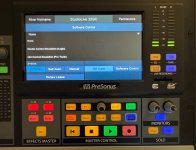
BTW: UC provides an easy way to take SIII touchscreen screenshots...

Mixer Screenshots.png
 
When you create a new Song in Studio One you get the option to use a template. That's the fastest way to set up a session with all the I/O mapping done for you. So you should look for it inside Studio One, not on the mixer.
 
When you create a new Song in Studio One you get the option to use a template. That's the fastest way to set up a session with all the I/O mapping done for you. So you should look for it inside Studio One, not on the mixer.
Yes, that was all shown here previously...

SIII 32SC.png
 
When you create a new Song in Studio One you get the option to use a template. That's the fastest way to set up a session with all the I/O mapping done for you. So you should look for it inside Studio One, not on the mixer.
that is indeed how I have set them up.
 
Studio One needs to be open for it to show in the dropdown list.
Is your computer and the SIII cabled and connected to each other or on the same network?
What are their IP addresses?
Can you ping the SIII from your computer?

BTW: UC provides an easy way to take SIII touchscreen screenshots...

View attachment 891
yes, open. just never shows up, always connected.
 
Is your computer and the SIII cabled and connected to each other or on the same network?
What are their IP addresses?
Can you ping the SIII from your computer?
Again, I need your answers to these questions.
 
Where can I download that specific template? It is not in the dropdown.
The PreSonus audio interface templates come standard in Studio One Pro 7.1.1.
Post a screenshot of what interface templates you see listed in the dropdown.

SIII 32SC.png
 
that. one. is. not. listed. people need to be listened to and believed. I don't have time to post more screenshots.

that said, it is a 169 address, so clearly no connection VIA IP. And no ethernet cable is connected to anything. Only USB.
 
ok, ethernet connected to router, now have IP. which might bring software control. I will check. In sessions now.
 
great, and the playback doesn't work on Logic. This is madness. Recording ONLY works on Logic but not playback. Playback ONLY works on StudioOne Pro but not recording.
 
Well, I have left the studio and that city. I had to leave them with a solution that worked and was easy for them. I am a pro with 30+ years of experience in multiple DAWs and multiple digital and analog mixers. If I cannot get it working in 5 days and nights... 1. I am not the problem LOL 2. They have no chance without me there.

I had them buy LogicPro (which worked instantly and intuitively every single time without any of these snags) and called it a day.

BONUS: With LogicPro they get instant LIVE support through Apple.
 
Status
Not open for further replies.
Back
Top