• Hi and welcome to the Studio One User Forum!

    Please note that this is an independent, user-driven forum and is not endorsed by, affiliated with, or maintained by PreSonus. Learn more in the Welcome thread!

StudioLive III 32SC - Issues with Studio One

Status
Not open for further replies.
Unfortunately, I don't have the luxury of walking. Under extreme time and financial pressure which I cannot wait to leave from. I am giving them 2 more days of my life, then I am done with them forever. That said. I actually know quite well all of the things you are referring to. The concepts as well as my way around the tech. But things are simply not working as expected.
 
Still unclear which is the culprit, though with everything working fine in Logic Pro...
 
You said this project was urgent and asked for our help.
We've asked you to post SIII/Studio One/Mac setup screenshots or a link to a video that can help us see what you have configured and may be causing your issues.

Why are you ignoring our requests?
 
1. sorry you feel ignored. 2. it was urgent (arguably still is though I am at the end of my rope with these people and tired of being superman for them). 3. there weren't much in the way of specific page requests, but if you have any specifics let me know... everything has been set up the way you had been posting but still have those 2 remaining scenarios.
 
I already responded to your issues with Transport and Studio One listed in the dropdown.

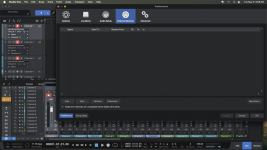
For recording, have you tried using the template (see screenshot) in Studio One for SIII 32 mixers?
That's the easiest way to get your I/O setup.
Be sure to disable Record/Monitor buttons in Studio One for all the channels and only enable what you need.

SIII 32SC.png
 
I already responded to your issues with Transport and Studio One listed in the dropdown.

For recording, have you tried using the template (see screenshot) in Studio One for SIII 32 mixers?
That's the easiest way to get your I/O setup.
Be sure to disable Record/Monitor buttons in Studio One for all the channels and only enable what you need.

View attachment 878
Thank you! I will try that when I get back to the studio tomorrow.
 
I already responded to your issues with Transport and Studio One listed in the dropdown.

For recording, have you tried using the template (see screenshot) in Studio One for SIII 32 mixers?
That's the easiest way to get your I/O setup.
Be sure to disable Record/Monitor buttons in Studio One for all the channels and only enable what you need.

View attachment 878
Even with template, no signal shows up in StudioOne Pro... only on the actual board.
 
Unless you post some screenshots or a link to a video we have no clue what you're doing wrong.
 
or IF I am doing anything wrong at all... But I digress. I will try and post some setup screenshots, but it is completely unclear what could possibly be setup wrong since nothing has been changed AND the thing works perfectly in Logic Pro.
 
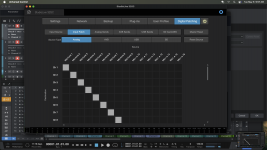
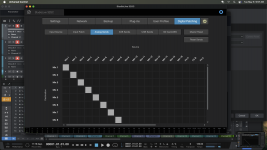
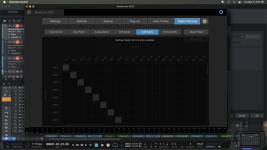
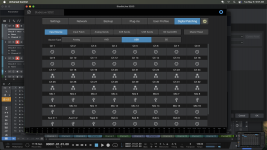
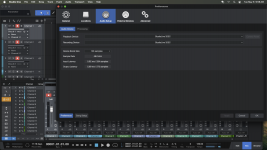
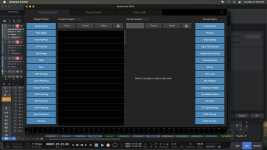
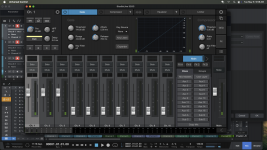
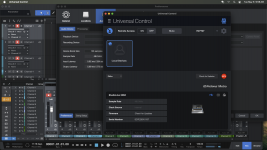
Screenshot 2025-05-06 at 9.57.36 AM.png
 

Attachments

  • Screenshot 2025-05-06 at 9.57.33 AM.png
    Screenshot 2025-05-06 at 9.57.33 AM.png
    361,2 KB · Views: 8
  • Screenshot 2025-05-06 at 9.57.29 AM.png
    Screenshot 2025-05-06 at 9.57.29 AM.png
    357,3 KB · Views: 9
  • Screenshot 2025-05-06 at 9.57.25 AM.png
    Screenshot 2025-05-06 at 9.57.25 AM.png
    363,5 KB · Views: 7
  • Screenshot 2025-05-06 at 9.57.20 AM.png
    Screenshot 2025-05-06 at 9.57.20 AM.png
    381,4 KB · Views: 8
the other screenshots
 

Attachments

  • Screenshot 2025-05-06 at 9.56.24 AM.png
    Screenshot 2025-05-06 at 9.56.24 AM.png
    373,5 KB · Views: 9
  • Screenshot 2025-05-06 at 9.57.04 AM.png
    Screenshot 2025-05-06 at 9.57.04 AM.png
    375,7 KB · Views: 6
  • Screenshot 2025-05-06 at 9.56.52 AM.png
    Screenshot 2025-05-06 at 9.56.52 AM.png
    435,9 KB · Views: 9
  • Screenshot 2025-05-06 at 9.56.45 AM.png
    Screenshot 2025-05-06 at 9.56.45 AM.png
    450,3 KB · Views: 6
  • Screenshot 2025-05-06 at 9.56.31 AM.png
    Screenshot 2025-05-06 at 9.56.31 AM.png
    358 KB · Views: 7
Post a screenshot of the Studio One mixer without UC sitting on top of it.
What's plugged into Channel 1?
You need to enable Monitor button to hear audio in Studio One.
 
At first glance:
- your mixer is in interface mode. That's not the default, and not the best choice for recording as you want your mixer as a mixer
- one of your screenshots shows the mixer's Projects/Scenes page. Did you click Reset for both? (wait a few seconds in between)
- which template did you use?
- are UC, drivers and firmware all up to date?
 
Post a screenshot of the Studio One mixer without UC sitting on top of it.
What's plugged into Channel 1?
You need to enable Monitor button to hear audio in Studio One.

Microphone. 3 microphones in 1-3 and the inputs are correct.
 
At first glance:
- your mixer is in interface mode. That's not the default, and not the best choice for recording as you want your mixer as a mixer
- one of your screenshots shows the mixer's Projects/Scenes page. Did you click Reset for both? (wait a few seconds in between)
- which template did you use?
1. Yes, all scenes are blank and reset. 2. Everything is and was default. But, I can put it into DAW mode if needed? I just need it to operate AS an interface, but it is not putting the signal through to the StudioOne software.
 
Post a screenshot of the Studio One mixer without UC sitting on top of it.
Are they dynamic or condenser mics?
 
Post a screenshot of the Studio One mixer without UC sitting on top of it.
Are they dynamic or condenser mics?
These are dynamic. And again, I open Logic Pro, and BLAM, everything is working perfectly without making any changes.
 
1. Yes, all scenes are blank and reset. 2. Everything is and was default. But, I can put it into DAW mode if needed? I just need it to operate AS an interface, but it is not putting the signal through to the StudioOne software.
The mixer will always be an interface too, but Interface mode dumbs it down to just that.
Did you check for updates for UC and mixer firmware?
And which Song template did you use, so I can verify results?

Toggling to DAW mode sets the console surface to control stuff in Studio One, but underneath the mixer should operate as normal.
 
Status
Not open for further replies.
Back
Top