• Hi and welcome to the Studio One User Forum!

    Please note that this is an independent, user-driven forum and is not endorsed by, affiliated with, or maintained by PreSonus. Learn more in the Welcome thread!

Studio One Plugin scan says I have 10,000 Plugins! It takes forever to scan & open.

You don't get to pick and choose from where you have Studio One look.
Ah, I see your response back to VP, only I would have answered in the same way he did, because of the ability to add paths as needed is really a pick and choose situation. My guess is the OP likely picked and choosed in the wrong way. To your point! 😃

FWIW, I have around 8 VST paths that I added into Studio One. Reason being, some of my plugins have the dll, in a preferred folder upon installation (recommended by some mfr's towards their own installation). Some other paths I created because the relevent dll's are either already set from Windows such as Steinberg vst's, and so on. Quite a common juggle by the user.
 
Last edited:
Thanks everyone for providing responses to help solve the reported issue!
Based on activity reports, the OP has seen these but is not responding.
Just letting you know that we will be closing this thread if we don't hear back from the OP.
 
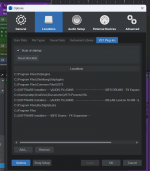
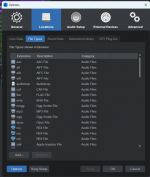
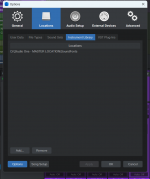
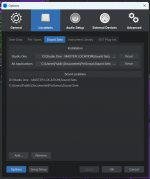
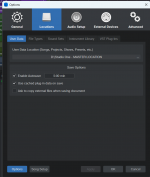
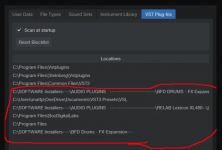
Someone asked that I post a screengrab of my plugins folder locations, so I'm doing that now.
It takes literally over an hour to start Studio One, with me hitting "SKIP" a million times, & Studio One saying it's scanning 9,990-something PlugIns. I don't understand why where it's looking for plugins would make a difference, unless I really actually had 10,000 plugins! I have maybe 40. Maybe someone can enlighten me. This has made it impossible to use Studio One!
It's a Dell XPS-15, Windows 11, 64GB Ram, LaCie 5TB external HD as well as internal. Would being connected to MS OneDrive have anything to do with this? I'm putting screengrabs of everything in that window of locations, etc. Any help would be appreciated!
 

Attachments

  • Studio One - VST Locations.png
    Studio One - VST Locations.png
    85,2 KB · Views: 21
  • Studio One FIle Types locations.png
    Studio One FIle Types locations.png
    81,1 KB · Views: 21
  • Studio One Instrument Lib locations.png
    Studio One Instrument Lib locations.png
    64,5 KB · Views: 18
  • Studio One Sound Sets location.png
    Studio One Sound Sets location.png
    64,8 KB · Views: 17
  • Studio One User Data Location.png
    Studio One User Data Location.png
    58,2 KB · Views: 21
Remove these locations from the list and you should be fine:
Untitled.png
 
FMN-Music has hit the nail on the head. Shouldn't C:\Program Files\Common Files\VST3 be included in that list. Studio One has habit of putting things back in this list by itself sometimes. It pays to check this list from time to time.

Also watch out when you are installing new Soundsets as well. I have got all my Soundsets on an external drive but before I install a Soundset I check the locations to where Studio One is going to put them. Often my external drive location is gone and instead its got some users location on the C drive. (When I was on Windows that is) Often I had to reset this before installing.
 
VST3 plugins are located automatically (as are AU plugins, if you are on Mac), no need to for the old fashioned scan at startup.
 
Does anyone have any more suggestions? I did what was suggested - deleting these directories. In fact, I deleted ALL directories. But it still is searching for 9,406 plugins. Does anyone have any more ideas? This is frustrating!!! I only have about 40 plugins on my computer, I swear :(

Studio One - VST Locations - ALL DELETED Still 9406.png
ScreenGrab - Studio One 10000 Plugin Error.png
 

Attachments

  • ScreenGrab - Studio One 10000 Plugin Error.png
    ScreenGrab - Studio One 10000 Plugin Error.png
    262,8 KB · Views: 10
You reported this issue to us on 6/3/2025 and after 3 weeks it's still not working after all the suggestions we've given you.
Have you submitted a Support Ticket (see link in my signature) yet?
If not, I'd recommend doing that so you can get this working.
 
If this issue has not been resolved I would second that suggestion. @Trucky
I really dislike making this suggestion and take no responsibilty for making it should @MWP follow it up.

@MWP
Try trashing your preferences, there is some info in the following link.


Best regards
 
Last edited:
Thanks guys! I'll try those & report back.
 
You reported this issue to us on 6/3/2025 and after 3 weeks it's still not working after all the suggestions we've given you.
Have you submitted a Support Ticket (see link in my signature) yet?
If not, I'd recommend doing that so you can get this working.
I did yesterday, and I'm still waiting to hear back from them. I wanted to try everything I could first. thanks. As to the '3 weeks' thing, my wife had open heart surgery a while back and serious (& scary) health issues pop up during her recovery, pretty much hijacking everything in my life from time to time, including my recording activities. So I wasn't just flaking off for no reason. Thanks...
 
I did yesterday, and I'm still waiting to hear back from them. I wanted to try everything I could first. thanks. As to the '3 weeks' thing, my wife had open heart surgery a while back and serious (& scary) health issues pop up during her recovery, pretty much hijacking everything in my life from time to time, including my recording activities. So I wasn't just flaking off for no reason. Thanks...
Best of luck to you and your wife for her complete recovery.
 
Next I'd inspect the following folder:
C:\Program Files\Common Files\VST3\
and
C:\Program Files\Common Files\CLAP\
Look for installations of programs, that are NOT plugins in these folders and de-install them and delete leftover folders afterwards. Only leave Plugin related stuff in there.
 
I'd remove all directories, and then start adding them one by one. That will save you a lot of (startup) time to find the culprit. Put the directories in a text file first so you can copy/paste. The C:\Program Files (no subdirectories) directory looks most suspicious of all.
 
Just remember - you do NOT need to add:

C:\Program Files\Common Files\VST3\

This location is maintained by the system and is scanned automatically by S1

For VST2 (if required) - if the OP has actually installed his plugins correctly and to a standard folder like say one that Steinberg recommends - like this:

C:\Program Files\VSTPlugins

This should be all one ever needs:

1750966469609.png


There should be no need whatsoever to add tons of paths to this dialog.

(See here for the plugin standards per Steinberg: https://helpcenter.steinberg.de/hc/en-us/articles/115000177084-VST-plug-in-locations-on-Windows)

VP
 
Back
Top