• Hi and welcome to the Studio One User Forum!

    Please note that this is an independent, user-driven forum and is not endorsed by, affiliated with, or maintained by PreSonus. Learn more in the Welcome thread!

Studio One 7.2.3 - Discussion Thread

Just saw this from a user on Reddit:

"I open StudioOne, then click the New... button (or File, New... from the menu). In the resulting New dialog, I press F1 and a Help Viewer window pops up. However the Help Viewer window is completely unresponsive to keypresses or mouse clicks and cannot be closed. At this point I also cannot return to the StudioOne main screen, either by clicking on it in the task bar or selecting it using Alt+tab, focus simply goes back to the unresponsive Help Viewer window. All I can do at this point is shut StudioOne down through task manager (shutting down just the Help Viewer window from task manager doesn't work).

I thought - what the heck - let's test this - and sure enough - I am now locked up as well? Anyone else want to try?

100% reproducible - every time. The only way out is a hard End Task in Task Manager. Can't believe I never noticed this one before.

VP
 
@Vocalpoint Must be a Windows thing!

Just tried it on my Mac, but no issues:
  • I can open the Window
  • I can see content
  • It's possible to navigate thru the content
  • No lagging / unresponsiveness
  • Help window can be closed any time
  • It's no problem to switch back & forth between Studio One and the help window
 
Just saw this from a user on Reddit:

"I open StudioOne, then click the New... button (or File, New... from the menu). In the resulting New dialog, I press F1 and a Help Viewer window pops up. However the Help Viewer window is completely unresponsive to keypresses or mouse clicks and cannot be closed. At this point I also cannot return to the StudioOne main screen, either by clicking on it in the task bar or selecting it using Alt+tab, focus simply goes back to the unresponsive Help Viewer window. All I can do at this point is shut StudioOne down through task manager (shutting down just the Help Viewer window from task manager doesn't work).

I thought - what the heck - let's test this - and sure enough - I am now locked up as well? Anyone else want to try?

100% reproducible - every time. The only way out is a hard End Task in Task Manager. Can't believe I never noticed this one before.

VP
I tested it on my Mac (MacOS 15.7.3). When the "New"-dialog I can open help with F1 but I cannot click anywhere outside the "New"-dialog, but it's no problem, to move the windows. When I cancel the new-dialog (or create a new song) everything works as expected.
 
Must be a Windows thing!

Just tried it on my Mac, but no issues:

* I can open the Window
* I can see content
* It's possible to navigate thru the content
* No lagging / unresponsiveness
* Help window can be closed any time
* It's no problem to switch back & forth between Studio One and the help window
Thanks for the test!

Yeah - this is a hard lock here. WIndows 10 22H2

VP
 
I tested it on my Mac (MacOS 15.7.3). When the "New"-dialog I can open help with F1 but I cannot click anywhere outside the "New"-dialog, but it's no problem, to move the windows. When I cancel the new-dialog (or create a new song) everything works as expected.
Ok, my fault - did not read carefully enough. 🤦‍♂️

@nhc is correct: When opening the F1 help in the "New" dialog, I get the same behavior as he describes. When closing the New dialog, the issue has gone (and I can close the Help window).

But on Mac the effect is not remotely severe as described by @Vocalpoint for Windows.
 
This isn't new but thought I'd bring up midi quantization. It always seems a bit buggy to me. See the video for example. Quantize is set to 1/16. The notes that move when I press quantize shouldn't be moving.

To view this content we will need your consent to set third party cookies.
For more detailed information, see our cookies page.

I could set the quantize to 1/8 but still, it often catches me out when notes move in a quantize when they shouldn't.
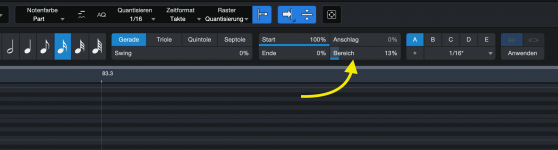
Please try to turn down the range value before quantizing. Although I'm not exactly sure what it does, it might solve this issue:

Bildschirmfoto 2025-12-18 um 21.14.04.png
 
Just saw this from a user on Reddit:

"I open StudioOne, then click the New... button (or File, New... from the menu). In the resulting New dialog, I press F1 and a Help Viewer window pops up. However the Help Viewer window is completely unresponsive to keypresses or mouse clicks and cannot be closed. At this point I also cannot return to the StudioOne main screen, either by clicking on it in the task bar or selecting it using Alt+tab, focus simply goes back to the unresponsive Help Viewer window. All I can do at this point is shut StudioOne down through task manager (shutting down just the Help Viewer window from task manager doesn't work).

I thought - what the heck - let's test this - and sure enough - I am now locked up as well? Anyone else want to try?

100% reproducible - every time. The only way out is a hard End Task in Task Manager. Can't believe I never noticed this one before.

VP

Yes, exactly the same here.
 
Just saw this from a user on Reddit:

"I open StudioOne, then click the New... button (or File, New... from the menu). In the resulting New dialog, I press F1 and a Help Viewer window pops up. However the Help Viewer window is completely unresponsive to keypresses or mouse clicks and cannot be closed. At this point I also cannot return to the StudioOne main screen, either by clicking on it in the task bar or selecting it using Alt+tab, focus simply goes back to the unresponsive Help Viewer window. All I can do at this point is shut StudioOne down through task manager (shutting down just the Help Viewer window from task manager doesn't work).

I thought - what the heck - let's test this - and sure enough - I am now locked up as well? Anyone else want to try?

100% reproducible - every time. The only way out is a hard End Task in Task Manager. Can't believe I never noticed this one before.

VP
If you press Escape, the New dialog in the background closes and the Help window comes in focus and can then be used normally
 
If you press Escape, the New dialog in the background closes and the Help window comes in focus and can then be used normally
So it does!

Nice catch.

VP
 
Back
Top