
-
Hi and welcome to the Studio One User Forum!
Please note that this is an independent, user-driven forum and is not endorsed by, affiliated with, or maintained by PreSonus. Learn more in the Welcome thread!
You are using an out of date browser. It may not display this or other websites correctly.
You should upgrade or use an alternative browser.
You should upgrade or use an alternative browser.
Square Plugin Buttons Like Pro Tools (Mock-Up Included)
- Thread starter jstudio
- Start date

Craig Anderton
Well-known member
Not exactly what you're looking for, but don't forget about these options when using the Level Meter as an insert.

Thank you - yes I have the S1 VU Meter via an old download link (which was removed by S1 for some reason?).
Here's another thread:

 forums.steinberg.net
"It’s really surprising that DAWs continue to focus on peak metering. Peak meters really aren’t useful for mixing. (You might as well just have a clipping light that goes off whenever 0dBFS is exceeded - the peaks themselves don’t help with mixing.) However, continuously integrating/averaging meters like VU, LUFS, etc. are hugely useful because you get a better idea on the overall energy of each track."
*You might as well just have a clipping light that goes off whenever 0dBFS is exceeded
Tons of people agreeing in the comments!?
I need stereo VU meters per track personally.
Or just have the main track meters be VU, like e.g. Hornet (VU bar meters):
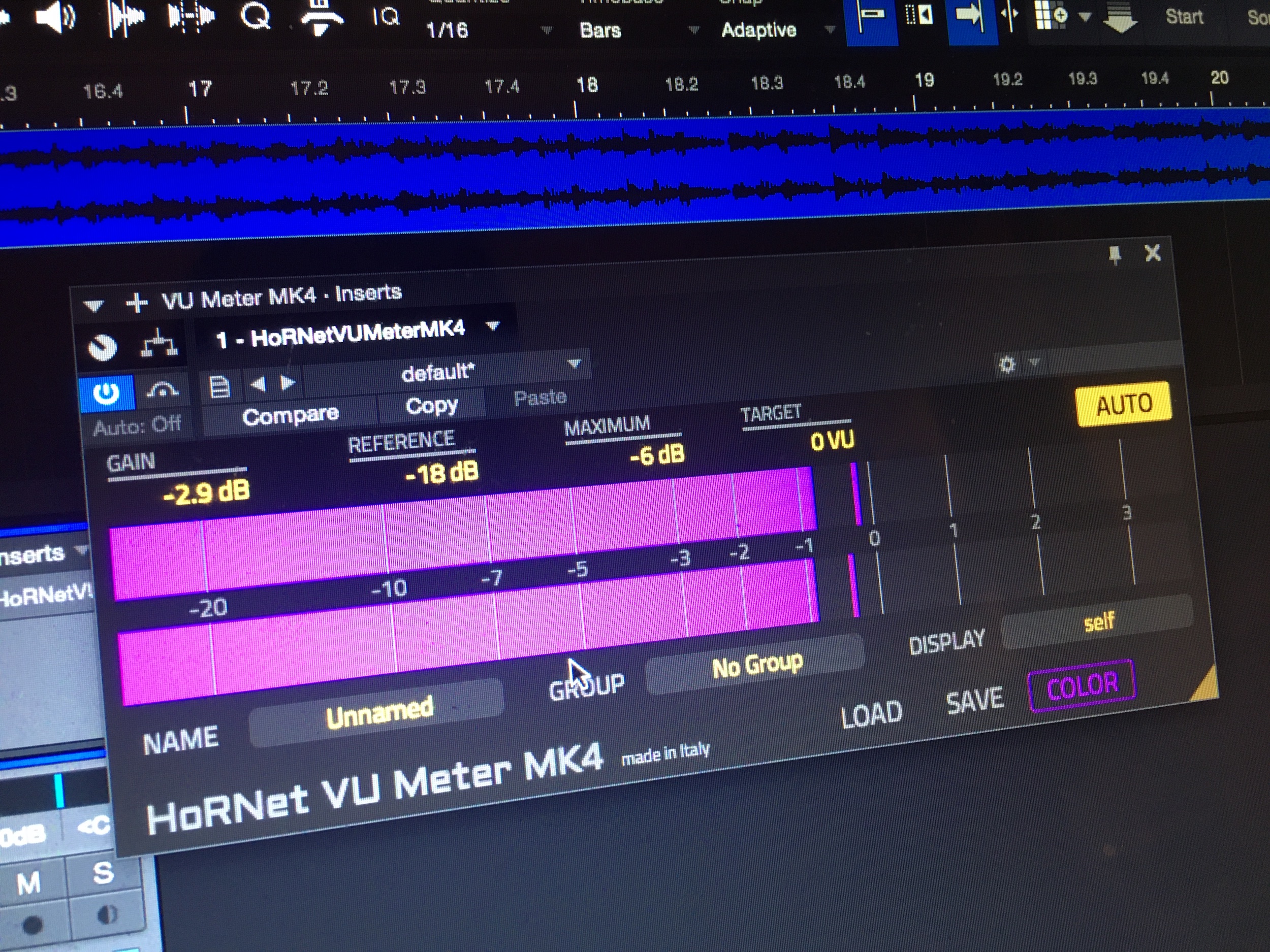
What about if you need -16dBFS instead of -18? Studio One never continued with the VU, even removed the download (it wasn;t available in my plugins list - S1 7 Pro)
Why not 2 rows, left & right?
Think the metering needs to be looked at & as many potential features, for everyone's needs, to be added IMHO.
Here's another thread:
VU meter/Peak meter/both option for all audio channels
For some engineers, peak meters are of little to no use on channels. When using a console, they tend to look at calibrated VUs and would like to do the same in Cubase. These users would like the ability in Cubase to switch any audio meter between peak reading and VU, or to display multiple...
forums.steinberg.net
"It’s really surprising that DAWs continue to focus on peak metering. Peak meters really aren’t useful for mixing. (You might as well just have a clipping light that goes off whenever 0dBFS is exceeded - the peaks themselves don’t help with mixing.) However, continuously integrating/averaging meters like VU, LUFS, etc. are hugely useful because you get a better idea on the overall energy of each track."
*You might as well just have a clipping light that goes off whenever 0dBFS is exceeded
Tons of people agreeing in the comments!?
I need stereo VU meters per track personally.
Or just have the main track meters be VU, like e.g. Hornet (VU bar meters):
HoRNet VU Meter MK4
Explore the latest update of the VU meter plugin, including fixes for Logic and Cubase/Nuendo. Download it for free now.
www.hornetplugins.com
What about if you need -16dBFS instead of -18? Studio One never continued with the VU, even removed the download (it wasn;t available in my plugins list - S1 7 Pro)
Why not 2 rows, left & right?
Think the metering needs to be looked at & as many potential features, for everyone's needs, to be added IMHO.
Also, why's it so small?Not exactly what you're looking for, but don't forget about these options when using the Level Meter as an insert.
View attachment 2256
What's all the empty space for - in such a small box??
Here's a modified re-scaled version:
Left & Right:
But they've abandoned it instead?
Very strange, like I just learned the old official S1 forum was abandoned??? WTH?
Reaper has the embedded UI feature, for third party plugins:

How to show plugin UI inside your tracks
Almost every REAPER plugin that has a graphic interface, has a way to embed it and be controlled right from your tracks! Here’s how to do it.
 www.reapertips.com
That would be good to have mvMeter2 available, etc.
Also why does it go up to +5 for, in such a small space? The standard +3 is fine & what 99% use.
There's no point tho is there. People have been wanting these things for years......
The S1 VU Meters were obviously very popular. Improve them, customise them, etc.!?!??
Loads of people already saying about the meters. It will be years or never........
There's no point tho is there. People have been wanting these things for years......
The S1 VU Meters were obviously very popular. Improve them, customise them, etc.!?!??
Loads of people already saying about the meters. It will be years or never........

lokeyfly
Well-known member
Thanks for that, jstudio. I follow something similar with bx_console abbreviations. Ive always liked Andrew's feedback, and I also mix largely in headphones with the same MDR-7506's for decades now.bx_console SSL 4000 E = S4E
bx_console SSL 4000 E = S4G
bx_console AMEK 9099 = AM9
bx_console SSL 9000 J = S9J
bx_console N = bcN
bx_console Focusrite SC = bcF
bx_townhouse Buss Compressor = TBC (THC, bxT)
Lindell Audio 80 Series = L80 or 80S
Lindell Audio 50 Series = L50 or 50S
Fabfilter Pro-Q4 = PQ4 or just Q4
etc.
You know what plugins you’ve put onto your tracks.
It’s already available & used in Pro Tools.
This is Andrew Scheps using squares with single letters:
View attachment 2249
You (or me, Andrew Scheps, etc.) could do everything from the arrangement view if there were squares:
View attachment 2252
The meters are available in the arrangement view.
TBH I don't understand about the 'order'? It's exactly the same as the existing order of plugins.
Goes left to right:
FL, Ga, GD, IRM (1, 2, 3, 4)
Mt, Mv, MD, OA (5 6 7 8)
PM Ph Pip (9 10 11)
Multiple of the same plugins = Ga (1) Ga (2) is just based off the order(?)
So I see from your image, you'd be looking to have audio tracks in Studio One access square plugin buttons in the same way PT does. I'd be all for it! Unfortunately, reality sets in and the architecture of Studio One and Pro Tools tracks and mix layouts are different. Where Pro Tools has the same signal path from tracks to mixer, Studio One has a instrument AND a audio tracks design so plugins are not placed along tracks at all. The audio path is largely the same, but not the instrument path. To clarify, instruments dont correlate 1:1 to the mixer. So how would the tracks section only have plugins and the instrument tracks not have them?
I can't even get a response from Presonus developer/feedback for a decade to even budge in so much as having an actual velocity meter shown on a instrument track (as apposed to that ridiculous pseudo looking level meter that only acts as a on/off signal indicator). Enter, you want plugins there (nearby). Well, I applaud your good intentions. Only, I'm going to clap slowly
 .
.Reason being, Presonus development is painfully slow on its GUI design. Yeah, they'll fix an error, or tidy up a look much like version 7 came with. Rounder and a nicer overall events, and esthetic look, but getting them to add plugins on the tracks/arrangement view, let alone square plugin buttons (which I'd love to see as well) would be a new breakthrough with their past track record. There's probably a pun in there, somewhere.
What I'll do going forward is vote up your FR. But I cant emphasize enough, even asking them to even so much as "reverse (skip advance) loop markers" like in Logic or Cubase, is like talking to paint.
I have a little hope in that Presonus development could adopt the square plugin buttons along the mixer channels because its a logical and rather space saving trend. That displayed on tracks? I'd fall off my chair.
Peace, out.

Last edited:
I would like to hear @Lukas Ruschitzka 's views on these.
e.g. big VU meters - not logically EASIER TO SEE, no? And the S1 plugin "VU Meter" actually be available for everyone (not having to find the old download links)
^above VU mock-up completely ignored and not a single thumbs up - so once again, according to democratic voting system, no one cares!?!?!?
What's going on with the metering in S1? People have made logical fair requests. Why have they been ignored?
e.g. big VU meters - not logically EASIER TO SEE, no? And the S1 plugin "VU Meter" actually be available for everyone (not having to find the old download links)
^above VU mock-up completely ignored and not a single thumbs up - so once again, according to democratic voting system, no one cares!?!?!?
What's going on with the metering in S1? People have made logical fair requests. Why have they been ignored?
Not exactly what you're looking for, but don't forget about these options when using the Level Meter as an insert.
View attachment 2256
All of this should be directly on the meter section, shouldn't it (available to add in the options).
The plugin title box takes up too much unncessary space.
Obviously you should be allowed to add them in options, and then they appear, without needing a plugin or plugin title/name within the meter section.
They're metering > meter section
lokeyfly
Well-known member
....."many people have been complaining about it for a decade now, sadly they don't seem to care"
.....So I wouldn't hold your breath on any changes!
.....How many amateurs are out there vs professionals?
.....No doubt too many people downvoted the ideas - because they personally/selfishly don't need it. When it would simply be an option to have it BOTH WAYS.
.....So even tho they'd make 10,000 x $X amount
the -1K downvotes (11,000) outweigh them
.....TBProAudio wont do any modification requests due to it "only being free" - despite me offering to pay for a paid-version of mvMeter2 as well. Too time consuming for a "free product" = it can't be improved upon!? ..... Or some stupid crap!
First, I'd suggest toning things down a little. You're providing an FR, not a stand off. Trust me, it will help your cause. Were you willing to go to contract for TBPro Audio to revisit a new design? Because I don't see them adjusting anything unless something was reasonably planned out.
Again (stated by several here), voting up or down is part of the process. Make that any process. Personally, I haven't had a chance to vote yet. I'll try my last question again. After all, I did spend some time responding.
Your display:
In the above display, you also show square plugins on tracks for Studio One. Specifically audio tracks in your example. With Studio One, plugins are never shown on tracks. You likely got this idea from Pro Tools. That is very different to S1 in its tracks and channels layout. Can you explain why you're illustration shows plugins, there?
I dont see that as happening with Studio One was my point. Square plugins could however be displayed on the mixer channels (as you've already shown) and Inspector views. Just not on tracks in Studio One's current tracks layout. Does that make sense to you?
I am supporting your overall square plugin request. Others likely are as well. Just give people a chance to respond is all. They're likely dug in, and are busy. I know I am.
Lastly, you're hurling out a number of other FR's or ideas in this thread. Some good points made, and by existing FR's already provided. However, the problem becomes and is already happening is the main subject points, become less visible. You're already inundating the thread with a lot of broad information. It's already getting a bit watered down, judging by the scattered talking points, and responses.
I'd suggest keep one idea per post. If you cant do that because they evolved through talking points, then bullet ● the items you want to see changed already presented in the thread. They're good ideas here, but already getting a bit buried because the title is about plugin squares. See my point? Anyway, we're here to help. Lukas and/or others might drop in based on their time, workload, and other obligations.
After all, we're on your side.
Last edited:
The instrument tracks and audio tracks are exactly the same spacing!!!!

This is what others are doing, apart from they're allowed to downvote.
So what ends up happening is Fender, who make hundreds of millions, don't e.g. provide ACCESSIBILITY FOR PEOPLE WHO KINDLY GENTLY ASK & SUPPORT STUDIO ONE.
This is what others are doing, apart from they're allowed to downvote.
So what ends up happening is Fender, who make hundreds of millions, don't e.g. provide ACCESSIBILITY FOR PEOPLE WHO KINDLY GENTLY ASK & SUPPORT STUDIO ONE.
I did a search for a list of third party plugin developers whose plugins support the embedded graphic display in the S1 mixer. I couldn't find any. Not sure if anyone knows of anyFYI people were talking about the click/double-click 2 years ago:
15th October 2023
"Agreed. There should be a preference to swap the click/double-click behavior of plugins in the mixer"
"many people have been complaining about it for a decade now, sadly they don't seem to care"
So I wouldn't hold your breath on any changes!
No doubt too many people downvoted the ideas - because they personally/selfishly don't need it. When it would simply be an option to have it BOTH WAYS.
--
Regarding the "VU Meter" apparently there is third party support. So why plugin developers haven't done their own VU embedded GUI???
Embedded Plugin UI Features
--
- Native Plugin Support: PreSonus's native plugins, such as the Pro EQ and VU meter, can display embedded graphical interfaces within the mixer channel view.
- Third-Party Plugin Support: Studio One includes support for embedding VST plugin views. This functionality is dependent on the plugin developer implementing the necessary protocols, such as native Wayland support for Linux versions (as mentioned in a technical discussion). Most modern, well-maintained VST3 plugins support this.
The guy at TBProAudio wont do any modification requests due to it "only being free" - despite me offering to pay for a paid-version of mvMeter2 as well. Too time consuming for a "free product" = it can't be improved upon!?
Then likely the downvoters will outweigh the voters - even tho e.g. there's 10,000 pro improved VU meters vs 11,000 that don't care, are selfish, don't want it
So even tho they'd make 10,000 x $X amount
the -1K downvotes (11,000) outweigh them
Or some stupid crap!
AI DAWs = "AI make the VU meter actually legible, without squinting, or needing to put your face up to the display"
Or AI will make all of this obsolete, so it can be open source, and people can add what they want/need...

SwitchBack
Well-known member
I'd like to see this thread split up in 'one GUI idea per thread' threads please. Not great to have 3+ ideas jumbled together.
Which is also what this thread comes down to, cramming as much as possible into a tiny space, on limited screen real-estate. Even square buttons have their limits, as does the space available for readable meters. Time to think outside the box rather than go smaller and wear thicker glasses.
Which is also what this thread comes down to, cramming as much as possible into a tiny space, on limited screen real-estate. Even square buttons have their limits, as does the space available for readable meters. Time to think outside the box rather than go smaller and wear thicker glasses.