
-
Hi and welcome to the Studio One User Forum!
Please note that this is an independent, user-driven forum and is not endorsed by, affiliated with, or maintained by PreSonus. Learn more in the Welcome thread!
You are using an out of date browser. It may not display this or other websites correctly.
You should upgrade or use an alternative browser.
You should upgrade or use an alternative browser.
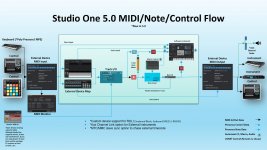
Signal Flowchart
- Thread starter dlsmusic
- Start date

TheMaartian
Member

OP
OP

dlsmusic
Member
Thank you TheMaartian!
Didn't the Studio One manual have something similar at one point? I though I remembered seeing one that looked more like a traditional flowchart in portrait mode. Maybe I'm just imagining it. Or maybe it was something in the Cakewalk manual when I was using Sonar.
In any case, thanks again for the quick response!
Didn't the Studio One manual have something similar at one point? I though I remembered seeing one that looked more like a traditional flowchart in portrait mode. Maybe I'm just imagining it. Or maybe it was something in the Cakewalk manual when I was using Sonar.
In any case, thanks again for the quick response!

lokeyfly
Well-known member
Thete were no signal flowcharts of this sort from the Studio One manuals. The flow chart you see here was created and maintained by a user who later was employed by Presonus as I recall. He [Jepetit] voluntarily kept the flowchart going during his tenure, only I haven't herd from him in a while. The one provided here looks to be up to revision 5. Use it with some allowance for changes (understandably) now incorporated into the latest Studio Pro version 8. I think it would be a very good idea if someone grabbed the baton and updated it. Particularly if Studio Pro is going to present itself as a pro DAW. There are times when users will have signal flow questions that could immediately be answered with a concise signal flow chart. Be it pre/post fader, insert, bus patching, VCA faders, etc.Didn't the Studio One manual have something similar at one point? I though I remembered seeing one that looked more like a traditional flowchart in portrait mode. Maybe I'm just imagining it. Or maybe it was something in the Cakewalk manual when I was using Sonar.
We shall see, but it's an undertaking by someone detailing such signal paths, acurately.
OP
OP
dlsmusic
Member
I would have offered to take on that task, but I just don't have the bandwidth, nor do I have the technical knowledge of what's going on under the hood to do so. I have however created a feature request to include such a flowchart in the manual. I would imagine that the development team already has such a thing.

Gary Shepherd
Member
With drag and drop I really have no idea what I would do with such a Flowchart or why it matters. I'm interested to know why it is important to some users. Thanks.

I’ve never really felt the need for a signal flowchart in Studio One.
The signal flow is already right there in the mixer (inserts, sends, buses) - it’s all visible and pretty self-explanatory. Turning that into an abstract diagram feels redundant to me.
I get that it might help beginners, but to me it’s more something you’d need in a less intuitive system.
The signal flow is already right there in the mixer (inserts, sends, buses) - it’s all visible and pretty self-explanatory. Turning that into an abstract diagram feels redundant to me.
I get that it might help beginners, but to me it’s more something you’d need in a less intuitive system.
OP
OP
dlsmusic
Member
Hey Gary. Personally, I find it useful to understand or troubleshoot gain staging issues, meter levels, effect levels, etc. It depends how your mind processes things I guess. Those who wouldn't find it useful would just ignore it if it were added to the manual.With drag and drop I really have no idea what I would do with such a Flowchart or why it matters. I'm interested to know why it is important to some users. Thanks.
Gary Shepherd
Member
Oh I understand it - I used to work as an engineer at IBC Studios in Portland Place in the mid 70's - an analogue 16 track studio - so signal flow etc was fundamental. Just can't see what the point is in this DAW - but that is just me.Hey Gary. Personally, I find it useful to understand or troubleshoot gain staging issues, meter levels, effect levels, etc. It depends how your mind processes things I guess. Those who wouldn't find it useful would just ignore it if it were added to the manual.

SwitchBack
Well-known member
Flowcharts visualise answers to questions like: Is Event FX before or after Clip Gain? Or: Is this or that level control printed when you bounce? We're not all visual thinkers, but those who are immediately gravitate to pictures like these.