Follow along with the video below to see how to install our site as a web app on your home screen.
Note: This feature may not be available in some browsers.
Hi and welcome to the Studio One User Forum!
Please note that this is an independent, user-driven forum and is not endorsed by, affiliated with, or maintained by PreSonus. Learn more in the Welcome thread!
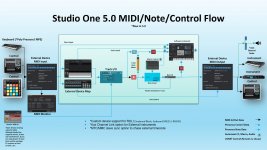
There used to be a Studio One signal flowchart circulating. It covered the microphone or guitar through the audio interface, into the Studio One channel, effects, sends, busses, main channel, etc. I searched online but couldn't find it. Does anyone have a copy?
Didn't the Studio One manual have something similar at one point? I though I remembered seeing one that looked more like a traditional flowchart in portrait mode. Maybe I'm just imagining it. Or maybe it was something in the Cakewalk manual when I was using Sonar.
Didn't the Studio One manual have something similar at one point? I though I remembered seeing one that looked more like a traditional flowchart in portrait mode. Maybe I'm just imagining it. Or maybe it was something in the Cakewalk manual when I was using Sonar.
Thete were no signal flowcharts of this sort from the Studio One manuals. The flow chart you see here was created and maintained by a user who later was employed by Presonus as I recall. He [Jepetit] voluntarily kept the flowchart going during his tenure, only I haven't herd from him in a while. The one provided here looks to be up to revision 5. Use it with some allowance for changes (understandably) now incorporated into the latest Studio Pro version 8. I think it would be a very good idea if someone grabbed the baton and updated it. Particularly if Studio Pro is going to present itself as a pro DAW. There are times when users will have signal flow questions that could immediately be answered with a concise signal flow chart. Be it pre/post fader, insert, bus patching, VCA faders, etc.
We shall see, but it's an undertaking by someone detailing such signal paths, acurately.