• Hi and welcome to the Studio One User Forum!

    Please note that this is an independent, user-driven forum and is not endorsed by, affiliated with, or maintained by PreSonus. Learn more in the Welcome thread!

Solved Shortcut for "Reset Event Color" ?

nhc

Member
I wanted to build a simple macro to set the event color to its initial state that is the track color. In the context menu you would chose the black&white icon in the color palette. When I want to select this color in the macro, it is the color "0". But when I run the macro, instead of resetting the color of the selected event, it opens the color palette.
Is there a way to address the "reset color" or is there a shortcut to reset the event colors of a selected track to all it#s events?
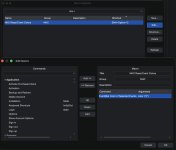
reset Event Color.jpg
 
Good catch. Yes, there's a bug in the Set Color for Selected Events command. The color picker is shown if there's no color argument. However, since in JavaScript 0 and undefined (no argument) are treated similarly depending of the way it's checked, it will also show the color picker if the argument is 0.

I've reported this to development. Until this is fixed, it seems there's no workaround other than selecting the events, right-clicking and selecting the "0" color.
 
  • Love
Reactions: nhc
Back
Top