• Hi and welcome to the Studio One User Forum!

    Please note that this is an independent, user-driven forum and is not endorsed by, affiliated with, or maintained by PreSonus. Learn more in the Welcome thread!

Sample Rate Mismatch - PSO unable to adjust sound card

DrLloyd

New member
I have a new problem that has popped up recently. It may or may not be due to the recent PSO update.
Now, when I open a project with a 96kHz sample rate, I get an error message that the sample rate doesn't match my sound card settings (card is set to 44.1kHz, etc.).
This never happened before until recently.
Shouldn't PSO adjust the sound card settings for each project automatically?
Anyone know why this is happening?
Thanks!
 
Windows? MacOS? Which SO version? Which audio interface?

Adding specs to your sig will make sure the details are always there. See the link in my sig
 
Anyone know why this is happening?
Thanks!
Hard to say without knowing any details. There should be a notice asking you to put your specs in your signature when posting in the Community Support forum. Don’t ignore it if you want help ;-)

BTW, PSO is typically used as the abbreviation for PreSonus Symphonic Orchestra.
 
I don’t see any specs in anyone’s signature? Not everyone is using a computer to view this website. Signatures don’t seem to show on cell phones.
On a PC we are told that best practices is to set everything to the same sample rate. Windows sound settings, audio interface and the default setting for projects in your daw.
If you do video editing then 48 is the standard to use. I can see that trying to use 96 might result in your system having problems. It probably why not many people use it.
 
At the risk of being annoying, I suggest there are only two sample rates which make sense, (a) standard CD quality (44.1-kHz) and (b) high-fidelity audio quality for standard video (48-kHz), the latter of which is 48-kHz because it's easier and faster for doing the required arithmetic in the software engineering code, not because it's somehow better than 44.1-kHz. The audio sample rate for standard video is higher than standard CD audio solely for faster computer processing. If you are doing audio for standard video, then use 48-kHz, but otherwise use 44.1-kHz, although there are some not so goofy reasons for using 96-kHz, but probably not in a truly practical way.

Why?

It's all about the rule colloquially called "Nyquist", which states that the sample-rate needs to be a little more than twice the highest-frequency that needs to be captured and reproduced, which for "normal" human hearing (20-Hz to 20-kHz) and maps nicely to 44.1-kHz, while 48-kHz extends the range approximately to 24-kHz, which is too high to hear but is done to make the computer arithmetic more efficient.

I wrote something about this in an earlier post; but the overview is that higher than standard sample rates are based on beliefs rather than acoustic physics and are in the same category as paying thousands of dollars for "magic music crystal rocks" based on the belief that sticking them with tape to headphones somehow will make music sound better, hence why not send thousands of dollars to the people who make absurd claims and sell "magic music crystal rocks".

Those also are the folks who sell USB cables for hundreds of dollars based on the belief and marketing strategy that their USB cables are "magical".

Digital Audio Workstation (DAW) applications and sampled-sound libraries support higher sample rates, because some folks think it's important and actually does something. Higher sample rates do nothing, but if folks like a 2-liter Coca-Cola rather than a 1-liter Coca-Cola, then sell it to them.

This is explained fully by electrical engineer Monty Montgomery in the YouTube video; and he proves it using analog and digital measuring equipment and a software charting application.

OBSERVATION

The Standard CD and Standard High-Fidelity Audio for Video (44.1-kHz and 48-kHz) are completely and totally sufficient for the best possible audio reproduction for human listeners, provided the amplifiers, loudspeakers, headphones, and ear buds are high-quality, where the curious fact about amplifiers and loudspeakers is best understood from the perspective of sound system engineers who do sound at concerts and as a group care only about the quality of the various components but are not the least bit influenced by marketing testimonials made by famous musicians and singers.

Instead of being influenced by learning that a famous lead guitar player uses a particular amplifier and loudspeaker rig made by Fender, Marshall, Orange, and so forth, sound reinforcement folks consider it mostly to be consumer marketing strategies, although there are valid reasons for different types of guitar amplifiers.

If there is a rule, then it's that the general goal of deceptive marketing is to extract as much money from consumers as possible while providing as little as possible.

One of my favorite bits of audio marketing is found in terms like "near field", which certainly sounds vastly important but actually means in simple English that "you need to get close to it to hear anything". 🤪

George Martin explained the rules best when he revealed that he added a 17-kHz tone at the end of the "Sgt. Pepper's Lonely Hearts Club Band" (Beatles) vinyl LP to "entertain dogs", which was his way of having a bit of silly FUN like the Beatles did and providing the clue that nearly nobody actually can hear those high frequencies.

Another favorite is "sea salt", which sounds exciting and tasty--except that all the salt found on this planet is sea salt. If the salt comes from salt mines in Kansas, then it's just as much "sea salt" and probably is cleaner than salt evaporated now from sea water.

In other words, sound reinforcement engineers are focused on acoustic physics rather than marketing puffery.

This is the reason you can have an excellent studio monitor system using PA loudspeakers and subwoofers used for nightclubs and small venues. They are not endorsed by famous musicians, hence do not cost a lot; but they are quite sufficient and generally are less expensive than other types of studio monitor systems, at least the ones that make deceptive claims and use marketing terms like "music power" and boast vastly large "music watts" and other nonsense.

I recommend two flavors of studio monitors, (a) Kustom PA two-way loudspeakers and deep bass subwoofers and (b) PreSonus Sceptre® S8 Studio Monitors (pair) and Temblor® T8 Studio Subwoofers (pair).

I do this for three reasons (a) folks who understand acoustic physics and concert sound know how to configure PA loudspeakers safely and have OSHA-approved ear protection for use while configuring, (b) the PreSonus studio monitors have accurate and truthful specifications, which is rare in the arena of commercial off the shelf (COTS) studio monitors and is something I checked and verified, and (c) the PreSonus studio monitors can be calibrated and configured safely by folks who are not complete and total audio geeks. The only other studio monitors I recommend are the ones by JBL Pro that cost $20,000 (US) with the required Crown power amplifiers, cables, and all that stuff, all of which needs to be connected to an external interface and at least an equalizer for calibrating where you need two deep bass subwoofers because you have two channel stereo and while you can use one deep bass subwoofer, doing it that way causes the subwoofer's self-powered electronics to do the deep bass mixing, not you.

SUMMARY

It's important for sample-rates to be consistent, and it's important that the sample-rate supports Nyquist for normal human hearing, which is just a bit over twice the highest frequency humans can--at least in theory--hear, which is 20-kHZ and maps to 44.1-kHz (Standard CD quality).

A sample rate of 48-kHz also is good; and it's what is used in high-fidelity audio for video.

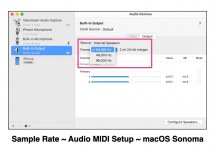
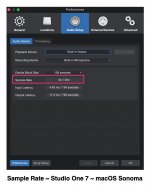
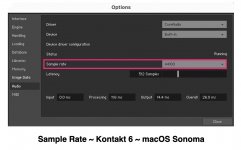
All the components in the digital music production chain have sample-rates, and they need to be the same, which generally is specified in Studio One, macOS or Windows, external digital audio and MIDI processors, and so forth, which also includes VSTi virtual instrument engines like Kontakt (Native Instruments). The sample rates need to be the same.

[NOTE: The sample rate in the Settings dialog is the exactly same for Kontakt 6, Kontakt 7, and Kontakt 8, which I verified after doing the Kontakt 6 screen capture.]

To view this content we will need your consent to set third party cookies.
For more detailed information, see our cookies page.
 

Attachments

  • SW-macOS-Sonona-iMac-Sample-Rate.jpg
    SW-macOS-Sonona-iMac-Sample-Rate.jpg
    94,6 KB · Views: 6
  • SW-Studio-One-7-Sample-Rate.jpg
    SW-Studio-One-7-Sample-Rate.jpg
    117,5 KB · Views: 6
  • SW-Kontakt-6-Sample-Rate.jpg
    SW-Kontakt-6-Sample-Rate.jpg
    87,6 KB · Views: 7
Last edited:
Regarding sample rates I have 3 remarks to add to James's post:
  1. The advantage of 48kHz (or 96kHz) for video is to have exactly the same number of audio samples for each frame, which helps the editing process.
  2. A part of latency is sample rate related. A higher sample rate results in a somewhat lower latency.
  3. That infamous xiph video isn't telling the whole truth. As Monty states he chose his examples "carefully", to make his point. Nyquist assumes perfect sample value precision. Lower bit depth means less precision means poorer reconstruction. Steady sinewaves (Monty's demonstration) are nicely repetitive and it's that repetition (oversampling if you like) which sneakily improves the precision needed for a good reconstruction. But real audio can be wildly irregular, lacking that repetition. Which makes for sketchy reconstruction from low bit depth samples.
 
Last edited:
Regarding sample rates I have 3 remarks to add to James's post:
  1. The advantage of 48kHz (or 96kHz) for video is to have exactly the same number of audio samples for each frame, which helps the editing process.
  2. A part of latency is sample rate related. A higher sample rate results in a somewhat lower latency.
  3. That infamous xiph video isn't telling the whole truth. As Monty states he chose his examples "carefully", to make his point. Nyquist assumes perfect sample value precision. Lower bit depth means less precision means poorer reconstruction. Steady sinewaves (Monty's demonstration) are nicely repetitive and it's that repetition (oversampling if you like) which sneakily improves the precision needed for a good reconstruction. But real audio can be wildly irregular, lacking that repetition. Which makes for sketchy reconstruction from low bit depth samples.
All of it is important! :)

I did not focus on Latency, which when working with VSTi virtual instruments is very important; and my current strategy as shown in the screen captures is to stop tweaking when everything sounds good, which is a bit lazy, but so what. Generally, if the latency is too low, then the audio does not sound good, since it takes too long to render; so I find a happy balance for my iMac and mostly leave it alone.

Latency also affects the VSTi virtual instrument engines, like Kontakt (Native Instruments); and ideally everything should be consistent, but in the screen captures I posted there is not such ideal consistency, which is a bit lazy on my part, but everything sounds good, so I leave it alone.

The 8-bit stuff is not good, as you observed.

Studio One handles it two ways, (a) internally which is either 32-bit floating point or 64-bit floating point and (b) exporting, which you can specify, where 24-bit looks to be a good default, although it depends.

Thanks for reminding me about the other stuff!

The sample-rate aspect for me is a bit of a "pet peeve"; and generally I prefer standard CD quality, although Telestream (video editor) probably upscales the audio to 48-kHz.

Pondering the sample-rate and bit-depth for a while, this might be a key to making sense of the observation that YouTube audio for most "major" musical groups tends to be better and stronger than what I have been able to achieve so far, where current songs by Metallica are an example.

After a lot of experimenting--which includes efforts to make sense of what YouTube does internally when it processes uploaded audio--I am getting good results for headphone mixes; but some of the "major" labels have better results, part of which is a mystery in the sense of my not knowing what they are doing and exactly how they are doing it.

Apple has a program where songs for iTunes and Apple Music can be improved using authorize third-party mastering labs; and I think YouTube has something similar; but I can't afford it; so I do experiments and make an effort to improve things.

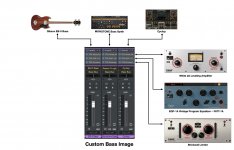
Recently, I have started using what I call a "Custom Image" for bass; and it's a combination of Gibson EB-0 (MODO Bass, IK Multimedia), MONOTONE Bass Synth (Reason Studios, via Reason Rack VST), and Cyclop (Sugar Bytes), along with EQP-1A Vintage Program Equalizer, White 2A Leveling Amplifier, and Brickwall Limiter (IK Multimedia). MONOTONE Bass Synth added deep bass to the Gibson EB-0 bass: and Cyclop add a bit of wobbly Dubstep-style growl.


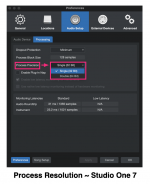
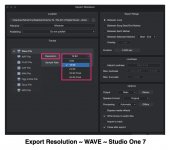
It doesn't help that Studio One uses "resolution" instead of "bit-depth"; but that's the way it works with terminology. As I read and understand, "process resolution" is the way Studio One handles audio internally as a software engineering activity; and "export resolution" is similar but is not such confusing terminology, since it's the way you specify how you want exported audio to be done. Additionally, the software engineering perspective and terminology is that "Single 32-bit" and "Double 64-bit" refer "Single-Precision Floating Point" and "Double-Precision Floating Point" arithmetic, respectively.
 

Attachments

  • SW-Studio-One-Process-Resolution.png
    SW-Studio-One-Process-Resolution.png
    154,6 KB · Views: 9
  • SW-Studio-One-Export-Resolution.jpg
    SW-Studio-One-Export-Resolution.jpg
    126,9 KB · Views: 9
  • 5-SW-Custom-Bass-Image.jpg
    5-SW-Custom-Bass-Image.jpg
    219,3 KB · Views: 9
Last edited:
It doesn't help that Studio One uses "resolution" instead of "bit-depth"; but that's the way it works with terminology. As I read and understand, "process resolution" is the way Studio One handles audio internally as a software engineering activity; and "export resolution" is similar but is not such confusing terminology, since it's the way you specify how you want exported audio to be done. Additionally, the software engineering perspective and terminology is that "Single 32-bit" and "Double 64-bit" refer "Single-Precision Floating Point" and "Double-Precision Floating Point" arithmetic, respectively.
Yeah, floating point can be a bit confusing. With 32 bits you could have 32-bit fixed point precision, where (single precision) 32-bit FP uses those same 32 bits for 'only' 24-bit precision but with an 8-bit exponent for way more dynamic range than the fixed point option. The advantage of FP is that you get that 24-bit precision at every practical signal level, where with fixed point effective precision gets less with weaker signals (using fewer bits). So bit depth and precision can be different things I guess, depending on definitions.

Edit: Corrected 11-bit to 8-bit
 
Last edited:
Yeah, floating point can be a bit confusing. With 32 bits you could have 32-bit fixed point precision, where (single precision) 32-bit FP uses those same 32 bits for 'only' 24-bit precision but with an (11-bit) exponent for way more dynamic range than the fixed point option. The advantage of FP is that you get that 24-bit precision at every practical signal level, where with fixed point effective precision gets less with weaker signals (using fewer bits). So bit depth and precision can be different things I guess, depending on definitions.
Studio One uses 32-bit floating point arithmetic internally but can be configured to use 64-bit floating point arithmetic internally.

It's the IEEE 754 standard, now called "binary32", but it also can be the "binary64", which maps to double-precision floating point rather than single-precision floating point.

It's unlikely that Studio One modifies floating point arithmetic, because that's done at the processor level and would not be easy to change.

The information you provided appears to be different from the IEEE 754 standard (binary32 and binary 64).
 
We've gotten away from the topic. Perhaps the Lounge would be a better place for lengthy discussions about various standards and implementations. Don't get me wrong - these discussions are sometimes interesting, but they are providing no information the OP can use to solve the issue this post was created for.

Thanks
 
We've gotten away from the topic. Perhaps the Lounge would be a better place for lengthy discussions about various standards and implementations. Don't get me wrong - these discussions are sometimes interesting, but they are providing no information the OP can use to solve the issue this post was created for.

Thanks
The problem the OP has is caused by the sample rates being inconsistent (in other words, not being the same).

Studio One is flexible for specifying the desired sample rate; and PSO keys off the sample rate specified in Studio One.

The OP just needs to set the sample rate consistently for Studio One, sound card, VSTI virtual instrument engines (if any); and perhaps Windows, although I do everything on the Mac and cannot verify how anything on a Windows machine works.

If there is an external digital audio and MIDI interface, then it probably has a way to set its sample rate; and if so, then all of them should match (operating system, Studio One, VSTi virtual instrument engines like Kontakt, and if present a separate sound card or an external digital audio and MIDI interface like the MOTU 828mk3 Hybrid or PreSonus Quantum 2626 and Quantum HD 8 USB-C Audio Interface).

To be precise, the OP should select a sample rate and then use it for each relevant software and hardware component (Studio One, sound card, and so forth).

Since the OP indicated the sound card is set top 44.1-kHz, one solution is to set Studio One to 44.1-kHz, and if applicable to Windows and any VSTi virtual instrument engines like Kontakt. Set all of them top 44.1-kHz or if 96-kHz is preferred, then set all of them to 96-kHz.

The sample rates need to match.

If you like, I can delete my posts about sample rates and move it to the Lounge. :)
 
Last edited:
The problem the OP has is caused by the sample rates being inconsistent (in other words, not being the same).

Studio One is flexible for specifying the desired sample rate; and PSO keys off the sample rate specified in Studio One.

The OP just needs to set the sample rate consistently for Studio One, sound card, VSTI virtual instrument engines (if any); and perhaps Windows, although I do everything on the Mac and cannot verify how anything on a Windows machine works.

If there is an external digital audio and MIDI interface, then it probably has a way to set its sample rate; and if so, then all of them should match (operating system, Studio One, VSTi virtual instrument engines like Kontakt, and if present a separate sound card or an external digital audio and MIDI interface like the MOTU 828mk3 Hybrid or PreSonus Quantum 2626 and Quantum HD 8 USB-C Audio Interface).

To be precise, the OP should select a sample rate and then use it for each relevant software and hardware component (Studio One, sound card, and so forth).

Since the OP indicated the sound card is set top 44.1-kHz, one solution is to set Studio One to 44.1-kHz, and if applicable to Windows and any VSTi virtual instrument engines like Kontakt. Set all of them top 44.1-kHz or if 96-kHz is preferred, then set all of them to 96-kHz.

The sample rates need to match.

If you like, I can delete my posts about sample rates and move it to the Lounge. :)

Yes, matching rates across devices and apps is essential.

I'll see if I can move your sample rate thesis and related posts to a new thread in the Lounge ... though not immediately.
Thank you for understanding.
 
Back
Top