• Hi and welcome to the Studio One User Forum!

    Please note that this is an independent, user-driven forum and is not endorsed by, affiliated with, or maintained by PreSonus. Learn more in the Welcome thread!

S1 not recognizing/scanning EZ Drummer 3

jude77

New member
Hey Guys:
S1 isn't finding EZ Drummer 3 on a startup scan. It was working fine a week ago. I deleted EZD then reinstalled it in the default folder. I checked the folder the VST3 is indeed there. I Opened S1, ran a scan, and checked the plugin manager and EZD is listed, but the little white dot next to it on the left is greyed out. I clicked it, it turned white. Closed S1 scanned again and EZD did not appear so I checked the Plugin Manager and the dot was grey again. I reset the blacklist and removed all the plugin setting, but it still won't scan. Any thoughts or suggestions?

Windows 11
 
What does this mean: " I deleted EZD then reinstalled it in the default folder".

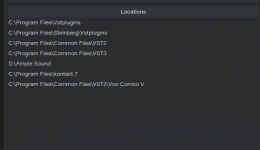
And what does your plugins Locations area look like? Screencap?

1765403964574.png


VP
 
First, thank you much for replying. I appreciate any help.

By "installed to default holder" I mean that I let Toontrack decide where to put things. In this case it chose Program Files>Common Files>VST 3.
Here is a screen shot that shows my locations list.
 

Attachments

  • locations.png
    locations.png
    13,2 KB · Views: 7
First, thank you much for replying. I appreciate any help.

By "installed to default holder" I mean that I let Toontrack decide where to put things. In this case it chose Program Files>Common Files>VST 3.
Here is a screen shot that shows my locations list.

First thing - you do not need to specifically list the VST3 directory - that is scanned by default.

Second - all the other locations - ideally should be condensed to a single location like:

C:\Program Files\VSTplugins

Have 6 or 7 extraneous locations - like Common Files\VST2\Vox Combo V - is not needed or tidy - this should simply be installed in

C:\Program Files\VSTplugins

The is a "nice to have" and might involve some work to accomplish - but it makes troubleshooting a breeze.

Now onto Toontrack - I do not ever recall the EZD installer asking "where" to install the actual VST3 plugin - it will know to place the VST3 in the industry standard "Common Files\VST3" folder - by defualt and without guidance.

The install WILL ask about where your MIDI library intends to be and where to install the standalone stuff - which is C:\Program Files\Toontrack\EZDrummer

It sounds to me - that if you manually guided the installer - you may have actually installed it in the wrong spot. Would be good to see what your VST3 folder looks like...should look like this:

1765408535966.png


VP
 
Back
Top