• Hi and welcome to the Studio One User Forum!

    Please note that this is an independent, user-driven forum and is not endorsed by, affiliated with, or maintained by PreSonus. Learn more in the Welcome thread!

Solved Really Beginning to Annoy Me. Please Help!

JBMusic

Active member
Up until just recently I used to be able to arm the track or tracks I wanted to record something in, mark the timeline where I wanted the range and then push the "R" key to record. Now it seems that this was all re-adjusted without my wanting it to be. Now, when I do all of the above and push the "R" key it takes the armed track out of record and transport does NOTHING! I can record but I have to push the "Record" button on the transport. Did something change that requires the user to configure the hot keys with every new project? I've been using S1 for well over a year and this change is just very recent. Can anybody please tell me what I need to do to get it working right again?

Thanks!

:)John B
 
Up until just recently I used to be able to arm the track or tracks I wanted to record something in, mark the timeline where I wanted the range and then push the "R" key to record.

Not sure I understand this specific phase. What do you mean by "mark" the timeline "where I wanted the range"?

Over here I simply place the cursor, hit R (and get a two bar count-in as part of my shortcut key/macro) and off I go.

Nothing has changed for me as far as recording like this goes.

And when was the last time whatever it is you do - work correctly?

VP
 
Excuse me. Maybe I should clarify "auto punch". :)
When I'm recording a vocal track and I want to auto punch in/out if I want to, say, punch in on a line in between for example, measure 73 and 74 I have to draw a line with the pencil tool between those 2 points. then, making sure I have the Auto Punch icon in the lower right of the transport selected, I should be able to hit the R key and have the transport go into record between 73 & 74. Now, what happens when I do this is the Record Arm button on the track de-selects and nothing happens.
Working correctly means the way it has worked since I started using S1 in September of 2024

:)John B
 
Last edited:
Excuse me. Maybe I should clarify "auto punch". :)
When I'm recording a vocal track and I want to auto punch in/out if I want to, say, punch in on a line in between for example, measure 73 and 74 I have to draw a line with the pencil tool between those 2 points. then, making sure I have the Auto Punch icon in the lower right of the transport selected, I should be able to hit the R key and have the transport go into record between 73 & 74. Now, what happens when I do this is the Record Arm button on the track de-selects and nothing happens.
Working correctly means the way it has worked since I started using S1 in September of 2024

:)John B
Ah - that's better. And am I reading your system specs correctly - you are still in Studio One v7?

Because nothing has changed there since the release of 7.2.3 (Oct 29, 2025)

When I do Auto Punch here - I have never used the Pencil tool etc.

Suggest you check out this vid - Mike does a great job of explaining the Auto Punch setup - maybe something has changed on your end:

To view this content we will need your consent to set third party cookies.
For more detailed information, see our cookies page.

And if your "R" key is not doing what it should - could be time to review your keyboard shortcuts (and possibly even macros too) - I have seen many a user alter a key without knowing they did - and then keep hitting that key and watching things go south.

VP
 
And if your "R" key is not doing what it should - could be time to review your keyboard shortcuts (and possibly even macros too) - I have seen many a user alter a key without knowing they did - and then keep hitting that key and watching things go south.

VP
Yeah, sounds like something I'd do. I'll check it out and get back to you.

Thanks
:)BJ
 
Up until just recently I used to be able to arm the track or tracks I wanted to record something in, mark the timeline where I wanted the range and then push the "R" key to record. Now it seems that this was all re-adjusted without my wanting it to be. Now, when I do all of the above and push the "R" key it takes the armed track out of record and transport does NOTHING! I can record but I have to push the "Record" button on the transport. Did something change that requires the user to configure the hot keys with every new project? I've been using S1 for well over a year and this change is just very recent. Can anybody please tell me what I need to do to get it working right again?

Thanks!

:)John B
Until the update, I used Alt+F followed by C to close the file. It no longer works.

From AI:
In Windows menus, underlined letters indicate access keys, which allow you to navigate using the keyboard by pressing the Alt key along with the underlined letter. This feature helps users quickly access menu items without using a mouse.
Access keys are also used to accelerate the use of dialog boxes.

Here's the setting in Windows:
1774459788480.png

Apparently, FSP8 doesn't support this accessibility feature. Too bad, because it's a great time saver.

As for the use of Studio Pro's Keyboard Shortcuts, I have seen unexpected changes more than once.
 
  • Like
Reactions: AAV
Until the update, I used Alt+F followed by C to close the file. It no longer works.

I have used CTRL-W - like forever. Works perfectly.

How did you arrive at ALT+F followed by "C"?

"C" has never equalled Close in S1 v6, v7 and now SPv8 (just checked them all...)

VP
 
I have used CTRL-W - like forever. Works perfectly.

How did you arrive at ALT+F followed by "C"?

"C" has never equalled Close in S1 v6, v7 and now SPv8 (just checked them all...)

VP
The Alt key is sometimes called the menu key. By default in Windows, pressing and releasing it will normally result in the first menu in the menu bar being selected. Pressing F selects the File menu, i.e., drops it down. Pressing C then selects the Close menu item. The file closes. That is until the last update.
 
Just checked again. Still doesn't work right. I remember now, when I launched S17 this morning it did an update before it launched. Maybe that changed a few things. When I hover the mouse pointer over the Record button in the transport it says something like "numpad". When I go into the Keyboard Shortcut section in the configurations and I choose Transport Record it says numpad. When I type R to select the R key for this function it says this key has already been selected. I'm totally confused.

:(JB
 
The Alt key is sometimes called the menu key. By default in Windows, pressing and releasing it will normally result in the first menu in the menu bar being selected. Pressing F selects the File menu, i.e., drops it down. Pressing C then selects the Close menu item. The file closes. That is until the last update.
Like I previously mentioned - ā€œCā€ has never equaled Close on the File Menu in S1v6, S1v7 and SPv8 - I checked each menu on each version before posting.

It has been CTRL-W here since at least 2021. So not sure exactly sure where you are getting Close = ā€œCā€ from

ALT+F works normally here. But adding in C does nothing at all. As it should.

1774466268011.png


and...

The Keyboard shortcuts area shows no correlation between ā€œCā€ and the Close command. It has been CTRL-W (or CTRL-F4) for as long as I can remember

1774466287084.png


And I am very confident that I would not select something as uncommon as CTRL-W by myself to assign as a shortcut for Close.

Unless you customized yours to be "C"?

VP
 
Last edited:
Just checked again. Still doesn't work right. I remember now, when I launched S17 this morning it did an update before it launched. Maybe that changed a few things. When I hover the mouse pointer over the Record button in the transport it says something like "numpad". When I go into the Keyboard Shortcut section in the configurations and I choose Transport Record it says numpad. When I type R to select the R key for this function it says this key has already been selected. I'm totally confused.

:(JB

So am I. As it’s not possible to have updates for Studio One v7 here in March 2026

What version of Studio One are you actually running?

VP
 
No updates possible for 7 now. Last was Oct 2025.

You sure it was an S1 update? Or an update for something else on your system?

VP
 
No updates possible for 7 now. Last was Oct 2025.

You sure it was an S1 update? Or an update for something else on your system?

VP
Maybe it wasn't updating but it looked like it was checking for something.
 
Maybe it wasn't updating but it looked like it was checking for something.
Background "checks" (soundsets, libraries, plugins) are normal but you would be clicking an actual button if it was a S1 update.

There would be a button on the Start Page for a program update.

And v7 is now retired anyway - no updates coming for that version.

VP
 
I guess my workflow will have to include hitting the "Record" button from now on instead of hitting the R key. That's OK. I just hope something else doesn't change.

:)JB
 
I guess my workflow will have to include hitting the "Record" button from now on instead of hitting the R key. That's OK. I just hope something else doesn't change.

:)JB
You can easily set "R" as your Record shortcut and ditch the assigned key (Numpad "."):

1774466858298.png


Takes two seconds and you are back in business.

VP
 
Even the Keyboard shortcuts area shows no correlation between ā€œCā€ and the Close command. It has been CTRL-W (or CTRL-F4)
I am not trying to invoke a keyboard shortcut. I am trying to use Windows access keys to open and select items from the main window's menu bar.

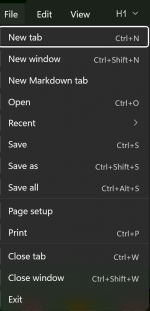
Look at Notepad. Pressing and releasing the Alt key results in this:
1774466684732.png

Pressing and releasing F opens the file menu:
1774467209306.png

Alt+F does the same thing. Instead of underlining the access keys, as has been used at least since Windows 3.1, Notepad uses an updated look by showing the access keys to the left of the menu.

Notepad++ uses a more classic Windows look:
1774467588678.png

Underlines denote the access keys. They are the fastest way to navigate a standard Windows menu tree. Even programs that don't support the visual display of access keys will often behave this way by default. The default behavior would be for the first letter of a menu or menu item to be used as the access key. If there are duplicates for the letter, then the menu or item will simply be highlighted, requiring the Enter key to open the menu or invoke the command associated with the item. It's a little hazy, but I believe that's how they behave.

The reason I am familiar with Windows interfaces is that I was the lead interface engineer for two software projects at a consulting company in the late 1990s. They ranged from 10-14 developers. Each of us was a member of the MSDN, giving us access to practically everything that MS ever made. I wrote the projects' interface guidelines. It was based on the Microsoft Windows Interface Guidelines.

The whole story goes back to 1961, when my father took me to work. I was 7, and he worked for Sikorsky, the helicopter company. He was a technician on the first helicopter simulator ever built. I got to sit in it as he switched it on. WOW!!! Did that have an effect on me!?!! I was ready when he came home from work the next day and demanded that he teach me math and electronics. Every evening after supper, we would sit at the kitchen table, and he would teach me math and electronics. I learned basic algebra and electricity that year. At the end of the year, he opened a TV "Sales and Service" shop, where I learned the practical side of electronics. By the time he left us (I was 9, my sister was 7, my mother was 7 months pregnant.), he had taught me Boolean algebra, trigonometry, basic differential and integral calculus, basic linear algebra, elementary differential equations, how to design a differential amplifier, Schmidt trigger..., how to operate a tube tester, DVTM, oscilloscope... We also touched on physics, philosophy, and world history. The old man only paid a single child care payment, but he left me far more than money could buy. - Stuart
 

Attachments

  • 1774466838947.png
    1774466838947.png
    75 KB · Views: 3
I am not trying to invoke a keyboard shortcut. I am trying to use Windows access keys to open and select items from the main window's menu bar.
Yes - I understand the Access Keys AND Windows menu design standards - however it is much quicker to simply hit CTRL-W to close a session in Studio One/Pro.

VP
 
Last edited:
You can easily set "R" as your Record shortcut and ditch the assigned key (Numpad "."):

View attachment 3308

Takes two seconds and you are back in business.

VP
Thanks VP. This works great and you've taught me yet another awesome aspect of this terrific program.

:)JB
 
Back
Top