I agree. Sometimes I think Vegas is an advertising campaign for DaVinci Resolve

The first thing I did when I couldn’t resolve the problem was I already had Resolve installed.
I attempted to take my clips and dump them in there. It seemed that I couldn’t drag and drop? So I import them and they were totally backwards on the time line even though they are sequentially numbered?
10 minutes later I started my normal routine of dragging the clips so they cross fade and the audio is smooth and flowing. Nope? 20 minutes later still can’t get that worked out so now I try and add transitions? 30 minutes later I give up and moved on to try Filmora. Much more intuitive and all is great and in no time at all I finally finished and go to export and it says that it will have a watermark? They said it was free!!
I finally find an editor called Lightworks that seems like it was promising. But once again. Can’t transition or slip edit or nothing!
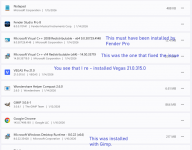
Right then this thread netted me the solution with the link to the C++ installer. Problem solved and now Im back to work in Vegas and in 20 minutes finished the stupid video.
I actually have not had crashes since I figured out that I needed to have auto save turned on.
Don’t know why but it seems to work.
I also avoid DX plugins.
What appeals to me is Vegas works like a Daw. And the ability to open the audio in Wave lab is pretty critical to my workflow. WaveLab instantly makes the audio bang on -1.5 db at -16 LUFS. Takes 10 seconds.!
Ya it’s very outdated at all the glamorous stuff but I’m not making movies.
Filmora looks like you could create something modern and spiffy but im not paying for a subscription.
Resolve reminded me of Ardour. Free but totally weird and not intuitive.


 I had a hard deadline for getting a promo video for MusicPro 26 done today. Don't know what I would have done without this fabulous forum!