• Hi and welcome to the Studio One User Forum!

    Please note that this is an independent, user-driven forum and is not endorsed by, affiliated with, or maintained by PreSonus. Learn more in the Welcome thread!

Pro Studio 8 killed Vegas ?

John Vere

Active member
Sorry I didn’t know what title to use.
Im reaching out to this community because I know there’s probably lots of people who use Vegas Pro 21.
I just installed Fender Pro 8 and I couldn’t help but notice that it installed a C++ runtime. Fine Thats normal.
I went to resume work on a video in Vegas and it crashed while loading. ?? It hasn’t crashed on me for a long time.
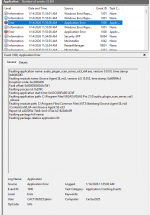
I submitted the dump report and tried again. Nope. Hmm. Reboot computer, nope, open in safe mode, nope. It always makes it just past the plugin scan. I submitted a couple of the dumps and took screenshots of a few.
So Im getting nowhere and I uninstalled it and reinstalled it actually thinking about the C++ deal. Re installing software will fix that. Or at least good software will.

So Im just wondering if anyone else here has installed Pro 8 yet and if they have Vegas pro 21 as well and could test it out.
Any other suggestions are appreciated.
Thanks.
 
What is Vegas actually doing? Error messages? Event viewer should tell you exactly what it does not like.

And if it is crashing because of a "new" Visual C++ redistributable - that is on Magix (or whoever owns Vegas) to fix.

These VC++ libraries are Microsoft's domain and are usually battle tested for current (and backward) compatibility.

While anything is possible - seems unlikely that a new VC++ library would bring the Vegas house down.

VP
 
Vegas is not, shall we say, a paragon of stability. Check any audio-related tabs. Soemtimes when doing tutorial videos I've had to use the Microsoft Sound Mapper with Vegas while using ASIO for Studio One.
 
While anything is possible - seems unlikely that a new VC++ library would bring the Vegas house down
I only mentioned that because it is the only thing that was changed in my system that I am aware of.
I should check the windows update list as well.
Other things come to mind is my Video card driver which Windows update often trash.
I posted in the Vegas forum as well but not optimistic that they will have any answers.
 
I only mentioned that because it is the only thing that was changed in my system that I am aware of.
I should check the windows update list as well.
Other things come to mind is my Video card driver which Windows update often trash.
I posted in the Vegas forum as well but not optimistic that they will have any answers.
Try and post up anything from Event Viewer.

If you can get me a error message I can probably decode it.

VP
 
Vegas is not, shall we say, a paragon of stability. Check any audio-related tabs. Soemtimes when doing tutorial videos I've had to use the Microsoft Sound Mapper with Vegas while using ASIO for Studio One.
Agree with this. But it actually become stable for a long time. I would switch to something else but I really depend on the opening the audio in WaveLab from within the program. I always used ASIO . But that said it crashes right as it’s loading and I saw ASIO flash by.

safe mode isn’t working so no way to get at the settings.
 
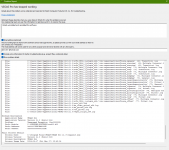
Thank you Vocal point for mentioning event viewer. I keep forgetting to check there. It's only Sonar that ever crashes on me and I just look in the Crash Dump folder I know where it is all too well. Vegas generates a dump file I also attached. But it never once pointed at groove agent.

Because that what this looks like, a Steinberg issue. In about 6 of the error reports it shows Groove Agent. I will go toss that out because it's nothing I would ever use anyway. But there must be more to this because nothing has changed in my VST folders, But then again ??
 

Attachments

  • Screenshot (758).png
    Screenshot (758).png
    62,5 KB · Views: 11
  • Screenshot (757).png
    Screenshot (757).png
    122 KB · Views: 12
Thank you Vocal point for mentioning event viewer. I keep forgetting to check there. It's only Sonar that ever crashes on me and I just look in the Crash Dump folder I know where it is all too well. Vegas generates a dump file I also attached. But it never once pointed at groove agent.

Because that what this looks like, a Steinberg issue. In about 6 of the error reports it shows Groove Agent. I will go toss that out because it's nothing I would ever use anyway. But there must be more to this because nothing has changed in my VST folders, But then again ??

Looks pretty sketchy on Groove Agent SE. Dump it and test again.

VP
 
Ok just uninstalled Groove agent and checked the Steinberg folders but still crashed. But I went to try another reboot and lo and behold there was a Windows update waiting for the reboot!! It must be something major because it said it would take about 6 minutes.

So Im just making a coffee and will go see. This might have been it.
I don’t know how many times I’ve been held at gunpoint wondering why something is not working only to find out widows is updating even though it is set not to do that.
 
I checked Windows updates and there's nothing other than the update today which was a Defender routine update.

So still crashing. I google the error code I notice it crashes just after VST scan and it shows as in screenshot I miraculously captured. It looks like it says UI which might be the graphics.

Here's what Google said.

An Unmanaged Exception (0xc0000005) is a common Windows error, an Access Violation, meaning a program tried to access memory it shouldn't, often caused by corrupt files, bad drivers (especially graphics), conflicting software (like antivirus), or faulty RAM, requiring solutions like running as admin, updating drivers, using SFC/DISM, or adjusting program settings for specific apps like Sony Vegas/MAGIX or Autodesk software.

Common Causes
  • Memory Issues: Program accessing invalid memory address.
  • Software Conflicts: Third-party apps (antivirus, overlays) interfering.
  • Corrupt Files: System files or program installation issues.
  • Driver Problems: Outdated or conflicting graphics/audio drivers.
  • Software Bugs: Issues within the application itself, sometimes after updates.
Memory.. I've got 64GB. Shows running at 11%
Software ? Nothing running, even checked startup. Only Defender and Motu.
Corrupted files, I just re installed? seems pretty unlikely
Driver - about the most probable. But Graphics= unchanged for 2 years, Motu same thing.

Oh well, I guess I'll give Resolve a spin again and see If i can get this project finished. I also still have a license for Movie Maker 17.

One other change to my system was a Sonar update that now included a Theme editor,,hmmm.
 

Attachments

  • Screenshot (769).png
    Screenshot (769).png
    76 KB · Views: 5
Hi folks,
Yeah, it kills Vegas. The v8 installer installs a version of Visual C++ that kills Vegas. More details here:
https://www.vegascreativesoftware.i...v145-kill-vegas-permanently--150332/#ca942950 .
You can download the latest version of Visual C++ here: https://aka.ms/vc14/vc_redist.x64.exe - I installed that and it fixed things right up.
I just saw this I must have been typing my reply at same time Thanks.?I’ll try that tomorrow. I tried to use Resolve and I can’t figure anything out at all. Then I tried Filmora and it’s more for kids.
 
I just saw this I must have been typing my reply at same time Thanks.?I’ll try that tomorrow. I tried to use Resolve and I can’t figure anything out at all. Then I tried Filmora and it’s more for kids.
I used Edius (https://www.edius.net/) when I did video.. I liked it, got myself a DAW to make background music. Now I only make music :cool:
 
Well I guess my Title is actually correct after all! Thank you @dean.winter for saving me. the trouble of trying to find that file. That was my very first instinct about this as this has happened in the past with other apps. As I said GOOD software should always refresh the C++ automatically. As we all know Vegas is not in that category. But It's what I grew up with and hard to switch right in the middle of something.
I did find one freebie called Lightworks that looks very promising right from the start. It seems to be set up just like Vegas.
 
Vegas is not, shall we say, a paragon of stability. Check any audio-related tabs. Soemtimes when doing tutorial videos I've had to use the Microsoft Sound Mapper with Vegas while using ASIO for Studio One.

You've got that right. I swear it crashed when I sneezed once.
 
But, on another note, yes. It crashed for me as well. Downloading the latest / greatest VC+++

And yes, that fixed it!
 
Glad it worked, folks. I saw a report of the same thing over in the "official" forum and so did a bit of digging. Hopefully Presonus/ Fender/Whomever will update their JIRA articles.

Dean
 
Thanks everyone guess we’ll mark this one as Solved when the developers take note of this.
Sonar had this same issue about a year ago. So that was why that C++ was a bit of a red flag for crashing. Vegas is back to its normal state of instability.
 
Back
Top