• Hi and welcome to the Studio One User Forum!

    Please note that this is an independent, user-driven forum and is not endorsed by, affiliated with, or maintained by PreSonus. Learn more in the Welcome thread!

My mix sound harsh, want a silky sound

M/S EQing on the Main Out is a good thing to try out I think and for FX-Channel too.
But i am just a hobbyist so i would like to know what professionals will tell.
 

Attachments

Last edited:
The "gold standard" in pro studios is oeksound Smoothe. It's not cheap, but it's excellent for individual tracks (it's a great way to get rid of amp sim "fizz") as well as stereo buses and mixes. Waves Crurve Equator is very good and costs less. Both have free trials.

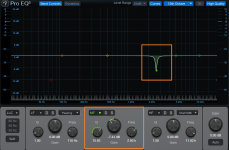
However, a sharp, narrow EQ notch between 2 kHz and 8 kHz may be all you really need. When you're dealing with that narrow a notch, it can be hard to locate the correct frequency and dial in the right amount of notch, but give it a try. I use this technique on many of my masters. It's minimally invasive and doesn't cause artifacts. If you need more info on this technique, I can post an excerpt from my Fender Studio Pro tips book.
 

Attachments

  • 1785857511199.png
    1785857511199.png
    182,1 KB · Views: 6
The "gold standard" in pro studios is oeksound Smoothe. It's not cheap, but it's excellent for individual tracks (it's a great way to get rid of amp sim "fizz") as well as stereo buses and mixes. Waves Crurve Equator is very good and costs less. Both have free trials.

However, a sharp, narrow EQ notch between 2 kHz and 8 kHz may be all you really need. When you're dealing with that narrow a notch, it can be hard to locate the correct frequency and dial in the right amount of notch, but give it a try. I use this technique on many of my masters. It's minimally invasive and doesn't cause artifacts. If you need more info on this technique, I can post an excerpt from my Fender Studio Pro tips book.
Do they use Soothe really on almost everything? I heard it`s like a wonderweapon everybody uses on everything.
 
Do they use Soothe really on almost everything? I heard it`s like a wonderweapon everybody uses on everything.

Maybe they do, but I use it strategically - only where needed. Without getting into too much detail, Soothe uses a bunch of dynamic EQs that cut response when peaks occur at particularly frequencies. A lot of smoothing can generate pumping and artifacts. This is most noticeable with program material.

For example, suppose you're using amp sims that generate fizzy resonances and you hear that in the master. Yes, you can apply Soothe to the master, and it will reduce those resonances. But this will also affect all the other audio. It's better to insert Soothe on only the tracks that generate the unwanted resonances.

Personal bias alert: I'm very much against "global" and "one-click" solutions, like compressing the master bus. It's better to simply compress the tracks that require compression. Ditto with pitch correction. Correct only the notes that actually sound wrong.
 
Hey guys
What is the plugin or the most obvious thing to try when your mix sounds harsh when you want it silky please ?
Thanks a lot
Normally a harsh mix has harsh signals. Vocals, cymbals, samples, synth, guitars and so on. So identifying and taming the single problems is the key.
I would suggest using a normal EQ if frequencies are popping out the whole time and dynamic eqs and tools if the harshness depends on the played note.
At the end you can use saturation plug-ins to smooth a mix but it also can make things worse.
 
I would suggest using a normal EQ if frequencies are popping out the whole time and dynamic eqs and tools if the harshness depends on the played note.
Yes
 
Hey guys
What is the plugin or the most obvious thing to try when your mix sounds harsh when you want it silky please ?
Thanks a lot
There are a few mix programs, and they allow for some altering EQ and dynamics sonically to meet one's needs. They principally work around a flat frequency EQ curve, while adding a little algorithmic hoodoo. I wont mention which apps, mainly because I've sampled a few and I was left feeling such audio correction services *or plugins) are snake oil. And that is not only my take, either.

FWIW, your question is quite vague. What one considers harsh or silky with audio is quite subjective. Both in description, and resolve.

If instead, you could provide an actual audio sample, that would allow for a tangeable response. Not trying to put you off, but rather offer the best advice that I possibly can. Silky? How, so?
 
Last edited:
UAD plugins.......mostly their tape sims are to me amazing.Also my beloved Kush Clariphonic.
 
What one considers harsh or silky with audio is quite subjective.

Also, the remedy depends on whether you're dealing with a stereo mix (my example above) or can remix individual tracks. But since it was a general question, here's some general advice about one technique that's worked for me. Hopefully others will find it useful.

The ear is most sensitive between 1 and 6 kHz, with peak sensitivity between 3 and 4 kHz. So, more energy in that range raises the potential for harshness or stridency. To begin de-harshing a mix, loop the range that sounds the harshest. (If the harshness is throughout the song, then loop the part with the most instruments playing together.)

The first goal is to find the tracks that don't contribute to harshness. Mute, then unmute, individual tracks one at a time to see if the sound becomes less harsh when a track is muted. Leave the non-harsh-contributing tracks unmuted, but you can ignore them in the following.

Still with a looped section, the next goal is to find what's building up in the upper midrange. Here's the important part. Individual tracks will often sound okay by themselves, so to chase down harshness, play combinations of tracks (particularly layered synths and tracks with saturation). Deal with the tracks that contribute the most to the harshness, using EQ. Make any EQ edits in context with the music.

Finally, back to mastering for a second. The EQ curve shown above is like what I've used on some stereo files given to me for mastering. The client thought they sounded "strident." These were acoustic sessions. The problem was that all instruments had been tracked in the same room, and it had a room resonance that you couldn't really hear with a soloed instrument. But when mixing, multiple instruments playing in the same range at the same time generated a pretty strong level bump around the resonant frequency. Reducing that one resonance solved the problem.
 
You might try UAD Vibe Analog Machines Essentials and the 610 Preamps coming vor free :)
 
- I'd put "harsh" somewhere inbetween 1.5k and 7k. If a mix turned out harsh but the the balance of things is right, you can try a semiwide parametric dip at around 4k and a highshelf boost at around 10k to balance the dip out on the mixbus. Then move the frequencies and gains around to try to find best match for the song.
- Mix louder. You'll notice harshness in signals earlier and easier.
- Listen to Reference Songs early and more often.
- Maybe try to find more mid- and highmid-forward headphones or speakers or tune them to be less "soft" or "hifi" sounding to be able to detect harshness better.
- use EQ where a signal seems harsh more constant, and spectral dynamics (Mutliband/soothelike) plugins where a signal's harshness comes out more infrequent "peaky".
- Use tapesims and other saturations in a subtle way to round things off... a bit here a bit there.. it's a cumulative thing, not a fixer tool.

hope there's something useful in there.
 
Another excellent plugin for smoothing out nasty resonances is Sound Theory Gullfoss. It's also not cheap and in the same category price wise as Soothe. It is also very good also. There is a master version as well as a track version. But as mentioned here it is much better to treat the Individual offending tracks rather than the whole master. (Tape Sims used subtly can help with spiky tracks) Then you can put Gullfoss on the final master also but just set it to tame gently overall. (When the mix is good then a master Gullfoss is not doing much)

While they say you should not listen to tracks in solo for too long, its this job checking for nasty resonances that in fact it does not hurt to do so. Spectrum meters on individual tracks will also likely show up harshness.

When you look at the nicest sounding pro level masters on a frequency readout type plugin (yes for a decent spectrum meter) you will always almost not see a flat response from 10 K onwards. Instead its a smooth downward slope usually. You should try for the same. Flat masters out to 20K tend to sound too trebly.

Also its a good idea to monitor your SPL levels while you mix. I tend to work very closely at 85 dB SPL (C weighted) When you monitor a little louder for longer your ears can get tired and then you find you are boosting highs to make things sound normal. They say you can work at this SPL level for 8 hours at a time. It is still good to take breaks every two hours also to give your ears time to settle back down.
 
Last edited:
Thanks a lot guys will dig all your precious answers.
(Soothe is really famous but expensive because i knew this plugin even before being interested by the topic lol)
 
I did not read all previous posts word by word, so imaybe it already was suggested by someone else.
If not:
Is it possible you post a snippet of your work?
Maybe it just sounds harsh to you and someone else thinks it sounds fine? Could be your monitoring or whatever.
Dispite there being a lot of helpful tips, I think without listening it´s really shooting in the dark.
EDIT: I just saw lokeyfly already suggested posting audio-examples!
 
Back
Top