• Hi and welcome to the Studio One User Forum!

    Please note that this is an independent, user-driven forum and is not endorsed by, affiliated with, or maintained by PreSonus. Learn more in the Welcome thread!

my.fender.com/products

Stuart Welwood

Active member
Some simple questions about my.fender.com/products:
  1. Some items have red dots above them. What do they mean?
  2. If I hover over the blue "+" sign that sits in the lower right corners of some, it says, "Included with Fender Studio Pro+." If I download one of these and use it, what happens to it after my subscription runs out? Will it no longer operate in existing songs, sessions, projects, shows, etc.?
  3. Is there a way to download and install all of these at once?
Thanks for the really great forum. - Stuart
 
1. I'm pretty sure that means you haven't looked at that product yet.
2. Yes, exactly - if you haven't rendered to audio, then you'd need to continue the subscription until you've done that, or you'll lose access to those plugins.
3. Not as far as I'm aware.
 
If you do the downloads/installs from within FSP, you can do more that one at a time.
 
Thanks for the info T & B. It looks like I have some deleting to do. I'm not into SaaS. And I don't like surprises.
 
Have you picked up a sub as a benefit of a hardware purchase? Some of the items that are actually part of the perpetual licence package may be marked as ‘Included with Studio Pro +’. At least, that was the case with v7. I think somewhere on the site is a list of what’s included in the perpetual licence.
 
Have you picked up a sub as a benefit of a hardware purchase? Some of the items that are actually part of the perpetual licence package may be marked as ‘Included with Studio Pro +’.
That was my suspicion. Right now, I'm only working with S1 7.2.3. I haven't downloaded FP8, and I may never, even though my subscription is paid up until 10/10/26. Yes, I may have some hardware perks installed.

I think somewhere on the site is a list of what’s included in the perpetual licence.
That would be very helpful, but I am about to give up with the whole Fender-Presonus thing. I want to make music - not mess with software or, even worse, with subscriptions. I'm an amateur, so my music is a work-in-progress whenever I say it is. I have no boss, no deadline, and no deliverables. I do it solely for my own pleasure (as may be the case with many users), and I want to be able to use the very same plugins whenever I feel the urge.

I want a simple way to install only the items that come with my perpetual license. And I want a way to easily and immediately determine if a plugin is going to become unusable when some subscription expires.

If Fender's aim is to introduce more guitarists to Studio Pro, then I would advise them to make this process less confusing.

So Fender, please PAY ATTENTION!!!
 
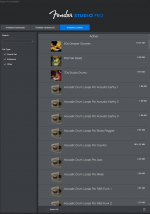
If you go to the Studio One Installation menu item under Studio One on the home page, you'll get a dialogue similar to this, except it'll also have 'Studio One + Content'. Deselect that and everything that comes up in the panel on the right will be non-subscription content that'll remain yours after the subscription period expires.

Screenshot 2026-02-16 003408.png
 
That's interesting, because I get this picture. I assume that you have a check box for purchased content, and I don't, is because you have paid for a perpetual license for some sort of additional content.
1771265850333.png


Here's possibly another clue. When I checked Select All on the Installed Content tab, two blue buttons appeared at the bottom. The Uninstall 209 isn't really a surprise; that's probably the number of total items. But why the Disable 22? (Wouldn't it be nice to have context sensitive help?) What's different about those 22. Could they be Pro+ content?

1771266459856.png


Thanks a lot for the help, Tim. I really appreciate it.

NOTE TO FENDER/PRESONUS: Many issues could be more efficiently handled by investing in context sensitive help. It would make your job easier, and decrease the learning curve for new users.

Context sensitive help that describes the meaning and function of the entire contents of every dialog box and window that can ever appear was an innovation of the 1980s and 1990s. I was there. It's always a disappointment to me to press F1 and see the introduction to the help app. - s
 
Yes, the 'purchased content' I have is probably from earlier versions of Studio One (v4 and v5 in my case) that included extra stuff that I may well have bought at the time (can't remember!). I also have a paid version of Melodyne which may be included there as Essentials is part of the base Studio One installation.

My total 'owned' items is around 40-odd, including those extras, and I think it was around 240-odd when I had my hardware-related Plus sub, so you've definitely got Plus content available - however, I think those items shown in your Active window are all default content (see my last screenshot). I don't have V7 installed on this computer any more, and it's too cold and wet to trudge out to the studio to check what that installation says right now - I'll get out there tomorrow and have a look and see if I can spot any obvious clues. At a guess, I'd say the 22 are the default items you have installed and are NOT Plus content.

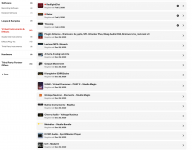
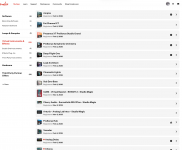
Here's the VSTs that are included in mine - 30 items all together. One or two of those probably come from those earlier iterations of Studio One. Note there's only one item in Samples and Loops, and that's the Ghosthack pack that was given to us in November. The loops and samples that are included with the default instruments are not shown as separate items in MyFender.

Screenshot 2026-02-16 193255.pngScreenshot 2026-02-16 193138.pngScreenshot 2026-02-16 193655.png
 
That's interesting, because I get this picture. I assume that you have a check box for purchased content, and I don't, is because you have paid for a perpetual license for some sort of additional content.
View attachment 3143

Here's possibly another clue. When I checked Select All on the Installed Content tab, two blue buttons appeared at the bottom. The Uninstall 209 isn't really a surprise; that's probably the number of total items. But why the Disable 22? (Wouldn't it be nice to have context sensitive help?) What's different about those 22. Could they be Pro+ content?

View attachment 3144

Thanks a lot for the help, Tim. I really appreciate it.

NOTE TO FENDER/PRESONUS: Many issues could be more efficiently handled by investing in context sensitive help. It would make your job easier, and decrease the learning curve for new users.

Context sensitive help that describes the meaning and function of the entire contents of every dialog box and window that can ever appear was an innovation of the 1980s and 1990s. I was there. It's always a disappointment to me to press F1 and see the introduction to the help app. - s
There is both the content view, and context sensitive help.
To view this content we will need your consent to set third party cookies.
For more detailed information, see our cookies page.
 
I found a screenshot I took for an earlier discussion about what was included in the perpetual licence (Studio One Pro 7). It might be helpful!

Screenshot 2025-10-15 140024.png
 
There is both the content view, and context sensitive help.
Those are great videos by Gregor, Lukas, and Joe. Gregor always lays it out quickly and directly. Also has special insights. Joe was a big help in getting up to speed. As for Lukas, looking at his videos, I can see that I have a lot left to learn.

Yes, there is context sensitive help (CSH) in many areas, but pressing F1 after bringing up the Song Info window takes you to the help intro. It's the same with the Studio One Installation window. It's not difficult to find others.

The New dialog opens the help app at the help intro, but it's completely inaccessible due to the modal event loop that was created for the dialog box, probably in the base class for the dialog. Same with Options dialog.

Without direct CSH for every dialog box, users are left to search help for the meanings and functions of things that are right in front of them, then maybe surf the web, and maybe end up here - if they're lucky!

Maybe it's different with FP8. I suppose I'll find out one of these days, but I'd rather make music than mess with software. I was a bit flipper for years.
 
I found a screenshot I took for an earlier discussion about what was included in the perpetual licence (Studio One Pro 7). It might be helpful!
Hmm. Do you remember where you got that? Was it on the website maybe? - s
 
Hmm. Do you remember where you got that? Was it on the website maybe? - s

Yes, of course it was! I'm just trying to help you identify what you should have as part of the perpetual licence and what you can ignore as it's part of the Plus sub. There's no point in not having stuff that will continue to be yours after the Plus sub ends, but I understand that it's not that easy to identify what the included items are, so any circumstantial evidence may be useful!
 
Without direct CSH for every dialog box, users are left to search help for the meanings and functions of things that are right in front of them, then maybe surf the web, and maybe end up here - if they're lucky!
"Every dialog box", hmmmm. While everyone has their own degree of learning, and that is perfectly fine, by and large, a DAW from really every brand out there with possibly the exception of Ableton Live (due to its rather non linear clip matrix) are all very much self learning. To start at the arrangement, click F1, and expect a user guide to instruct ways to get around might be just as unclear to many who arent expecting a walk-thru. What would the walk thru encompass? Setting a track?, preparing an FX chain?, getting one's audio interface ready?, etc. There's too much to list. The Studio One user guide while not the model of best guides I've come across, cant be all things for all users. Just my opinion, and you might not hear me ever defending that manual again. However, I think my point is a fair one. Leave the guide alone. Jump in, watch a video or three. Bump into a few walls, its ok. There's far more in the realm of learning how to track, mic instruments, and develop both your own and industry useful skills, anyway. That doesn't come from, or start at a user manual. But yes, this is a great resource for such questions. 👍
Maybe it's different with FP8. I suppose I'll find out one of these days, but I'd rather make music than mess with software. I was a bit flipper for years.
I most definately agree! Its almost unnerving how many people wait on the end of a new DAW release lure. Both nibbling, and bitch'ng at the same time. When in actuality, the object is to create and get past the GAS element. Expecting a worthwhile release won't put most of these users in any better shape then they were. Yet, they fork over money faster than saying "make me more betterer". Even worse, this goes on for many releases.
So your practical take on "get er done" should be embodied by many others!
Stay clear of the bit flippers. : )
Enjoy!
 
Last edited:
When I decided to learn S1 properly - at least for my limited purposes - I spent £10 on a Udemy course which walked me through the basics of v5 very nicely. Once I’d grasped that, things like Craig’s guide and Lukas’s videos made much more sense, and I was able to fairly quickly determine which of the various help items were useful to my workflow and which were superfluous (to me). That Udemy course was one of the best tenners I’ve ever spent!
 
When I decided to learn S1 properly - at least for my limited purposes - I spent £10 on a Udemy course which walked me through the basics of v5 very nicely. Once I’d grasped that, things like Craig’s guide and Lukas’s videos made much more sense, and I was able to fairly quickly determine which of the various help items were useful to my workflow and which were superfluous (to me). That Udemy course was one of the best tenners I’ve ever spent!
Yes, totally. As I mentioned, everyone will have both a different need, and skill set. There are some great courses set out by people who know how to tap into the many chapters for modern recording, microohone techniques, and such. Weather its for ones own needs, or someone looking to advance their careers in the art of Studio recording. I went to one here in NYC, and the knowledge from both the institutions, faculty, and work experience can't be over stated. People will find their niche. On the other hand, there are A LOT of You-Tuber blow hards that don't have the ability to even describe recording equipment or controls in the correct manner, let alone provide fundamental use for such things. Unfortunately, this can make those who genuinely want to learn the right way (often, still while doing), fall into bad habits, or simply get bad information. Another factor are those countless product reviews by bloggers who receive a product that day, or two, and immediately post some product review. This ends up being nothing more than guesswork and poor coverage to what might be a good product (or snake oil). Only rarely, will the consumer get the proper facts.

So, all of this info, as well as manuals, and hoo-doo gets a little lost in the sauce.
I just saw one yesterday, and while I won't blast this idiot for his lack of well...... everything, his video left more questions on the table, was poorly edited, and yes, is employed by Fender! What a joke.
But, there ya go.

When one finds a good resource such as you did, TimC340, its really helpful to pass along. 👍
 
When I decided to learn S1 properly - at least for my limited purposes - I spent £10 on a Udemy course which walked me through the basics of v5 very nicely. Once I’d grasped that, things like Craig’s guide and Lukas’s videos made much more sense, and I was able to fairly quickly determine which of the various help items were useful to my workflow and which were superfluous (to me). That Udemy course was one of the best tenners I’ve ever spent!
Good advice, I'm sure. However, it looks like I've already taken the long road.

Videos would be especially good for me; I'm 72 and have had arthritis all over my body since I was 25. Doctors at Yale told that my spine could fuse solid by the time I was 40. (Thank goodness, many drugs helped prevent that.) I'm glad that I tried to practice guitar 6 hours a day when I was high school. At one time, I could do construction projects like you, Tim. Keep on going while can. More power to you.
 
Videos would be especially good for me; I'm 72 and have had arthritis all over my body since I was 25. Doctors at Yale told that my spine could fuse solid by the time I was 40. (Thank goodness, many drugs helped prevent that.) I'm glad that I tried to practice guitar 6 hours a day when I was high school. At one time, I could do construction projects like you, Tim. Keep on going while can. More power to you.
And to you, Stuart. Wow, God bless. 🙏
I hope my points still hold true. You are an inspiration.
 
"Every dialog box", hmmmm. While everyone has their own degree of learning, and that is perfectly fine, by and large, a DAW from really every brand out there with possibly the exception of Ableton Live (due to its rather non linear clip matrix) are all very much self learning. To start at the arrangement, click F1, and expect a user guide to instruct ways to get around might be just as unclear to many who arent expecting a walk-thru. What would the walk thru encompass? Setting a track?, preparing an FX chain?, getting one's audio interface ready?, etc. There's too much to list. The Studio One user guide while not the model of best guides I've come across, cant be all things for all users. Just my opinion, and you might not hear me ever defending that manual again. However, I think my point is a fair one. Leave the guide alone. Jump in, watch a video or three. Bump into a few walls, its ok. There's far more in the realm of learning how to track, mic instruments, and develop both your own and industry useful skills, anyway. That doesn't come from, or start at a user manual. But yes, this is a great resource for such questions. 👍
Yes. Taken to its limit, doing every dialog box results in the kind of help we used to get with early Microsoft products. Help for the Rename box would be virtually worthless, for example. I guess I would move the line more in that direction, though.

I most definately agree! Its almost unnerving how many people wait on the end of a new DAW release lure. Both nibbling, and bitch'ng at the same time. When in actuality, the object is to create and get past the GAS element. Expecting a worthwhile release won't put most of these users in any better shape then they were. Yet, they fork over money faster than saying "make me more betterer". Even worse, this goes on for many releases.
So your practical take on "get er done" should be embodied by many others!
Stay clear of the bit flippers. : )
Enjoy!
I had to look up GAS. Oh yeah! Been there. I have even been called a gearhead, but I'm nothing compared to some members of this group.

There was a time when I thought gear could make me better. I worked every summer in high school for my cousin's landscaping business for $1.50/hour. I saved every penny that I could, and in 1970 bought a 100 Watt Marshall stack - 1959 Super Tremolo top and 1960A and B bottoms. WOW! That was one punchy amp, but my 1966 Jazzmaster wasn't giving me the sound I wanted. So I bought a Gibson ES-340TDW later that year. Then I finally got a J-45 acoustic in the spring of 1971. Did it make me a great player. No, but it reminds me of something Ben Franklin said, "An educated fool is still a fool but speaks with better language."

And as anyone ever exhausted the creative capabilities of a Korg M1 or a Casio CZ-101? MUSIC WORKS THE MAGIC!!!
- s
 
Back
Top