• Hi and welcome to the Studio One User Forum!

    Please note that this is an independent, user-driven forum and is not endorsed by, affiliated with, or maintained by PreSonus. Learn more in the Welcome thread!

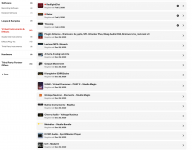
my.fender.com/products

Some simple questions about my.fender.com/products:
  1. Some items have red dots above them. What do they mean?
  2. If I hover over the blue "+" sign that sits in the lower right corners of some, it says, "Included with Fender Studio Pro+." If I download one of these and use it, what happens to it after my subscription runs out? Will it no longer operate in existing songs, sessions, projects, shows, etc.?
  3. Is there a way to download and install all of these at once?
Thanks for the really great forum. - Stuart
 
1. I'm pretty sure that means you haven't looked at that product yet.
2. Yes, exactly - if you haven't rendered to audio, then you'd need to continue the subscription until you've done that, or you'll lose access to those plugins.
3. Not as far as I'm aware.
 
If you do the downloads/installs from within FSP, you can do more that one at a time.
 
Thanks for the info T & B. It looks like I have some deleting to do. I'm not into SaaS. And I don't like surprises.
 
Have you picked up a sub as a benefit of a hardware purchase? Some of the items that are actually part of the perpetual licence package may be marked as ‘Included with Studio Pro +’. At least, that was the case with v7. I think somewhere on the site is a list of what’s included in the perpetual licence.
 
Have you picked up a sub as a benefit of a hardware purchase? Some of the items that are actually part of the perpetual licence package may be marked as ‘Included with Studio Pro +’.
That was my suspicion. Right now, I'm only working with S1 7.2.3. I haven't downloaded FP8, and I may never, even though my subscription is paid up until 10/10/26. Yes, I may have some hardware perks installed.

I think somewhere on the site is a list of what’s included in the perpetual licence.
That would be very helpful, but I am about to give up with the whole Fender-Presonus thing. I want to make music - not mess with software or, even worse, with subscriptions. I'm an amateur, so my music is a work-in-progress whenever I say it is. I have no boss, no deadline, and no deliverables. I do it solely for my own pleasure (as may be the case with many users), and I want to be able to use the very same plugins whenever I feel the urge.

I want a simple way to install only the items that come with my perpetual license. And I want a way to easily and immediately determine if a plugin is going to become unusable when some subscription expires.

If Fender's aim is to introduce more guitarists to Studio Pro, then I would advise them to make this process less confusing.

So Fender, please PAY ATTENTION!!!
 
If you go to the Studio One Installation menu item under Studio One on the home page, you'll get a dialogue similar to this, except it'll also have 'Studio One + Content'. Deselect that and everything that comes up in the panel on the right will be non-subscription content that'll remain yours after the subscription period expires.

Screenshot 2026-02-16 003408.png
 
That's interesting, because I get this picture. I assume that you have a check box for purchased content, and I don't, is because you have paid for a perpetual license for some sort of additional content.
1771265850333.png


Here's possibly another clue. When I checked Select All on the Installed Content tab, two blue buttons appeared at the bottom. The Uninstall 209 isn't really a surprise; that's probably the number of total items. But why the Disable 22? (Wouldn't it be nice to have context sensitive help?) What's different about those 22. Could they be Pro+ content?

1771266459856.png


Thanks a lot for the help, Tim. I really appreciate it.

NOTE TO FENDER/PRESONUS: Many issues could be more efficiently handled by investing in context sensitive help. It would make your job easier, and decrease the learning curve for new users.

Context sensitive help that describes the meaning and function of the entire contents of every dialog box and window that can ever appear was an innovation of the 1980s and 1990s. I was there. It's always a disappointment to me to press F1 and see the introduction to the help app. - s
 
Yes, the 'purchased content' I have is probably from earlier versions of Studio One (v4 and v5 in my case) that included extra stuff that I may well have bought at the time (can't remember!). I also have a paid version of Melodyne which may be included there as Essentials is part of the base Studio One installation.

My total 'owned' items is around 40-odd, including those extras, and I think it was around 240-odd when I had my hardware-related Plus sub, so you've definitely got Plus content available - however, I think those items shown in your Active window are all default content (see my last screenshot). I don't have V7 installed on this computer any more, and it's too cold and wet to trudge out to the studio to check what that installation says right now - I'll get out there tomorrow and have a look and see if I can spot any obvious clues. At a guess, I'd say the 22 are the default items you have installed and are NOT Plus content.

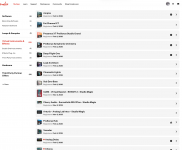
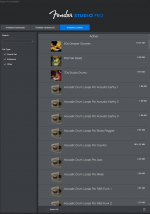
Here's the VSTs that are included in mine - 30 items all together. One or two of those probably come from those earlier iterations of Studio One. Note there's only one item in Samples and Loops, and that's the Ghosthack pack that was given to us in November. The loops and samples that are included with the default instruments are not shown as separate items in MyFender.

Screenshot 2026-02-16 193255.pngScreenshot 2026-02-16 193138.pngScreenshot 2026-02-16 193655.png
 
That's interesting, because I get this picture. I assume that you have a check box for purchased content, and I don't, is because you have paid for a perpetual license for some sort of additional content.
View attachment 3143

Here's possibly another clue. When I checked Select All on the Installed Content tab, two blue buttons appeared at the bottom. The Uninstall 209 isn't really a surprise; that's probably the number of total items. But why the Disable 22? (Wouldn't it be nice to have context sensitive help?) What's different about those 22. Could they be Pro+ content?

View attachment 3144

Thanks a lot for the help, Tim. I really appreciate it.

NOTE TO FENDER/PRESONUS: Many issues could be more efficiently handled by investing in context sensitive help. It would make your job easier, and decrease the learning curve for new users.

Context sensitive help that describes the meaning and function of the entire contents of every dialog box and window that can ever appear was an innovation of the 1980s and 1990s. I was there. It's always a disappointment to me to press F1 and see the introduction to the help app. - s
There is both the content view, and context sensitive help.
To view this content we will need your consent to set third party cookies.
For more detailed information, see our cookies page.
 
Back
Top