
-
Hi and welcome to the Studio One & Studio Pro User Forum!
Please note that this is an independent, user-driven forum and is not endorsed by, affiliated with, or maintained by Fender. Learn more in the Welcome thread!
You are using an out of date browser. It may not display this or other websites correctly.
You should upgrade or use an alternative browser.
You should upgrade or use an alternative browser.
MIDIGUITAR by JAMORIGIN
- Thread starter juosd
- Start date
When i tried to add mg3 as an external audio device, there was not the option to in the 'receive from' drop down menu in the audio devices window. thats where i think the 'enable mpe' button is that youre referring to, i see it under my 2 attached keyboards. anyone have any tips on getting mg3 to show up there? i tried running the standalone version outside of so7 but i couldnt input or output it to so7.
i did find something about that reduction setting before, & its currently on zero with no effect on the latency.
ive tested my system with latencymon & found no issues there.
i say "consensus seems to be" because i havnt found a solution & i see that complaint anywhere someone else is looking for the same solution, but not many, so either people are figuring it out & not documenting it or people are giving up & resorting to other daws (which i was instructed to do 2x now). thus me still searching in places this way & asking around while trying to figure it out by tweaking different settings.
heres a screencap of the symptom, youll notice a fraction of midi data trickling through while simultaneously showing the steady notes in the audio track.

i did find something about that reduction setting before, & its currently on zero with no effect on the latency.
ive tested my system with latencymon & found no issues there.
i say "consensus seems to be" because i havnt found a solution & i see that complaint anywhere someone else is looking for the same solution, but not many, so either people are figuring it out & not documenting it or people are giving up & resorting to other daws (which i was instructed to do 2x now). thus me still searching in places this way & asking around while trying to figure it out by tweaking different settings.
heres a screencap of the symptom, youll notice a fraction of midi data trickling through while simultaneously showing the steady notes in the audio track.
Last edited:
I have no experience with live recording or MPE but I went to the MG website because I was curious. MG3 seems to be in beta and supports MPE but there is no info I could find besides a YouTube performance video and some unhelpful description.
But MG2 (without MPE) features an old YouTube installation tutorial for S1. In the YouTube comment section someone mentions a noticeable latency and it was acknowledged by the uploader as unavoidable. You "tried to add mg3 as an external audio device" but the video shows that you have to drop the MG2 plugin on the audio track because it's apparently a MidiFx plugin with audio as an input (I never used one). Your low resolution screenshot is barely readable but the audio track is set to timestretch which AFAIK isn't necessary and may cause other problems. There is also nothing in your blurry screenshot that shows the routing or the configuration of your instrument track and plugin. The screenshot from the S1 manual I posted clearly states that you need to enable MPE for the instrument as well yet you don't mention it in your response.
I don't know if MG3 will eventually work with S1 but you barely made an effort to solve it on your own or provide sufficient infos to forum members. (And you and others should be more qualified than me anyway.)
But MG2 (without MPE) features an old YouTube installation tutorial for S1. In the YouTube comment section someone mentions a noticeable latency and it was acknowledged by the uploader as unavoidable. You "tried to add mg3 as an external audio device" but the video shows that you have to drop the MG2 plugin on the audio track because it's apparently a MidiFx plugin with audio as an input (I never used one). Your low resolution screenshot is barely readable but the audio track is set to timestretch which AFAIK isn't necessary and may cause other problems. There is also nothing in your blurry screenshot that shows the routing or the configuration of your instrument track and plugin. The screenshot from the S1 manual I posted clearly states that you need to enable MPE for the instrument as well yet you don't mention it in your response.
I don't know if MG3 will eventually work with S1 but you barely made an effort to solve it on your own or provide sufficient infos to forum members. (And you and others should be more qualified than me anyway.)
This thread is aimed at someone that DOES have that experience, so i can ASK them. Idk why you are assuming i barely made an effort, im literally in the middle of that effort right now, not just in this thread.
I tried to run mg3 after spending due time with mg2 & the jam origin forums suggested mg3. I am aware that it comes as standalone & plugin, ive gone through troubleshooting with the plugin before trying the standalone. i uploaded that screencap only to show the discrepency between the audio & midi tracks that were receiving the same input, which is visible at the small size, but here is the full size image so you think im making enough of an effort for you:

as far as enabling mpe, i would absolutely love to, but part of the problem im having is that the place im supposed enable mpe is not available because mg3 doesnt appear as an option in that menu, which i made an effort to write in a reply above.
i see where it says timestretch, i didnt select that, so if its not supposed to default to that then i can try changing it, & ill make an effort to document the results.
I tried to run mg3 after spending due time with mg2 & the jam origin forums suggested mg3. I am aware that it comes as standalone & plugin, ive gone through troubleshooting with the plugin before trying the standalone. i uploaded that screencap only to show the discrepency between the audio & midi tracks that were receiving the same input, which is visible at the small size, but here is the full size image so you think im making enough of an effort for you:
as far as enabling mpe, i would absolutely love to, but part of the problem im having is that the place im supposed enable mpe is not available because mg3 doesnt appear as an option in that menu, which i made an effort to write in a reply above.
i see where it says timestretch, i didnt select that, so if its not supposed to default to that then i can try changing it, & ill make an effort to document the results.
Because I have nothing better to do I visited jamorigin's forum and I found this thread from December 2024. The OP "hds" doesn't follow the simple advice/setup that's presented. I stole the screenshot of a working MG2/S1 combo and highlighted in red the routing. (The high CPU usage at the bottom left is a bit concerning.)
I wrote (the manual says) "enable MPE for the instrument" and you responded by "enable mpe is not available because mg3 doesnt appear as an option in that menu". MG3 is used on the audio track, the MPE option is offered for every VST instrument (in your case "GOLDEN Piano").

I wrote (the manual says) "enable MPE for the instrument" and you responded by "enable mpe is not available because mg3 doesnt appear as an option in that menu". MG3 is used on the audio track, the MPE option is offered for every VST instrument (in your case "GOLDEN Piano").
Last edited:
This thread is aimed at someone that DOES have that experience, so i can ASK them. Idk why you are assuming i barely made an effort, im literally in the middle of that effort right now, not just in this thread.
I tried to run mg3 after spending due time with mg2 & the jam origin forums suggested mg3. I am aware that it comes as standalone & plugin, ive gone through troubleshooting with the plugin before trying the standalone. i uploaded that screencap only to show the discrepency between the audio & midi tracks that were receiving the same input, which is visible at the small size, but here is the full size image so you think im making enough of an effort for you:View attachment 2183
as far as enabling mpe, i would absolutely love to, but part of the problem im having is that the place im supposed enable mpe is not available because mg3 doesnt appear as an option in that menu, which i made an effort to write in a reply above.
i see where it says timestretch, i didnt select that, so if its not supposed to default to that then i can try changing it, & ill make an effort to document the results.
Is this a latency issue or is it enabling MPE ?
If it's about enabling MPE then you also do it on the VST Gui... see pic below
If this is about latency, I cannot help with and surely it would be evident with other input sources?
Anyway hope this helps.
Best regards.
Last edited:
The MG VST is an audio-to-midi converter. So the obvious solution would be:
1. Create a standard audio track
2. Drag 'n' drop the MG VST on the audio track
3. Create a VST instrument on a second track
4. Change the Midi-in of the instrument to listen to the MG Midi-out
5. Enable monitoring or recording
6. Done
For the MPE version simply use MG3 and enable MPE for the instrument. If the non-MPE version works then the MPE version should be working too.
Edit: Some latency is expected (see S1's latency monitor). If it's much higher then something is wrong.
(Also edit: I've been a bit aggressive/annoyed throughout but the thread got off a bad start and it's still lingering.)
1. Create a standard audio track
2. Drag 'n' drop the MG VST on the audio track
3. Create a VST instrument on a second track
4. Change the Midi-in of the instrument to listen to the MG Midi-out
5. Enable monitoring or recording
6. Done
For the MPE version simply use MG3 and enable MPE for the instrument. If the non-MPE version works then the MPE version should be working too.
Edit: Some latency is expected (see S1's latency monitor). If it's much higher then something is wrong.
(Also edit: I've been a bit aggressive/annoyed throughout but the thread got off a bad start and it's still lingering.)
Last edited:
Mako, I have some questions (because I have the suspicion I'm missing something):
- Where is the MG2 VST located? In the effects channel (audio only) or arranger/track (audio/midi)?
- If in the effect channel then is MG2 doing some Midi port trickery to get the midi data back to the arranger/track VSTs or does S1 support audio-to-midi routing natively and the placement in the effects channel is just awkward?
- Where is the MG2 VST located? In the effects channel (audio only) or arranger/track (audio/midi)?
- If in the effect channel then is MG2 doing some Midi port trickery to get the midi data back to the arranger/track VSTs or does S1 support audio-to-midi routing natively and the placement in the effects channel is just awkward?
The MG2 VST is in the insert effects stack of the audio input track for your guitar
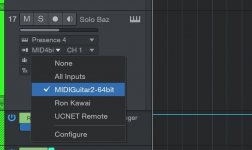
Then you add a midi track and a synth. There is a midi input you can select for the synth track, mg2 shows up there without doing anything. so MG2 is a midi source in studio one even with it sitting in the audio track effects stack as an effect.
you will want to set the instrument in the MG2 plugin to none otherwise MG2 has its own synth
Here is a screen shot of selecting MG2 for a synth track in on my system
Then you add a midi track and a synth. There is a midi input you can select for the synth track, mg2 shows up there without doing anything. so MG2 is a midi source in studio one even with it sitting in the audio track effects stack as an effect.
you will want to set the instrument in the MG2 plugin to none otherwise MG2 has its own synth
Here is a screen shot of selecting MG2 for a synth track in on my system
Attachments
Last edited: