• Hi and welcome to the Studio One User Forum!

    Please note that this is an independent, user-driven forum and is not endorsed by, affiliated with, or maintained by PreSonus. Learn more in the Welcome thread!

How to use both SoundID and Realphones for 2 separate final outputs?

Hello Everyone,

I already have SoundID from SonarWorks. I have it on the listen buss, on the last insert slot. Works well. However, I just got Realphones, and I now need to find a way to also have that as a mutable/switchable output option from my DA... It seems FSP 8 cannot have two listen busses? So, what is the best way to set this up?

I am using a switchable output device (Coleman) that allows me to route multiple inputs to the same set of monitors and a headphone jack. I want to use out 1-2 for the main monitors via Sonarworks, and the outputs 15-16 with Realphones on that output pair for the phones option...

Any suggestions?

Thank you for the help.
 
Last edited:
The „Multiple Listen Busses“ feature request came up a lot on the old forum. it’s been requested for many years. But Fender rather seems to care about AI
 
If you have the hardware OUTs, maybe use cue mixes while we wait for multiple LBs
 
If you have the hardware OUTs, maybe use cue mixes while we wait for multiple LBs
OK, this seems promising. I just spent some time learning about this feature. I have some questions, regarding solving my needs for having two simultaneous outputs, each with a separate, discrete processing plugin on it, playing at the same time on their own outputs pairs. So,

If I use the listen buss (Main Out 1-2), and place my SoundID room correction plugin for my monitors here: I get my final 2-buss mix, the same as what is out of the Master Buss (Main Out 1-2), with room correction applied. But, the Master Buss is not processed by the SoundID room correction when printed/bounced, since the Master buss audio is feeding the listen buss after itself. This is the usual way we can use the listen bus, and works well.

Now, since I also need to have a separate feed for my Headphone amp, can I create a cue mix for «Headphone OUT» (Out 15-16) on my DA, and just not change any levels to keep it locked to the exact mix that is coming out of my Master 2-Buss? Can I then apply the Realphones plugin to this out put channel (Headphone OUT 15-16), and get what I need? I want too be sure that any processing on the listen buss is not going too be included in the feed for the cue mix!

Does this make sense? Will this work?

Thank you for the help and suggestions, I appreciate it.
 
Yes, that will work a treat. The fastest way is:
  1. In the I/O settings of the song create an extra stereo output channel, link it to a pair of interface (hp) outputs, check the Cue box, and click 'Apply' before closing the I/O window.
  2. Increase the height of the Console window so you can see the inserts on the channels and buses. Below the area with the inserts there are two (nearly invisible) dividers you can pull upwards to reveal the normal sends and the cue sends. All of the cue sends should have a lock on them to show that level and pan are locked in with the channel's level and pan. You'll also see that cue is on all channels and on all buses but not on channels that feed into buses, which is exactly what you want.
  3. On the left of the Console click 'Outputs' to reveal all I/O output channels you created, including your new cue output channel. This is where you can insert your output plugins, obviously. You may have to copy the plugins you have on Main first, before adding the hp output treatment plugins.
 
Last edited:
The Cue Mix is works with sends so keep in mind this will not reflect all your bus processing. So while this may work for recording it's no solution for mixing with headphones.
 
That is not correct. Everything routed to the main bus is routed to the cue mixes too: Channels, buses, fx'es and all. The only processing not on the cue outputs by default is the inserts on the main output bus itself, but those can be copied across easily.
 
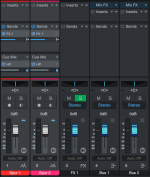
How do you do this? For me the Cue Sends are only accessible on the individual channels but not Bus and FX channels (see screenshot)
That is not correct. Everything routed to the main bus is routed to the cue mixes too: Channels, buses, fx'es and all. The only processing not on the cue outputs by default is the inserts on the main output bus itself, but those can be copied across easily.
 

Attachments

  • Bildschirmfoto 2026-06-14 um 21.46.29.png
    Bildschirmfoto 2026-06-14 um 21.46.29.png
    99,7 KB · Views: 6
Well, for me they simply appear, everything routed directly to Main gets a Cue send per Cue output channel. So make sure those buses and FX channels are routed to Main, and make sure you find both dividers on them.

I did a quick search if maybe it's a setting somewhere but couldn't find something of the kind.

Edit. And I stand corrected. Cue on Studio Pro works as described by @Rambler , unfortunately.
 
Last edited:
Well, for me they simply appear, everything routed directly to Main gets a Cue send per Cue output channel. So make sure those buses and FX channels are routed to Main, and make sure you find both dividers on them.

I did a quick search if maybe it's a setting somewhere but couldn't find something of the kind.
interesting. It always has been that way for me that it’s only possible for singular channels to be routed to cues. Must be a setting somewhere
 
Interesting.

@Rambler: please keep us posted to this puzzle for your system. Hopefully it is just a setting somewhere.

@SwitchBack: are you on and can confirm this is correct fop FS 8.1 (latest)? Hopefully this still hold true.

Question for anyone regarding cue mixes: once you set-up a cue mix channel, when you later add other FX, Busses, Tracks, etc to the project, do they automatically get their cue mix designation added to them to keep everything current and consistent? This is important to know.

Thank you.
 
Right. I just tried to do this on my laptop, without other outputs other than the 1-2 main MacBook speakers. As Rambler says, I do not get any sends for the newly created cue mix channel on FX and Bus tracks... Maybe because there are no other output options on my system? I will try this on the studio machine and see if having other output channels works to also include send and FX getting cue mix sends on them when using a separate output on my system.

I can confirm that adding new tracks does automatically get a cue mix send on it when created in the session, however...
 
Hello Everyone,

I already have SoundID from SonarWorks. I have it on the listen buss, on the last insert slot. Works well. However, I just got Realphones, and I now need to find a way to also have that as a mutable/switchable output option from my DA... It seems FSP 8 cannot have two listen busses? So, what is the best way to set this up?

I am using a switchable output device (Coleman) that allows me to route multiple inputs to the same set of monitors and a headphone jack. I want to use out 1-2 for the main monitors via Sonarworks, and the outputs 15-16 with Realphones on that output pair for the phones option...

Any suggestions?

Thank you for the help.
(I realize it sounds like you have another solution but I thought it would be worthwhile to point out that just switching between the two plugins on the same Listen Bus is also a viable option.) I have both Realphones and Car Test (I sub in Melda MMatcher and other plugins now and then) on my listen bus, and use a single button on my Akai LPD8 (one of the Pads) that activates one of the plugins while deactivating the other using a Channel "macro" - this gives me instant A/B comparison using each of the plugins on the listen bus, and is completely based on Marcus Huyskens' excellent video in this thread from last year (https://studiooneforum.com/threads/macro-or-script-to-switch-plugins-on-and-off.1168/). He defines it pretty well. The "catch" is that FSP treats channel macros differently so you can't just create a button or a keyboard shortcut and add it to a macro toolbar. You have to be sure that the button you use is set up for Global mapping, otherwise you would have to have the listen bus editor open all the time for it to do its thing. https://freeimage.host/i/CnVNgDu
 
(I realize it sounds like you have another solution but I thought it would be worthwhile to point out that just switching between the two plugins on the same Listen Bus is also a viable option.) I have both Realphones and Car Test (I sub in Melda MMatcher and other plugins now and then) on my listen bus, and use a single button on my Akai LPD8 (one of the Pads) that activates one of the plugins while deactivating the other using a Channel "macro" - this gives me instant A/B comparison using each of the plugins on the listen bus, and is completely based on Marcus Huyskens' excellent video in this thread from last year (https://studiooneforum.com/threads/macro-or-script-to-switch-plugins-on-and-off.1168/). He defines it pretty well. The "catch" is that FSP treats channel macros differently so you can't just create a button or a keyboard shortcut and add it to a macro toolbar. You have to be sure that the button you use is set up for Global mapping, otherwise you would have to have the listen bus editor open all the time for it to do its thing. https://freeimage.host/i/CnVNgDu
Thank you for this extra info, Marcus has excellent videos. However, in my case, I need two have the two streams going at the same time because Realphones is binaural processing for headphones only, and not suited for speakers... So, room correction made for monitor speakers (SoundID), and a separate feed for my headphones with Realphones.
 
Interesting.

@Rambler: please keep us posted to this puzzle for your system. Hopefully it is just a setting somewhere.

@SwitchBack: are you on and can confirm this is correct fop FS 8.1 (latest)? Hopefully this still hold true.

Question for anyone regarding cue mixes: once you set-up a cue mix channel, when you later add other FX, Busses, Tracks, etc to the project, do they automatically get their cue mix designation added to them to keep everything current and consistent? This is important to know.

Thank you.
Wow, good point! I was checking on my old travelling laptop running S1v6 with Cue working as I described, having no reason to expect them to break this feature. But on S1v7 and SOv8 they removed the buses and fx'es from the Cue mixes as described by @Rambler . That's not cool :(
 
Back
Top