I'm writing music to film for the first time and have encountered a problem I don't know how to solve.
As an example, let's say I've locked in a cue for the 10m mark, and at this mark my tempo is 75bpm and the time signature is 6/8. Great, all is looking and sounding good. Now I go back to the beginning of the film (let's say 5m mark) and want to add a new cue that's in 4/4 and 100bpm. Well, I tried something like this and it completely messed up my later cue, changing when my tempo and time signature changes happen. How do I go about "locking in" the durations? I want that 6/8 cue to happen at that exact moment in the scene no matter what I change before it.
Is there a way to do this? Any help is appreciated, thanks!
OVERVIEW
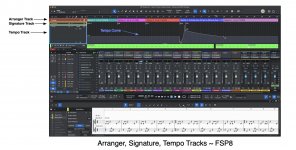
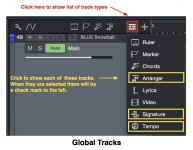
(1) You will need to use the Signature Track for the Time Signature (2/4, 3/4, 4/4, 5/4, 6/8 and so forth); but remember that Fender Studio Pro 8 allows the denominator the Time Signature
only to be multiples of two; so for example you cannot have a 7/5 time signature, but you can havea 7/4 time signature. Ditto for all odd denominators.
(2) You will need to use the Tempo Track to specify the tempo (Beats Per Measure [BPM]).
(3) It is helpful visually to use the Arranger Track to identify sections the film.
RULES
(R.1) The tempo curve is drawn on the Tempo Track and it works similarly to the way Automation works for volume and panning; but the Tempo Track interacts with the Time Signature, because inserting a time signature can affect the way the tempo curve behaves.
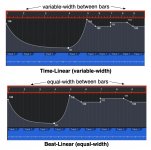
(R.2) It's important to use the vertical position indicator when changing the tempo and the time signature, because there some interactions, dependencies, or changes that occur; but it depends on the time signature and the way you have the Timebase selected for the song, where the two important choices for Timebase are {Time-Linear, Beat-Linear}. As best as I can determine, the Fender Studio Pro 8 Reference Guide has the graphic diagrams reversed for Time-Linear and Beat-Linear.
The terminology also appears to be reversed.
Beat-Linear has the bars at the same width (not "length"), while Time-Linear adjusts the width of the bars to match the Time signature and tempo.
(R.3) The time signature and the key signature can change
only the
first beat of a measure. This rule is very important.
(R.4) The vertical position indicator, called the
cursor, for the timeline is important to use when changing the tempo and time signature; because generally it determines where number values are changed. It also determines where you can change the time signature (
see R.3, above) You might want to change a numerical value at the 22nd measure but the vertical position indicator is at the 12th measure. If you enter a number, it applies to the 12th measure.
(R.5) Do some experiments what a song until you discover how all the tempo curve, time signature, and other stuff works. Remember the first rule (R.1), because the way it works is not so intuitive, at least if you have no idea how the time signature and the tempo interact. It might make sense, but making sense of it probably requires you to learn a bunch of music theory stuff and then to remember it.
(R.6) Save your work frequently and use "Save As . . . " to make copies of important steps that you do not want to have to redo is you make a mistake.
HOW TO VIDEO
I plan to make a "How To" video, which is the easiest way to show how this stuff works.
You can read and study the Fender Studio Pro 8 (FSP8) Reference Manual, where the key words are {
arranger.
tempo,
signature}.
THOUGHTS
I read everything which appeared to be relevant in the FSP8 Reference Manual; and once I found, discovered, and understood rules (R.3) and (R.4), this set of activities became straightforward and easy to do. When you follow rules (R.3) and (R.4), the Tempo Curve drawing and editing works like the Automation Curves for volume and panning.
Lots of FUN