• Hi and welcome to the Studio One User Forum!

    Please note that this is an independent, user-driven forum and is not endorsed by, affiliated with, or maintained by PreSonus. Learn more in the Welcome thread!

Graphics hardware acceleration issue...

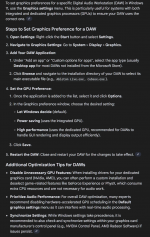
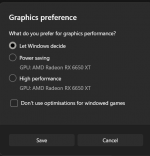
Anyone tried these settings to see if it helps. Never noticed it before but was curious if anyone's tried them.
 

Attachments

  • Screenshot 2025-11-12 222247.png
    Screenshot 2025-11-12 222247.png
    318,1 KB · Views: 43
  • Screenshot 2025-11-12 222301.png
    Screenshot 2025-11-12 222301.png
    26,7 KB · Views: 43
Anyone tried these settings to see if it helps. Never noticed it before but was curious if anyone's tried them.
Quick follow up.

I decided to try setting the GFX Preference to High Performance over Windows deciding and so far after three or four reboots the Hardware Accleration error (0x887A0005) has not showed up. I will do some more testing with it ofc.
 
I have the 0x887A0005 and driver timeouts of AMD drivers when i have 32 GB RAM and 4 GB are used for onboard grophics. I have a ryzen 8600G and win 11 and update to 48 GB 6800 RAM, because i know windows swap system work bad. Then driver timeouts are gone and system work stable.

Maybe it is a studio one problem and the developers of studio one should alloc memory that it is non swapable that studio one for high priority realtime tasks need(the audio buffers)

I only have less or more after a standby resume no graphics in fender pro 8 too. reisze the window a little and graphic is redraw. and the 0x887A0005 error i get too sometimes, but let not crash studio one or PC. I often boot only every 15 days when a new windows update need it. studio one also run many days, because song load take much time i have studio one always on and use it for loopback of windows sound and process with studio one with arc x . I have a apollo solo and use 512 bytes blocksize 10 ms output latency. but i can run with 128 samples too stable. I always notice when run windows and the requestet memory is more than the pysical memory you have, then windows get unstable. I have enough fast SSD memory with a M2 . but i notice since all my windows experience, windows swapping work bad. so i always buy enough RAM and do not crash. see screenshot from taskmanager memory display. this 29.6 is more as 32 GB ram subtracted 4.4 GB . I have songs with many VST that need many memory. from the 48 GB ist the 4.4 subtract and reach 43.8 GB. with 32 GB when 4.4 GB is subtractet reach 27,8 GB. so look when you have crashes if the left value is more than the right value. If so try reduce memory usage or try reduce onbard graphic to 2 GB reserved. currently RAM is very expensive i buy 48 GB RAM für 170 eur. now cost the same 700 eur

2026-01-25 20-12-22-559.jpg
 
Back
Top