• Hi and welcome to the Studio One User Forum!

    Please note that this is an independent, user-driven forum and is not endorsed by, affiliated with, or maintained by PreSonus. Learn more in the Welcome thread!

Graphics hardware acceleration issue...

I'll just quickly reply here...I don't do any video stuff in SO and never have. I wouldn't know where to start. I do home recordings/ music. So I won't be able to do any video testing. Sorry coro.

Disable the AMD devices unless for some unlikely reason you are using them..If not sure do it anyway you can always enable it again later.
 
Thanks Number6.

For the discussion in general...in unprecedented scenes here I just had my desktop (Windows) glitch out as per how the gfx glitches out in Studio One (see my previous posts). I've never had anything but SO glitch out in this way in over 2 years living with this gfx acceleration issue. First time it's happened outside SO. Did not get any error popup.
 
This thread is a bit of a mess. Different people write about similar or unrelated problems with occasionally limited understanding of how computers or software work. I'm pretty sure none of the problems have anything to do with Studio One.

If Studio One detects and reports a graphics hardware acceleration problem then it's likely a graphics hardware/driver problem. As already mentioned by Number6, the common theme here is AMD (discrete graphics card or cpu graphics). There're only a limited number of practical 'solutions' and probably none fixes the root cause.

It's not uncommon to write workarounds for buggy hardware, software or media so that their own software just keeps working (and to avoid getting blamed by helpless or ignorant users). But this approach can easily reach painful levels. And it encourages the companies responsible to never fix their bugs.

I'm not sure if these kind of threads make sense here. There are more appropriate forums for generic/common hardware and software problems.
 
It's just a thread Jens. People jabbering. Happens all the time. Maybe you'd like to move on to the next thread if you have nothing to offer apart from your lofty disdain.
 
It's just a thread Jens. People jabbering. Happens all the time. Maybe you'd like to move on to the next thread if you have nothing to offer apart from your lofty disdain.
Ahh, the insults finally are coming. First, it was Presonus, now it's me.

You already wrote (#10) that you tried another forum but "Nobody knows how to fix it". And neither could Presonus support, see #6 by madFloyd. So, what makes you think this forum can (or should) do any better?
 
Ahh, the insults finally are coming. First, it was Presonus, now it's me.

You already wrote (#10) that you tried another forum but "Nobody knows how to fix it". And neither could Presonus support, see #6 by madFloyd. So, what makes you think this forum can (or should) do any better?
Finally? You just joined the forum on Tuesday.

I don't think the forum can or should do any better. But who knows...maybe someone who lobs in knows something useful. Or not. It's just a thread. With jabbering. Nothing to get worked up over. Relax.
 
if you are using Nvidia, make sure you have the studio and not game version of the driver set.
 
Studio for sure but 'game ready' never did me any harm neither.
Regardless this looks like AMD.
 
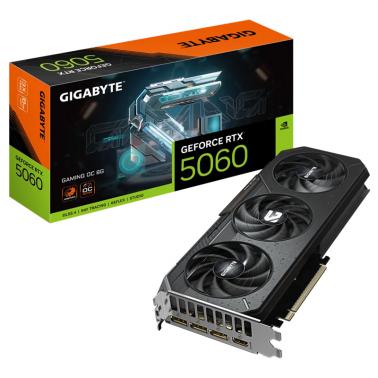
Anyone know if this would be a GPU to try?


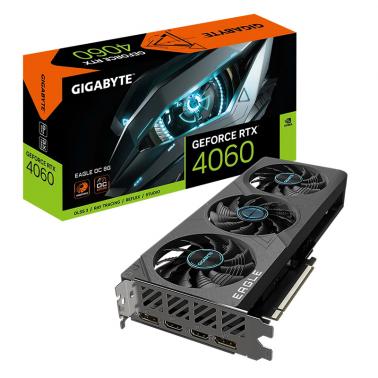
Or this older cheaper one...


EDIT: I got a 5060 ti 16gb. Hopefully that will put to rest the gfx hardware acceleration issues that dogged Studio One with my old Radeon 6600. And I say SO because that was the application where the error manifest 99.9% of the time.
 
Last edited:
QUICK UPDATE from Tech Support

From analysis of the DMP file you sent, the issue lies with msmpeg2vdec.dll, which is a video codec built into Windows.

I recommend you run an SFC Scan on your PC to replace or repair any broken system files such as this codec.
 
Run as Administrator...

sfc.png
 
If you want to be more thorough:

SFC /Scannow
Dism.exe /online /Cleanup-Image /StartComponentCleanup /ResetBase
SFC /Scannow
(yes - run it again!).
 
If you want to be more thorough:

SFC /Scannow
Dism.exe /online /Cleanup-Image /StartComponentCleanup /ResetBase
SFC /Scannow
(yes - run it again!).
Even better:

Dism.exe /Online /Cleanup-Image /RestoreHealth

followed by

SFC /Scannow (only need it once)

VP
 
I have black screen of deaths. I have actually had BSODS since June. It is my 'non-music' work PC too and this is very annoying. Is an RTX2060 that old? I know that my laptop has one in it which is not that old. I could never pin it down, but I suspected Universal Control OR my graphics card never thinking it would be the two of them in cahoots. I have a Quantum 2626 with a Gigabyte Designare MB running the latest Windows 11.
 
I have black screen of deaths. I have actually had BSODS since June. It is my 'non-music' work PC too and this is very annoying. Is an RTX2060 that old? I know that my laptop has one in it which is not that old. I could never pin it down, but I suspected Universal Control OR my graphics card never thinking it would be the two of them in cahoots. I have a Quantum 2626 with a Gigabyte Designare MB running the latest Windows 11.
Any black screen = hardware issues.

You would need to audit the crash logs and find out exactly what file is causing it - and then try to connect that to a problematic driver or hardware item.

Doubtful that it is your audio interface AND graphics teaming up for trouble. Windows 11 24H2 has had lots of trouble with graphics - hence the reason I do not use a graphics card at all in all my DAWs - cannot remember the last time I had a blue screen. Have never seen a black screen (yet)

VP
 
I have black screen of deaths. I have actually had BSODS since June. It is my 'non-music' work PC too and this is very annoying. Is an RTX2060 that old? I know that my laptop has one in it which is not that old. I could never pin it down, but I suspected Universal Control OR my graphics card never thinking it would be the two of them in cahoots. I have a Quantum 2626 with a Gigabyte Designare MB running the latest Windows 11.


Things to try.

Download DDU and do a full uninstall, then download the latest driver from Nvidia site and install.

If you aren't using your motherboards display driver, then disable it in the BIOS.

Update your motherboards BIOS.. Maybe there is a firmware update for RTX2060 too.

Open up your PC case and check the cables are secure. Find out the wattage of your computers power supply, it may not be enough.
 
Well [big sigh] thanks to number6 (who has almost an identical system give or take) and VocalPoint. All your suggestions were valid and potentially curative. I don't have a great history with crash logs as they never tell me in enough detail what it causing the problem, plus wish I'd never looked because there are other errors in there so I am going to address those if and when 🙄

However! It's my 'working' theory that there is a driver technology war going on between Nvidia and Microsoft. If I update the Nvidia driver and then run a system update things seem to be ok. It's when I run one or the other that things don't go so well. So I will ignore one until the other is available.
 
Microsoft gets it's drivers from Nvidia. Nvidia is the sole developer of drivers for Nvidia cards.

Always get your driver's direct from Nvidia not via windows update, they are the latest and greatest.

If for some reason Microsoft via windows update is overwriting the Nvidia drivers with earlier drivers you need run DDU (as I suggested) and then install the Nvidia drivers and do a clean install. If it still persists overwriting then Google for solutions.

Regardless if you haven't run DDU yet you really should, and then install the latest Nvidia driver.

Always make backups.
 
Puts V7 on and now I also have the Hardware Acceleration issue detected (0x887A0005). Long story short I was plagued with this in V5 and now it's there starting V7. I managed to solve it in the past using a specific driver for the GFX card. Nothing else worked. So today I was messing about and noticed if I start Studio One 6 first that has never had the issue, close it and open V7, It fires up with no error every time. Open 7 on it's own and it's present instantly every time but only on the first instance of starting V7. I have the same settings across all versions of S1. The only thing that stops V7 from throwing up (0x887A0005) in my case, is to disable HiDpi Scaling. V6 is fine with scaling, V7 under scaling starts with the error with the same settings per DAW version.

I went through all this with V5 and tried everything trolling the net for solutions. In my case the only solution came from a specific GFX driver version and not updating it for a while. Looks like I will have to find one that sticks again for both versions or 7 and move on.
 
I do a lot of video and have the 4070 Ti Super Navida product. Never had an issue with either video or music.
 
Back
Top