• Hi and welcome to the Studio One User Forum!

    Please note that this is an independent, user-driven forum and is not endorsed by, affiliated with, or maintained by PreSonus. Learn more in the Welcome thread!

Fender Studio Pro 8 - Discussion Thread

Dear community,

here it is: the new major update for Studio One. - Wait a minute, what's that? What is “Fender Studio Pro 8”?
That's right, Fender Studio Pro 8 is the successor to PreSonus Studio One 7!
Same code base, same team, different name.

So what's new here? In short:
- Channel and Arrangement Overviews
- Redesigned user interface, plug-ins and instruments
- Updated Sample One and Impact samplers
- AI-powered audio-to-note conversion
- New Studio Verb plug-in
- Drum Metronome
- Chord Assistant
- Video support on Show Page
- Seamless integration with Fender Studio
- New Fender-branded guitar and bass amp plug-ins

For a complete list of all features and improvements, please refer to the release notes for this version.
Users are as diverse as their wishes and needs. That is why this version also has some personal highlights for me. One of them is definitely the new Studio Verb. It gives the DAW a very convincing room simulation, suitable both for natural spaces and for more fantastic, creative environments. Check it out!

What are your favorites?
Happy exploring the new version & happy discussion!

Ari

Fender Studio Pro 8 - Website

View attachment 2626
View attachment 2627
View attachment 2628View attachment 2629
I'll admit it's hard to criticize when they gave me a full license for two years. That said, none of the issues in the previous versions have been addressed, and this is the second update focused on *cosmetic changes and moving stuff around* which SUCKS. Come on guys, quit changing the workflow just for the heck of it!

Cosmetic updates to all the stock plugins. I use mixtool on every single mix. Why in the *world* did they hide the automation indicator??? So you can't see if it's automated at a glance? Was the original design to constrained for space at 2"x4"??

Why is the clip editor button now a tiny "i" in the bottom left corner?? It was in a good place before.

Is it really necessary to change the main workflow when opening plugins? And aren't the micro views literally the same thing as the new "channel overview?" Who uses these?? Mostly my experience with micro views is they get opened too easily already and I end up closing them to clean up the DAW view (in other words totally wasted effort).

Why did they make the faders 3D? The shaded areas make it much more difficult to see the settings, and it's not useful.

Why do we need a 'freeze track' button? You can do the same thing right clicking on the channel header in previous versions (for a handful of times you do this in a mixing session). And now we can't access the automation lines from the stock view because we have a pan controller??

And rearranging the sidebar modules just makes us relearn the software needlessly. A good upgrade would let me toggle the sidebar windows on and off as needed. I don't need an extra fader and plugin list there- I use the entire mixer window on a different screen.

It appears they did get rid of the 'total whiteout' highlight on selected clips. It's still hard to see the transport locator line on some colors, but its better than in v6. But can we also go back to the black clip outlines? The thick white clip outlines make it impossible to edit accurately.

We don't need a generic channel overview, equally ugly and devoid of function as the (nearly identical) track editor. And if you're going to do that, make it so I can tell which plugin is which, because with dozens of plugins on a session squinting at generic gray boxes to see the tiny print around the *knobs* is a literal headache. And why is it that the same symbol on the channel that evokes the track editor is used to denote the link to the actual plugin from the channel overview?

While you're at it, please tell whomever is in charge of the ridiculous cosmetic changes to stop stealing screen real estate for no reason- They're taking nearly 10% of the vertical space on the screen for an empty black header and much thicker 3D function bar?? Oh yeah, the header at the bottom of the screen is thicker too- and 3D because why?? And why the hell did they rearrange the layout??? Do you think anyone on earth is going to use that tiny "master volume" control? We need a "transpose" displayed on the main transport bar?? And why do I need bigger transport controls? I have a DAW controller for that- and if I needed to click on the stop button it was fine before. Stop making backwards "improvements" to the layout. Gotta be honest folks, the appearance of v7 was elegant by comparison. This is clunky and dark and wastes valuable screen real estate that makes me spend more time moving things around while I'm working.

Seriously, I feel like they've got people creating features and making changes that never worked a moment with real audio- which is what Studio One was always great for doing. If I wanted FL STudio with a bunch of amp sims, I could've bought it from them. And does Fender actually expect me to believe they suddenly modeled 47 different guitar amps?? Don't insult my intelligence. I'd be happy with ONE that actually sounds and feels like a Super Reverb. EDIT: Yeah, sorry. Having now tried the "'57 Super Reverb" that has neither reverb nor vibrato, but does have a gain knob?

PS. Super tacky renaming it "Fender." I have a '71 Strat. That's Fender. This monstrosity of a business empire they're bloating into is not Fender and I sure don't want their branding on everything they buy.

Some design enhancement that we need:


1) More group functionality like ProTools. It would be great to edit the settings on all my vocals tracks when editing with Pro Q. The group links options are very limited.

2) 3D matrix you can assign to busses on the output? You can't set up a proper 3D sound field in stereo without 3D routing you can control. Again go see ProTools.

3) Legacy colors option for the edit window without thick while clip borders and total whiteout clip highlight. And the transport marker needs to be high contrast over ALL clips. The old narrow black clip outlines and color schemes were much more useful.

4) freeze mixer order option. Every time I drag a bus over by the channel to write automation, the entire mixer rearranges itself, scattering busses throughout the channels for no reason whatsoever. Alternately it would be nice if only the channel or bus I'm moving decided to grow legs.

5) Eliminate the black dead space at the bottom of the plugin browser with the Presonus logo. A taller plugin browser window would be much better.

6) Shift-precision option while adjusting levels throughout the DAW so you don't have to fight to get the exact value you want? Half the time I end up expanding windows to get more resolution or having to right click, then move the mouse to the pop-up window precisely on the value to type it in. No really, what IF you could actually set it at -.4dB instead of choosing between -.3dB and -.6dB in the clip itself? That's a workflow NEEDING improvement.

7) Is there a reason the order of commands in the channel right-click menu change order all the time? Do I really need to search for the Show/Hide Automation option every time I open it? Top or bottom you choose, just fix the way it changes all the time.

8) In the main view, lots of wasted space on the automation track headers controlling plugin automation. I would be great if they said which plugins they're controlling.

9) Finally, how about making *new features* user options rather than just changing everything for no reason?


Being one to give a fair review, I'll add these pros to my list of cons:

1) The new software installed flawlessly in a flash and works perfectly.
2) The startup sequence and plugin scan are blindingly fast. Sessions load faster too.
3) They did apparently remove the 'whiteout' on clip selection, but the thick white borders still make it hard to edit accurately.
3) I made myself go use the DAW for a couple hours to find more Pros. It only ended up revealing more complaints.

Bottom line? At some point please start working on updates for the people who already own the product rather than changing it hoping to find new subscribers. We've ALREADY invested in your product, so how about making us a bit more of a priority?

Signed a long time Studio One Pro user that's been searching for a relevant upgrade since v5.5.2 and wondering when the cosmetic BS is going to stop making my job harder.
 
Last edited:
I'm just getting familiar with Studio One 7. I see that this is a paid upgrade. Do I have to upgrade to Fender Studio Pro? Is there a time period coming up in the future when I will have to change? Will Studio One 7 continue to get updates?

Thanks
:)John B
 
What one might call the "traditional" perspective strongly suggests there need to be elaborate reference manuals; but (a) does anybody actually read them and (b) are they mostly the way technical writers interpret the often abstract information provided by software engineers who as a group tend to speak Jupiterian and have personal caches of plutonium? 🤪

(a) I've read my Studio One manual in PDF form for 15 years and is how I learnt half the things I know about the DAW, the other half coming from a combo of support forum posts from the old board (and this one!), and video/blog tutorials from people like Lukas and Craig, Marc Hyuskens, Grigor Beyerle, and Quanta.

(b) I've always felt the Presonus Studio One manuals to be very well-written and accessible -- my only complaint would be that they weren't technical enough during times of intense troubleshooting, quite the opposite of your predicament.

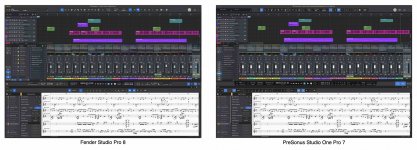
Consider the image I created earlier this morning to show the various significant parts of the Fender Studio Pro 8 GUI . . .

I searched the Reference Manual for about an hour and (a) didn't find much of anything presented in a clear way and (b) for a while just coined names for stuff based on the way recording studios in the 1960's were designed (real mixing boards, effects racks, and magnetic tape machines).
I generally find what I'm looking for in the PDF manual by searching (ctrl+F) keywords in about 2-3 seconds, sometimes 5 if it's a long phrase. The time it takes for me to find a manual entry is about as long as it takes me to type the keyword/s.

Things aren't mystically named as you suggest, they are literally the name of the item in question within the software, just SEARCH for the term!

That said, Studio One is a DEEP DAW, deceptively so, and again, the reason you likely couldn't find what you were looking for is that the manual isn't technical enough.

This problem was exacerbated when Fender nuked the old support forum 14 months ago, which had thousands upon thousands of threads that contained Google-indexed troubleshooting solutions and tips that are now lost to the general public forever.
To be more specific by providing an example, the way I read and understand ". . . take away more features, make it simpler and more intuitive" maps exactly to the "double-click and show the Channel Overview" behavior, which replaces a bunch of stuff (a) that was available separately but not in one place or required more clicking and navigating with (b) a straightforward solution that is easier for me to use,

Nothing went away!

It's just packaged in an elegant and intuitive way that does not require me to lose focus on the music due to having to mess with a bunch of computer stuff. (y)

While I haven't downloaded the update, I've seen all the promo material and some demo videos of the channel overview, and while it's a good idea, it has been horribly implemented. You will literally work slower attempting to add all the parameters you need manually than simply opening the damn plugin GUI.

Why couldn't they have given us 'VST GUI Presets' instead?!

The 'Toggle Editors' command (F12 for me) does just this, only with a single set of last-open GUI windows.
The tech obviously exists then, to be able to save multiple 'GUI states/locations' for all your VST plugins, as they are saved with 'Toggle Editors'.
It would be an incredible timesaving feature, because you could allot multiple plugin window configurations to different workflows, one for vocals, one for drums, one for guitars, keys, etc. etc.

Instead we got a token feature that doesn't actually accomplish anything, surprise.
The boomer CEO probably designed it himself.
Flashbacks to Gibson acquiring Cakewalk and effing that all up.
Feels like a big misguided effort to leverage a DAW into more guitar related purchases - somehow?
Pasting the Fender logo all over the software is not a 'plus'. I'm a guitar guy through-and-through but it turns me off.
Strongly suggests that Fender leadership misunderstands the DAW market.

Replace Ampire with a Fender/Mustang branded plugin, fine (which I tried and I find the UI very frustrating) but I don't want a guitar company making my music composition & production software and I don't want my music-software company making my guitars.

QFT fellow guitar-dude, this is how I expect virtually all guitar players (that I know) to react to something like this...
The corporate people who came up with these changes are living in a bubble, as evidenced by the obtuse name-change.
To be fair so are we, but theirs is more severely disconnected from reality methinks.
 
I listened to the Joe Gilder guitar and bass amp sim videos. Well, they're certainly an improvement over Ampire. And there aren't as many bass sims people already own, so it's likely some people might find value in them. And in fairness I can see them being a selling point for guitarists who have never recorded to a DAW before, who don't happen to already own the likes of S-Gear, the new UA Paradise Guitar Studio (yummy), Neural, and so on who get a fairly good starting point for free as it now comes with S1, er, I mean FSP. The question is how many of these aspiring guitarists are out there?

Well, what's really going on in the guitar world today, since no one has emerged this century to remotely challenge how deep players got into guitars in the latter part of the last century, is people who want to copy the innovative guitarists of yore since someone has released easy to follow video tutorials or transcriptions of every guitar part that every guitar player last century came up with. That gives anyone with guitar hero aspirations a cheat sheet to live out their dreams of being Hendrix, Page, Van Halen, Richards, etc. There is a lot of that going on in YouTube land, for better or worse.

The small problem with catering to that crowd is that it does nothing for people who want to innovate in the electronic world, or use guitars in non-classic ways. Well it does something: it makes them question why the company is looking backward. But Fender always wants people looking backward to the 1950s, since that's when they originally came up with their enduring guitars and amps that are somehow still moving through sales channels today. In other words, the new direction makes a lot more sense for Fender the company than it does for (former) Studio One customers who are forward looking.
 
Last edited:
Wow so many moans about the name! Who gives a flying fader about the name of their DAW :ROFLMAO:
Glad to see video added to Show Page, doesn't look as if anything else has been added to Shows, DMX would be good, but at least if there's a new feature then maybe they haven't abandoned it after all...

I wish they'd sort the automatic language options on their website though - I have to scroll all the way down to the foot of the page to select ENGLISH (I live in France and it automatically chooses French) but then when I click on a link within that English page it reverts to French - anyway what I couldn't find was System Requirements - I use the Show page on an older MacBook Pro running Monterey, and would like to know if this new release will run on it. I'll go for the upgrade at 99€ anyway, for the M4 Studio Mac - I like the overall look and some of the new features seem useful - and I'm upgrading from version 6 so that's a good deal for me, having not bothered to spend 149 to go from 6 to 7. Always good to have the latest version anyway, and I can keep V6 in case there are issues whilst they bug-shoot 3rd party plugins.

And again guys, the name?? get over it!! I've got a 1963 Fender Jaguar sitting in the corner - I'm fairly sure I won't get mixed up and try to connect my MIDI controller to it.....
 
anyway what I couldn't find was System Requirements - I use the Show page on an older MacBook Pro running Monterey, and would like to know if this new release will run on it.
Fender Studio Pro 8 requires macOS® 13.5 (Ventura) or higher.

Here are the full system requirements for macOS:

- macOS® 13.5 (Ventura)** or higher
- Intel® Core™ i3 / Apple® M1 processor or better
- Internet connection (needed for installation and activation)
- Monitor with 1280 x 768 resolution (Retina display recommended)
- A multi-touch enabled monitor with TUIO support is required for touch operation
- 8 GB RAM minimum
- 40 GB hard-drive space
 
Wow so many moans about the name! Who gives a flying fader about the name of their DAW :ROFLMAO:
Perhaps all the people who say they give a flying fader?
 
Wow so many moans about the name! Who gives a flying fader about the name of their DAW :ROFLMAO:
Given the responses towards the name, I'd say a lot of folks are both curious why, and perhaps even a little taken back. Of course some wont care. Its certainly going to come up. I mean after all..... it is being asked why.
 
I awoke this morning and soon was in a gnarly mood, because after enjoying toasted and buttered Sunbeam bread with orange marmalade and very strong Massimo Zanetti Master Chef Coffee for over half a century, the corporate executives who control everything in my life finally managed to screw up my breakfast, since now the bread is sliced. 🤪

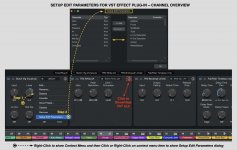
Once I realized Sunbeam bread always has been sliced and then enjoyed a few cups of very strong coffee, I did some experiments with Fender Studio Pro 8 and the new Channel Overview GUI based on a very helpful observation made in this topic by @Crossinger which suggested there is a way to edit the parameters shown for a VST effect plug-in when in simplified mode in the Channel Overview.

I also discovered another bit of GUI elegance, which is that there is a tiny button you can click to show and hide the original VST effect plug-in's GUI.

The attached image shows the steps to get to the dialog box for setting the edit parameters, which actually is the same dialog used to configure an Automation Lane for the VST effect plug-in. (y)
 

Attachments

  • SW-Setup-Edit-Parameters-For-VST-Effect.jpg
    SW-Setup-Edit-Parameters-For-VST-Effect.jpg
    198,3 KB · Views: 12
  • SW-Fender-8-PreSonus-7-Side-By-Side.jpg
    SW-Fender-8-PreSonus-7-Side-By-Side.jpg
    194,3 KB · Views: 12
Last edited:
I'm just getting familiar with Studio One 7. I see that this is a paid upgrade. Do I have to upgrade to Fender Studio Pro? Is there a time period coming up in the future when I will have to change? Will Studio One 7 continue to get updates?

Thanks
:)John B

No requirement for you to do anything at this time. Or ever if that is your thing.

And no further updates to Studio One 7

VP
 
Given the responses towards the name, I'd say a lot of folks are both curious why, and perhaps even a little taken back. Of course some wont care. Its certainly going to come up. I mean after all..... it is being asked why.
That, and some folks are a little, um, somewhere between disappointed and shellshocked at the corporate takeover of what were once individual and idiosyncratic businesses which operated with a more human touch.
 
I love the update...copying my VI Control post:

S1 has been my main DAW since around 2015 or so.
I cringed when I saw the name change....first reaction was that it's time for me to finally Crossgrade to Cubase.

I updated earlier today from V7 (perpetual license, have never done the subscription...not interested in that.)

Initially, my user account showed that I was ineligible for the upgrade as I had purchased V7 over a year ago...however, I purchased a Quantum HD8 late last year and recalled that it came bundled with a license I hadn't activated. So, I sent a short note to customer support and within 15 minutes my account was updated and eligible for the update.

I updated accordingly and was also pleasantly surprised to see some Eventide/NewFangled Audio plugins I didn't have, along with some other nice third party offers. Nice.

I've only spent a couple hours in the latest version, but my experience has been overwhelmingly positive. It's a bit jarring to see "Fender" plastered all over the place, but to me that's not a big deal (though the desktop/taskbar icon change (I'm on Windows) threw me off a bit). I play guitar quite a bit -- but I don't feel like this is now first a DAW for guitarists -- it feels like the S1 I've used the past 9-10 years with an update.

My personal favorite highlights after a couple hours of clicking around (no particular order):
  1. I like the "quality of life" improvements and look of the DAW. I'm a fan of the arrangement and channel editors/overviews. Excited to experiment with that as I think there is a lot of creative workflow potential there. Add macros and awesome scripts like scoring tools and it does whatever I want. I read about missing/"ignored" feature requests...honestly I don't fully understand some of them, so not going to comment there.
  2. I love the updates to the metronome.
  3. Single click to open vsts in the console - Love it (did confuse me at first)
  4. Looking forward to trying out the new fx.
    Updates to SampleOne and Impact are welcome.
  5. I'll miss the look of "red light distortion".
  6. Old projects/templates loaded w/ no issues.

Would I have paid for this update? As of this moment:
Absolutely.
 
  • Like
Reactions: AAV
Having issues with the project page freezing. Having issues with splice. Annoyed to the point what was an easy daw is going to make me go back to pro tools. Way to go fender always a step behind
 
Back
Top