• Hi and welcome to the Studio One User Forum!

    Please note that this is an independent, user-driven forum and is not endorsed by, affiliated with, or maintained by PreSonus. Learn more in the Welcome thread!

Fender Studio Pro 8.1 - Discussion Thread

Hello Guys,

Im having this issue where i save my project to Save to New folder option, and i zip that up and open it up in my other pc, im missing a lot of audio files. This was working perfectly before the 8.1 update, and that was how i used to shuffle around my project between my main mixing PC and laptop. I read somewhere that its to do with the saving non recorded auido (drag and drop or other loops downloaded else where oustide project folder) into the project file option, it was in always save to project folder option, and then i changed it to ask always. im still having the same issue.
Anyone have any ideas, fixes?
 
Where else would you suggest I look for a gate in that signal path?
If your interface is showing sustained notes but they're being gated in the DAW, then that could suggest a gate is on the input channels, even though you list that you've checked these already on your opening post.

So, I would double check the input channels on the Studio Pro mixer:

I don't know your ability or familiarity with Studio Pro, but the input channels can be displayed, and inserts for those input channels shown as per this video:
To view this content we will need your consent to set third party cookies.
For more detailed information, see our cookies page.
 
Details :-) No repro, no fix.

Is it about insert effects in a channelstrip? Or instrument plug-ins in the instrument rack? If it's the latter, it must be the Instrument Set rack since the "regular" instrument rack does not have a "Remove All" command - only "Remove Unused".

View attachment 3589
Yes, it's in the Inserts channel, as I described earlier. No instruments are involved.

The "Remove All" function there has not always worked reliably. It's similar to the zooming issue with the Magic Mouse.

Another problem I've encountered recently is that the display of Waves plugins sometimes doesn't work correctly. In those cases, you have to disable the plugin once and then re-enable it.

The issues I just mentioned do not happen all the time, only occasionally.
 
One thing that confuses me is that the exact same sputtering occurs when recording the Tele directly into Input 1 of the Studio 68C with no amp involved. Also, the input meter shows normal sustain while recording, and the same guitar records normally in QuickTime. Where else would you suggest I look for a gate in that signal path?
No global Noise Gate setting on my amp (Mustang GTX100). On the preset ('65 Twin Reverb) I have it set to "low". Ideas anyone? Could this be an issue with the my audio interface Presonus Studio 68C and Studio Pro 8.1?
 
Ok... problem solved after a few more hours, uninstall, reinstall.... that little microphone icon in my Mac's toolbar was on and "voice isolation" was selected for some reason instead of "standard". Sigh... there's a multi-hour learning lesson. :)
 
Ok... problem solved after a few more hours, uninstall, reinstall.... that little microphone icon in my Mac's toolbar was on and "voice isolation" was selected for some reason instead of "standard". Sigh... there's a multi-hour learning lesson. :)
Glad you found the problem
 
I'm usually an LLM hater but I must admit this one doesn't seem so bad. It's like an advanced search for the manual, and while sometimes it hallucinates it doesn't seem to have any major issues and mostly works as intended. I also like the dry language and most importantly that it tells you when it can't find something.

Two underappreciated features I like a lot are the event pitch curve and the middle button scrolling. The latter was a pretty popular feature request and it's a shame it's not getting the attention it deserves. Basically when holding the middle mouse button you can scroll and pan the arrangement page like a pdf. I wish it had some inertia/momentum like the auto-scroll feature but it's still alright.
 
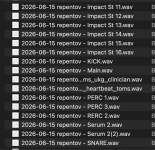
Thanks, Fender! Now, every time I export stems, I'll have to manually remove that useless prefix from every single track! You guys are the best! Keep it up! Why don't we add AI video generation and an online casino next?
 

Attachments

  • Снимок экрана 2026-06-16 в 13.51.09.png
    Снимок экрана 2026-06-16 в 13.51.09.png
    153,1 KB · Views: 42
Jokes aside, there is room for improvement in the naming scheme for stems...
and not being able to have no prefix is probably (hopefully) unintentional.. a bug.
https://www.den4b.com/products/renamer to the rescue!
 
I'll have to manually remove that useless prefix from every single track!
Isn't that "useless" prefix - the actual title of the song/project these stems belong to?

Not really following how this is a bad thing?

And yes Renamer rocks!

VP
 
Isn't that "useless" prefix - the actual title of the song/project these stems belong to?

Not really following how this is a bad thing?

And yes Renamer rocks!

VP
Why do I need a project name in the stems if I'm putting the tracks into an archive named after the project? Or do you guys throw tracks from different projects into a single folder? Okay, why remove the option to disable the prefix?
I don't want tracks like this:
1. eifwfhwoeGUHAUWEHG - GUITAR
2. eifwfhwoeGUHAUWEHG - SNARE
🤮🤮🤮🤮🤮🤮
I want:
1. GUITAR
2. SNARE
What's the point of this prefix? It's not like I don't know the name of the project, right?
 

Attachments

  • Снимок экрана 2026-06-16 в 15.20.43.png
    Снимок экрана 2026-06-16 в 15.20.43.png
    184,2 KB · Views: 9
Last edited:
Шутки в сторону, но в системе наименования корней есть куда стремиться...
А невозможность указать префикс, вероятно (и будем надеяться), является непреднамеренной ошибкой.
https://www.den4b.com/products/renamer спешит на помощь!
I hope this is actually a bug, but because of it, I'll have to use a renamer until the next update :) This is exactly what we pay Fender for.
 
Why do I need a project name in the stems if I'm putting the tracks into an archive named after the project?

To be fair - we all have different workflows. No one at Fender knows that your intent is to "put the tracks in an archive".

That said - if I was putting my tracks in an archive - I do not see an huge issue with having the name of the song they belong to - be part of the filenames.

This is a personal preference and I get it. And yes - there should be an option to export with no prefixes.

This is one reason I never use this Export Stems module. Drag and drop to the project folder - using my specific named events - is how I operate.

VP
 
This is one reason I never use this Export Stems module. Drag and drop to the project folder - using my specific named events - is how I operate.
But this is special too, I have edited events as an example and of course I don't want to consolidate them. And if you deliver stems often you also deliver not only channels but also busses.
The export naming options were always basic in SPro.
But yeah auto prefix is really annoying, should always be optional.
 
Possible additional Improvements:
- Option for a Number as prefix representing the order of placement inside the Song
- Option to include Track notes in Meta Data Comments tab
- Option to create Subfolders for specific tracks or track-types
- Option to include track-type in stem name
- Option to include Song Version or create subfolder with version name
- Option to rename tracks inside the Stem Rendering Window
- Option to Cut after last event on track (including manual padding time values)
- Same options for pre- and postfix
- Option for not having any of these :-)
- Pre & Postfix settings saved with Songs/User Templates or custumization.settings
 
Possible additional Improvements:
- Option for a Number as prefix representing the order of placement inside the Song
- Option to include Track notes in Meta Data Comments tab
- Option to create Subfolders for specific tracks or track-types
- Option to include track-type in stem name
- Option to include Song Version or create subfolder with version name
- Option to rename tracks inside the Stem Rendering Window
- Option to Cut after last event on track (including manual padding time values)
- Same options for pre- and postfix
- Option for not having any of these :-)
- Pre & Postfix settings saved with Songs/User Templates or custumization.settings
Option to bloody have wildcards for event naming so every exported file name is explicitly how I want it named.

And an option to save these wildcards as templates that can be used over and over.

VP
 
Anyone noticing that the tempo is messed up in 8.1? My project plays fine in 8.03 but goes haywire in 8.1.

EDIT: I think it's a matter of something related to timestretching working slightly differently now. I need to look into it further.
 
Last edited:
And an option to save these wildcards as templates that can be used over and over.
Yup this is the way. A tokenized templating system. As it stands now, I don't like the " - " that gets inserted. But out of respect for my own time, I don't let it get me down, I just stay internally imbalanced.

Tokenized stuff like:
TEXT {LoopFirstMarkerName} {MetaTitle} {TrackBusName} {TimeCodeStart:hh.mm.ss.ff}
{nn} {TrackBusName}
{MetaComposer}_{TrackBusName}_{DateTimeNow.Utc}

That's where it's at.
 
Anyone noticing that the tempo is messed up in 8.1? My project plays fine in 8.03 but goes haywire in 8.1.
Not yet, but I will keep this in mind. The whole tempo presentation/functioning changed in 8. I'm still not comfortable with it. The change has to do with a combination of meter and tempo. For example if I am at 80bpm 4/4 and I have a meter change to 5/8, the indicated tempo now doubles (because the 8th note is getting the beat) and the visible graphing just feels wrong. Furthermore, the metronome doesn't "follow" with the subdivisions in mind and you get more of a conductor beating rather than strict metronome. So tempo/meter functions were definitely reworked and they may be academically accurate, but I am not used to it, and as I said the graph is not only gorked (especially at higher tempos) but also dragging the graph often causes unexpected results.
 
Not yet, but I will keep this in mind. The whole tempo presentation/functioning changed in 8. I'm still not comfortable with it. The change has to do with a combination of meter and tempo. For example if I am at 80bpm 4/4 and I have a meter change to 5/8, the indicated tempo now doubles (because the 8th note is getting the beat) and the visible graphing just feels wrong. Furthermore, the metronome doesn't "follow" with the subdivisions in mind and you get more of a conductor beating rather than strict metronome. So tempo/meter functions were definitely reworked and they may be academically accurate, but I am not used to it, and as I said the graph is not only gorked (especially at higher tempos) but also dragging the graph often causes unexpected results.
Yeah, I'm struggling with it and I also have a lot of signature changes. I seem to get a lot of unexpected results when deleting a node, and then it takes of series of undo's to actually undo it and try something different.

If it isn't buggy, it would be a great video tutorial for someone to make!
 
Back
Top