• Hi and welcome to the Studio One User Forum!

    Please note that this is an independent, user-driven forum and is not endorsed by, affiliated with, or maintained by PreSonus. Learn more in the Welcome thread!

Event selection follows track selection?

nhc

Member
This might be a beginners question: I'm working on a session and created a pattern event on an instrument track using NI Battery. Now I create another instrument track to record a pad sound to an empty track while the pattern editor is still open, as I didn't close the editor manually.

Although I selected the second instrument track, the pattern event on the first track is still selected. When I start recording my synth pad, the opened pattern editor activates "record arm mode" and records my chords in addition to the instrument track with my synth-plugin.

So my question is: is there a setting to automatically deselect all events on a track, when the track is no longer selected? Or is there another way to not unintentionally recording notes while the pattern editor is still open?
 
Last edited by a moderator:
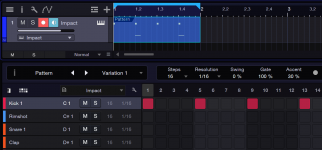
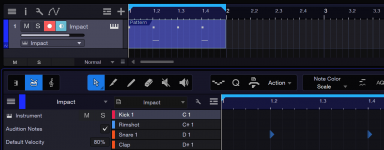
You can try to check "Instrument Input follows Selection" (click the wrench icon) but be aware that the pattern mode is somewhat broken (or highly unintuitive) anyway because there's a disconnect between track/event selection and pattern/drum editor:

1. Create an empty event by double clicking.
2. Right click event and pick "Instrument Parts -> Insert Pattern".
3. Double click event to open the Pattern editor.
4. Enter a pattern for the kick.
5. Select the track by clicking on the track panel. The drum editor appears but without the kick pattern.
6. Enter a snare pattern.
7. Toggle the pattern/drum editor by clicking on the track or event.
8. The event in the arranger view shows (and plays) both patterns, the track selection shows only the drum snare pattern, the event selection shows only the kick pattern.
 

Attachments

  • Event selection pattern editor.png
    Event selection pattern editor.png
    72 KB · Views: 9
  • Track selection drum editor.png
    Track selection drum editor.png
    71,5 KB · Views: 7
Thanks for your reply, but I think, this is not the point. I made a short video to demonstrate what's happening:

To view this content we will need your consent to set third party cookies.
For more detailed information, see our cookies page.
 
Commenting/revisiting for people who might find this thread later via search.

First, I should amend my mistake in choosing "Insert Pattern" instead of "Convert Part To Pattern". It creates an additional event overlay that's only indicated by a different shade of color and unrecognizable in my simple example.

I also learned that pattern and drum/note mode are more different than I thought/remember. The record button in the pattern editor is a step record button that's unique to the pattern mode and doesn't mirror the record button on the track.
 
Can you please attache the video somewhere where I can watch it without to have doing something?
So it's impossible for me to reproduce this. Also a little demo song that shows the issue would help.

Thanks
Ari
 
I've found out. This isn't new right? So this is not a regression.
It has always been that way. That would have been an important fact.
 
I've found out. This isn't new right? So this is not a regression.
It has always been that way. That would have been an important fact.
Hi Ari, thanks for your answer.

I checked it now with version 6, 7 and 8 (each with the latest release for MacOS).


Here's a step by step explanation of what I did:

1. Open a new Song/Session with the default template
2. Drag Impact from the browser tab to the track area
3. Doubleclick in the arrangement to create a midi event, then convert it to a pattern
4. Doubleclick the pattern to open the editor
5. Adding some notes to the empty pattern, set the loop range to the pattern and hit play
6. Dragging MaiTai from the browser tab to the track area, the editor reflects the new empty track
7. Selecting the Impact-Track once again (with the up-arrow key)- the editor shows the pattern

-and here starts the difference between V6 and V7/V8-

8. Selecting again the MaiTai-track with the down-arrow key:

Version 6 shows the editor for the still empty MaiTai track, In Version 7 and 8 the editor shows still the pattern, although the MaiTai-track is selected and record-armed

When I hit "record" on my controller or my keyboard, this is what happens:

In Version 6 it records only to the MaiTai track (exactly what I expected), In Version 7 and 8 in the still open pattern editor step-input is activated and notes are recorded as well in the pattern as to the MaiTai track.


So there is no difference between V7 and V8, but in V6 the behavior seems logical to me.
The strange thing about this is, that I could replicate it several times, but then for whatever reason after clicking in several places it suddenly behaves again as expected.
 
Back
Top