• Hi and welcome to the Studio One & Studio Pro User Forum!

    Please note that this is an independent, user-driven forum and is not endorsed by, affiliated with, or maintained by Fender. Learn more in the Welcome thread!

Solved Drum View Note Order

Teksonik

New member
So for decades I've been using Piano Rolls in different DAWs to program drums and the note order is of course always lower notes show below higher notes. So for example Kick on C displays in the piano roll below Snare at D and so on.

However when using Studio Pro in Drum View Mode the notes display Kick at C above Snare at D. In other words instead of going from low notes up to high notes it goes low notes down to high notes and it's making my OCD scream after looking at it the other way around for so long....😆Is there any way to permanently flip the display to go from the bottom up instead of top down? I've managed to get Impact to display the way I want it by dragging notes and setting default preset but it doesn't seem to work in third party drum plugins. For example in Modo Drums I can set order, save a drum map, and set a default preset but although the note names are remembered the order goes back to be top down instead of bottom up. The image below shows how I want the order to display for all drum plugins. Thanks in advance for any help.🙂


FPS 08-19-26-4.png
 
Last edited:
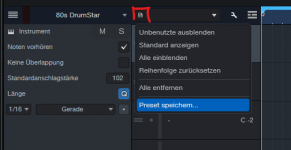
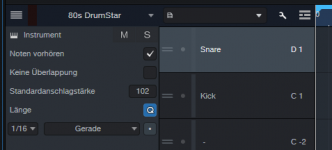
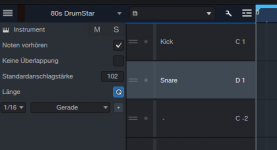
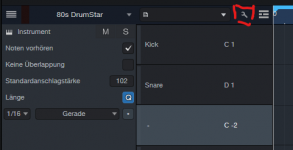
Yes. While in Drum View, select the wrench icon, set any order you prefer and save it afterwards as a preset using the little page icon. See images.
 

Attachments

  • FSP_4.png
    FSP_4.png
    17,2 KB · Views: 6
  • FSP_3.png
    FSP_3.png
    11,9 KB · Views: 6
  • FSP_2.png
    FSP_2.png
    12,3 KB · Views: 5
  • FSP_1.png
    FSP_1.png
    12,9 KB · Views: 6
There's no simple way to revert the order. Create/Save/Load a pitchlist (drum map) for VSTs who don't report the pitch names or a track preset if they do. The pitch order is maintained even though the pitch names might change. Track presets also remember the pitchlist, so use them if you want to avoid the extra step of loading a pitchlist.
 
There's no simple way to revert the order. Create/Save/Load a pitchlist (drum map) for VSTs who don't report the pitch names or a track preset if they do. The pitch order is maintained even though the pitch names might change. Track presets also remember the pitchlist, so use them if you want to avoid the extra step of loading a pitchlist.
Thanks but as I said I have created Drum Maps for third party plugins and it's been my experience that while note names are remembered, the order they display is not. Often just maximizing the drum view then shrinking it back will re-order the notes to top down. Unless someone else has a suggestion it looks like this will have to a be a feature request. I'm going to work on it further today and of course I can always just use the piano roll which does display notes in the logical bottom up order. I like Impact and will probably start using it over Speedrum for custom kits but I have a lot of other drum plugins like Nepheton, Drumazon, Microtonic, etc that I'd love to use in drum view mode. By the way are you Jens from the KVR forums?
 
Thanks but as I said I have created Drum Maps for third party plugins and it's been my experience that while note names are remembered, the order they display is not. Often just maximizing the drum view then shrinking it back will re-order the notes to top down.
That's the part I didn't understand or misunderstood. I don't even know how custom Drum Maps in third party plugins work.

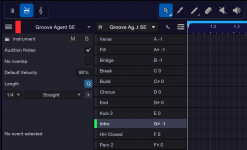
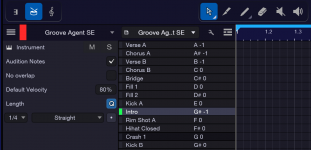
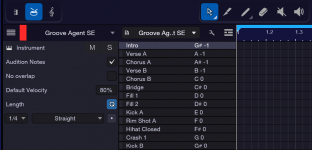
I (and tulamide) was describing the S1/SP approach using pitchlists. In my case I'm using Groove Agent which updates the pitch name for each preset. The position/pitch "Intro" is remembered after recoloring/resizing and preset change.

(I read KVR but I'm not registered there.)
 

Attachments

  • Resized and switching to 4 Am preset.png
    Resized and switching to 4 Am preset.png
    70,3 KB · Views: 3
  • Intro pitch moved and colored.png
    Intro pitch moved and colored.png
    71,8 KB · Views: 3
  • Groove Agent 29 min Jupiter preset.png
    Groove Agent 29 min Jupiter preset.png
    71,8 KB · Views: 3
Last edited:
Sorry for some reason I didn't see Tulamide's suggestion which I had already done as shown in my first post. Okay I've tried it again with Nepheton 2. In the left image is the order I have set, low notes up to high which is how they diplay in any piano roll. But when reloading a Pitch List or Drum Map the order is reset as shown in the right image to low notes down to high which is opposite of how they diplay in a piano roll. This also happens when saving/loading a track preset or when setting a default preset in Nepheton 2.


Nepheton 1.png
Nepheton 2.png
 
Okay, I've made a video showing what happens when the Drum View is maximized then minimized:


You're in pitchlist edit mode when switching max/min views. SP reverts to non-edit mode and discards the changes when switching.

(Also: The forum software reversed the order of my images. Or my Firefox browser messed it up. The preview showed the order as intended.)
 
Last edited:
Ah ha that was the issue. Thanks. I have Speedrum and Nepheton 2 at least partially mapped out now and the order is being recalled properly. I must have been in Edit mode all the time. Thanks again for the help. (y)
 
  • Like
Reactions: AAV
Back
Top