• Hi and welcome to the Studio One & Studio Pro User Forum!

    Please note that this is an independent, user-driven forum and is not endorsed by, affiliated with, or maintained by Fender. Learn more in the Welcome thread!

Default Channel Strip Settings

cpsmusic

New member
Hi All,

Is there a way to set the default channel strip settings that are used when I drag and drop audio files into a project?

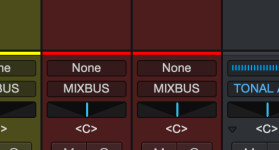
Currently, after importing audio I have to change the input and output for all the channel strips. It would be nice if I could set this to a default value.

Cheers!
 
Hopefully to avoid confusion:
"Channel strip" usually means the choice and order of tools on an (input) channel, like limiters, EQ and compressors. But from your question I take that you mean the S1/SO I/O settings and yes, you can set a default I/O configuration for new songs (from the I/O settings window). What S1/SO cannot do is second-guess the channel(s) you want your imported audio on, so after importing you probably still have to move it, but only the track(s) you just imported.
 
Sorry for the confusion - what I'm referring to is the Input and Output on each Channel Strip that gets created when an audio file is dragged into S1 (see below).
 

Attachments

  • Screenshot 2026-09-04 at 9.51.18 AM.png
    Screenshot 2026-09-04 at 9.51.18 AM.png
    20,4 KB · Views: 1
I usually drag files into a bus folder. That way they get routed to that bus. Input defaults to input 1 of my StudioLive. I don't know how to change that..
 
Back
Top