• Hi and welcome to the Studio One & Studio Pro User Forum!

    Please note that this is an independent, user-driven forum and is not endorsed by, affiliated with, or maintained by Fender. Learn more in the Welcome thread!

Default Channel Strip Settings

cpsmusic

New member
Hi All,

Is there a way to set the default channel strip settings that are used when I drag and drop audio files into a project?

Currently, after importing audio I have to change the input and output for all the channel strips. It would be nice if I could set this to a default value.

Cheers!
 
Hopefully to avoid confusion:
"Channel strip" usually means the choice and order of tools on an (input) channel, like limiters, EQ and compressors. But from your question I take that you mean the S1/SO I/O settings and yes, you can set a default I/O configuration for new songs (from the I/O settings window). What S1/SO cannot do is second-guess the channel(s) you want your imported audio on, so after importing you probably still have to move it, but only the track(s) you just imported.
 
Sorry for the confusion - what I'm referring to is the Input and Output on each Channel Strip that gets created when an audio file is dragged into S1 (see below).
 

Attachments

  • Screenshot 2026-09-04 at 9.51.18 AM.png
    Screenshot 2026-09-04 at 9.51.18 AM.png
    20,4 KB · Views: 2
I usually drag files into a bus folder. That way they get routed to that bus. Input defaults to input 1 of my StudioLive. I don't know how to change that..
 
Hi All,

Is there a way to set the default channel strip settings that are used when I drag and drop audio files into a project?

Currently, after importing audio I have to change the input and output for all the channel strips. It would be nice if I could set this to a default value.

Cheers!
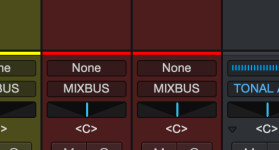
For mixer channels as you display, (please avoid calling them channel strips), as mentioned, you can set an I/O configuration, and even give them a name.

For general usage, (and as mentioned, channel strips cover channel inputs), you can save them with a descriptive name. For example, if you had a general P Bass setting that was ducked from 80 Hz to 110 Hz, -2 dB, at some preferred notch or slope. Save that as a preset. Then simply call up that preset. That might even include additional fx, or chain. Its how you save it. You could store these exclusively under channel strips, Ch. Str, etc.

With SP. Things are so easily configured, as Gerran points out, you can create busses on the fly, so it might be best to describe your intentions for this. Thanks!
 
Back
Top