randyowens7
New member
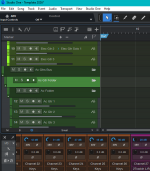
I have busses with tracks associated, etc. My acoustic guitar bus has 2 folders between the bus and the tracks on the tracks pane. Any idea how to get rid of them? It's important that I don't delete any audio tracks.


...or all of them at once.You can also drag and drop the tracks one by one outside the folder, to feel more comfortable before removing it.

I can't find a way to delete it. Inspector tells me which folder the tracks are associated with, so I know which one to delete, but can't delete it.
We use essential cookies to make this site work, and optional cookies to enhance your experience.