• Hi and welcome to the Studio One & Studio Pro User Forum!

    Please note that this is an independent, user-driven forum and is not endorsed by, affiliated with, or maintained by Fender. Learn more in the Welcome thread!

Bus folders

randyowens7

New member
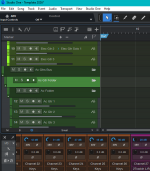
I have busses with tracks associated, etc. My acoustic guitar bus has 2 folders between the bus and the tracks on the tracks pane. Any idea how to get rid of them? It's important that I don't delete any audio tracks.
 
Can you show a screenshot? Not sure what "2 folders between the bus and the tracks" means. There are no busses in the arrangement, only automation tracks.

If this is about removing the automation track: Expand the automation lanes, right-click the lanes and choose "Remove Volume" (or whatever automation it is). Once the automation is removed, the track is no longer connected to the bus channel and you can safely remove the track without affecting the bus in the mixer.
 
Here is the screenshot. When creating a bus, you "pack folder". I think I did something wrong, or possibly did something twice.
 

Attachments

  • Bus_Folders.PNG
    Bus_Folders.PNG
    52,6 KB · Views: 41
You can also drag and drop the tracks one by one outside the folder, to feel more comfortable before removing it.
 
I can't find a way to delete it. Inspector tells me which folder the tracks are associated with, so I know which one to delete, but can't delete it.
 
Back
Top