• Hi and welcome to the Studio One User Forum!

    Please note that this is an independent, user-driven forum and is not endorsed by, affiliated with, or maintained by PreSonus. Learn more in the Welcome thread!

Apply track names to instruments does not work for me in Fender Studio Pro

dboudah

New member
I am using the new "Scoring Tools 2.0 for Studio One" macro library written by Lukas Ruschitzka.

The 'Apply track names to instruments' function appears to be unresponsive in both Fender Studio Pro and Studio One 7 Pro. Despite following the manual—selecting multiple Kontakt tracks and triggering the command—the internal instrument names won't update to match the track names. Has anyone else encountered this issue?

1768532845396.png

1768536949342.png
1768536932690.png
 
Last edited:
I updated my post to be a little more specific. Thank you for responding. I am trying to rename the instruments so they do not all say "Kontakt".
 
Ahh yes... you're working from the Scoring Tools MACRO toolbar.
I use the Navigation Essentials MACRO toolbar; from there it works for me consistently.
May be a question directly for @Lukas, who wrote that script package.
 
Last edited:
Actually, it’s the newer version of that product called Scoring tools 2.0 for studio one. I wonder if the new version does not work but the old one does.
 
I'm in 7.2.3, where it works as stated for me. Maybe V8 broke it, or Lukas hasn't caught it yet. Sorry, can't be any more help.
 
Ah, I think I know what the problem is. v8 ist not the problem, all my scripts should work fine in v8.

@dboudah Do you have Navigation Essentials 2.0 installed in addition to Scoring Tools? The problem seems to be that the command is also included in Navigation Essentials, but assigned to the wrong category (Tracks → Apply Track Names to Instruments instead of Scoring Tools → Apply Track Names to Instruments).

Because of this, the menu item in Scoring Tools can't find Scoring Tools → Apply Track Names to Instruments.

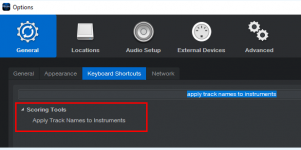
Could you please open Keyboard Shortcuts and search for Apply Track Names to Instruments?

apply-track-names-to-instruments.png


If it's listed under Tracks (most likely it is), than that's the issue. To still use the command,

a) add a keyboard shortcut for the command or
b) do Help Find Command and enter assign track names to instruments to trigger this command.

I will deploy a fix for Navigation Essentials 2.0 soon.
 
Last edited:
Is it possible that the scoring tools didn’t install properly? Most of the features I tested seem to work, but I can’t find the shortcut for ‘Apply Track Names to Instruments’ when I search for it.

I took a movie of my screen but I cannot seem to get the animated gif file small enough to upload to this site. Here is a link to my dropbox two videos showing how it does not work.

https://www.dropbox.com/scl/fi/0dif...ey=2np4lqcidvzayn5ftfzuylm8n&st=oyz47xnc&dl=0

https://www.dropbox.com/scl/fi/r0j2...ey=v5boji3lv4teea7enwy7u8t8j&st=2shieax8&dl=0

I am pretty sure that I do not have Navigation Essentials 2.0 installed.

Thanks for any help.

@Lukas
 

Attachments

  • 1768785168257.png
    1768785168257.png
    30,1 KB · Views: 25
Last edited:
Ah, I think I know what the problem is. v8 ist not the problem, all my scripts should work fine in v8.

@dboudah Do you have Navigation Essentials 2.0 installed in addition to Scoring Tools? The problem seems to be that the command is also included in Navigation Essentials, but assigned to the wrong category (Tracks → Apply Track Names to Instruments instead of Scoring Tools → Apply Track Names to Instruments).

Because of this, the menu item in Scoring Tools can't find Scoring Tools → Apply Track Names to Instruments.

Could you please open Keyboard Shortcuts and search for Apply Track Names to Instruments?

View attachment 2785

If it's listed under Tracks (most likely it is), than that's the issue. To still use the command,

a) add a keyboard shortcut for the command or
b) do Help Find Command and enter assign track names to instruments to trigger this command.

I will deploy a fix for Navigation Essentials 2.0 soon.


@Lukas I do not see a keyboard shortcut on my system for this command. I also downloaded scoring tools for my Macbook and I do not see the shortcut there either. Did it now install properly on my two systems? thanks for any more info....

1768963375875.png
 
Sorry for the delay.

Can you please click on the Help/Info button in the toolbar and update to the latest version of Scoring Tools (2.0.1.2)? Let me know if this fixes the issue for you.
Your modification to Scoring Tools won't break the existing function in Navigation Essentials for those of us using only the latter?
 
Sorry for the delay.

Can you please click on the Help/Info button in the toolbar and update to the latest version of Scoring Tools (2.0.1.2)? Let me know if this fixes the issue for you.
The "Apply Track Names to Instruments" function now works in v2.0.1 and it also shows up in the keyboard shortcuts section as well. THANK YOU for helping me with this. This is a very useful and welcome feature!
 
Your modification to Scoring Tools won't break the existing function in Navigation Essentials for those of us using only the latter?
Do you have Navigation Essentials and Scoring Tools installed? In this case, it would break the button in the toolbar, but not the command it self. If you don't have Scoring Tools at all, it obviously won't make any difference for you.

A new version of Navigation Essentials (2.0.1) is now available. It fixes this minor conflict, so I recommend everyone who uses both add-ons to update.
 
Last edited:
Do you have Navigation Essentials and Scoring Tools installed? In this case, it would break the button in the toolbar, but not the command it self. If you don't have Scoring Tools at all, it obviously won't make any difference for you.

A new version of Navigation Essentials (2.0.1) is now available. It fixes this minor conflict, so I recommend everyone who uses both add-ons to update.
I am not running either FSP8 or File Explorer with Admin privileges. When I drag the 2.0.1 installer into FSP, I get the message "Navigation Essentials is already installed!" (I am on version 2.0.1 of NE. I have Scoring Tools and Harmony Wizard at current revision levels installed and they all migrated correctly from S1 7.) Tried several times. with same result. I will load up S1 7 and see if it installs there.
 
I was just working on the download backend in the last hour so it could be it delivered the old 2.0.0.2 version. Could you please download version 2.0.1 again (via the Help/Info button in the toolbar that brings you to the manual page) and try to install it?
 
Last edited:
I am not running either FSP8 or File Explorer with Admin privileges. When I drag the 2.0.1 installer into FSP, I get the message "Navigation Essentials is already installed!" (I am on version 2.0.1 of NE. I have Scoring Tools and Harmony Wizard at current revision levels installed and they all migrated correctly from S1 7.) Tried several times. with same result. I will load up S1 7 and see if it installs there.
Same thing in S1 Pro .
 
I was just making some changes to the download backend in the last hour. Could you please download version 2.0.1 again (via the Help/Info button in the toolbar that brings you to the manual page) and try to install it?
Will do 👍
 
Yes that worked this time Lukas. Thanks for the quick response! 👍
 
Back
Top