• Hi and welcome to the Studio One User Forum!

    Please note that this is an independent, user-driven forum and is not endorsed by, affiliated with, or maintained by PreSonus. Learn more in the Welcome thread!

Anyone Else Notice Weird Distortion Issues with the Analog Delay?

If anyone else comes back with a problem that they can demonstrate to me, I'll be right back on board.
I have been following this and am confused what you are asking Mr. Anderson for. He produced wave files that demonstrate the artifacts he is hearing back on his post at Saturday at 4:28 PM.

I have no skin in the game here, it just seems like there might be some mis-comunication going on.
 
Progress report...

Ari cleaned up the .song file I sent him that reproduces the problem, and he sent it back to me for additional testing with his file. Unfortunately, in cleaning it up, he modified the panning in such a way that it would be impossible to hear the issue. Once I returned the two panpots to the correct positions, his cleaned-up file reproduces the problem every time (and I've tested it dozens of times). I've informed him of this, so he can try again.

For the record, last Saturday I did provide a link to three audio files (with descriptions). However, they did not use his cleaned-up file. So that there can be no doubt as to what he should expect to hear, I recorded a new audio file using his cleaned-up .song file.

Here's what I've found:

  • The problem develops over time. It becomes objectionable in as little as 3 minutes of looping, or as much as 20 minutes. It seems to average 8-12 minutes.
  • There was no problem in Studio One 5 when I re-created his cleaned-up .song file in that version. I even let it loop for 40 minutes, and the sync was rock-solid. I know NOTHING about programming, but perhaps between v5 and v7, the Analog Delay lost its ability to have rock-solid sync to the host tempo.
  • Upon stopping playback, the Analog Delay remains in its problematic state. You need to turn it off and on again to reset it. So, looping is probably just a way to make it happen more quickly compared to repeated, isolated playbacks (but I haven't tested this).
  • I thought the problem involved my original song having a major tempo change. I was wrong. The problem still happens with no tempo changes.

Here's why this issue matters to me:

  • I use a technique that requires two tracks of the same audio in two channels, with both panned so there is overlap (i.e., not hard left and hard right, but centered or slightly offset from center). One has Analog Delay inserted and one does not. Over time, the sound deteriorates. It's a hassle to have to reset the Analog Delays every 10 minutes or so when mixing, especially with massed background vocals.
  • I don't use Studio One live, but hope to. Because the deterioration occurs over time, I'm concerned whether this will happen if the program runs continuously for the length of a set.

And here's why this issue doesn't matter:

  • Renders or exports don't exhibit the problem because they don't happen over time. Rendering or exporting also resets the delays, which when using a lot of delays, is faster than turning each one on and off individually.
  • There are simple workarounds. If you don't need the Analog Delay's modulation capabilities for the solo vocal enhancement tip mentioned in a previous blog post (this tip is prone to exposing the issue), you can obtain the main enhancement effect using decorrelated filtering. This avoids using the Analog Delay altogether. I've created an FX Chain based on this technique, which you'll be able to download from an upcoming blog post.
  • If you run into problems due to the Analog Delay issue, substituting the Waves H-Delay has been a suitable workaround for me.

If anyone is interested in testing this on their system (for all I know it's a Windows 11 or system-specific thing - I don't have an Apple Silicon Mac for testing), I can link to a folder in my personal cloud storage with Ari's song file, the audio example, and recipe to reproduce. But it's probably worth waiting to see if Ari hears the problem once he corrects the panpot positions in his cleaned-up .song file.

At least I've isolated the problem and found workarounds to avoid it. So if it is system-specific, it's been worth going through all this.
 
  • Like
Reactions: AAV
[..] is faster than turning each one on and off individually.
Is turning off and on all plugins with the global on/noff button (next to reset solo and reset mute, bottom left of the arranger view) not an option? Saves at least the search time for each individual instance...
I'd be happy to test a scenario for you if that helps although I'm on Windows as well. It's the least I can do after all the tips you've shared that helped me a lot!
 
Is turning off and on all plugins with the global on/noff button (next to reset solo and reset mute, bottom left of the arranger view) not an option?

Only if the person who should have thought of that didn't :ROFLMAO: That would be...me.

As to testing the scenario, let's see if Ari can experience this now that he knows about the proper test song setup. If he doesn't, then it's system-specific. If other people experience the problem, they now know the potential workarounds. I'll also post the test .song, so people can test whether their system is susceptible.

If he does experience it, is it worth fixing? If other people don't care, and since it doesn't show up in renders or exports, then this is an annoyance - not a show-stopper. However, if it exposes an issue that could affect other parts of the program or other plugins, then it may be worth pursuing. That's up to PreSonus.

Initially, I thought this was important because I didn't realize there could be workarounds. Now I've discovered workarounds. I've always felt that issues with available workarounds should be much lower priority than issues with no workarounds.

I pursued this because Ari stated I was ignoring requests for an audio file "and nobody knows why." I didn't want people to think I was making up stuff and gaslighting the forum.

My work here is done. I've found the cause of the issue, can reproduce it reliably, have generated audio examples with ugly-sounding audio, and proposed potential workarounds. And, a cool new FX Chain will result from what I've learned in the process :cool:(y) Back to music.
 
The basic task was to duplicate voices. The analog delay was used for this. Have you already considered my tip to use the Doppler I mentioned for doubling voices? That's what this tool is for.
 
The basic task was to duplicate voices. The analog delay was used for this. Have you already considered my tip to use the Doppler I mentioned for doubling voices? That's what this tool is for.

No chorus or ADT creates the effect that I want, hence the need to develop a new technique. The goal was NOT time-based ADT. Including the Analog Delay simply gave the added option of doing traditional, "tight" ADT if that's what the user wanted.

The heart of this technique is not time-based processing, but filter-based phase decorrelation. The filters in the Analog Delay work well for this application because they're not linear-phase. The resulting sound is not two different voices, but ONE big voice. It's like the way you hear a single vocal in a binaural mix, where you don't hear two voices, but a single voice with more space and a non-monaural image. Unlike conventional chorus or ADT effects, the vocal also collapses perfectly to mono without any flanging or other artifacts, because there is no time separation between the two voices, only decorrelation.

I totally understand why this isn't making sense to you, it's not a technique I've seen before. The upcoming blog post "Enhance Solo Vocals" removes the Analog Delay, as a workaround to avoid the problem it creates. The post's FX Chain still delivers the "big solo voice" effect. The tradeoff is that it doesn't also do conventional ADT effects, but people can use the Chorus if that's all they want.
 
Last edited:
I saw that compared to your original Tip of the Week article you proceeded by adding a bit of low-cut (50Hz or so). Have you tried adding a bit of high-cut as well? Feedback is a wily thing, in effects too. Maybe over time something builds up in the supersonic frequencies. If the filters are inside the loop (maybe Ari can comment that) then hi/low-cutting may keep things better in check.
 
Right, both filters are part of the feedback loop. What leads to very interesting results also in more extreme settings, and in combination with the drive parameter.
 
I saw that compared to your original Tip of the Week article you proceeded by adding a bit of low-cut (50Hz or so). Have you tried adding a bit of high-cut as well? Feedback is a wily thing, in effects too. Maybe over time something builds up in the supersonic frequencies. If the filters are inside the loop (maybe Ari can comment that) then hi/low-cutting may keep things better in check.

I've tried some high-cut, but it doesn't help. The specific low-cut frequency isn't that critical - mostly you want two identical tracks (including any processing), but one with an additional analog-modeled Low Cut filter (preferably 6 or 12 dB/octave) and one without.

The higher the cutoff, the wider the low-frequency image, and the wider the image at lower frequencies. Of course, you don't want to cut out too much vocal, but having a full-bandwidth track in parallel means you can get away with a lot, like going up to a 150 Hz cutoff. The low-frequency decorrelation means most of the imaging happens in the low end, while the highs stay centered. That's ideal for vocals, because you don't want the intelligibility frequencies "wandering."

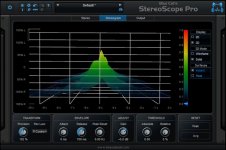
I've attached a screenshot of what the imaging looks like (the calibrations aren't relevant because I rotated the response display). The Y-Axis is frequency, the X-Axis is the stereo field. Imagine that the signal is moving forward in time, away from you, and you're looking at it from the rear. You can see the big spread at the lower frequencies.

What started me on this quest was working on a mix of a song by Chuck D (Public Enemy). He has an AMAZING, deep, full voice. With the right mic, he doesn't even need EQ. I wished my voice had some of that character! Well, this technique fills out my voice well in the low end. It may be coincidence, but I've gotten more compliments on my vocals since using this technique.
 

Attachments

  • StereoScope.jpg
    StereoScope.jpg
    53 KB · Views: 9
The upcoming blog post "Enhance Solo Vocals" removes the Analog Delay, as a workaround to avoid the problem it creates. The post's FX Chain still delivers the "big solo voice" effect. The tradeoff is that it doesn't also do conventional ADT effects, but people can use the Chorus if that's all they want.

As promised...the Enhance Solo Vocals blog post is up, and there's a downloadable FX Chain.
 
  • Like
Reactions: AAV
Back
Top