I saw that compared to your original Tip of the Week article you proceeded by adding a bit of low-cut (50Hz or so). Have you tried adding a bit of high-cut as well? Feedback is a wily thing, in effects too. Maybe over time something builds up in the supersonic frequencies. If the filters are inside the loop (maybe Ari can comment that) then hi/low-cutting may keep things better in check.
I've tried some high-cut, but it doesn't help. The specific low-cut frequency isn't that critical - mostly you want two identical tracks (including any processing), but one with an additional analog-modeled Low Cut filter (preferably 6 or 12 dB/octave) and one without.
The higher the cutoff, the wider the low-frequency image, and the wider the image at lower frequencies. Of course, you don't want to cut out
too much vocal, but having a full-bandwidth track in parallel means you can get away with a lot, like going up to a 150 Hz cutoff. The low-frequency decorrelation means most of the imaging happens in the low end, while the highs stay centered. That's ideal for vocals, because you don't want the intelligibility frequencies "wandering."
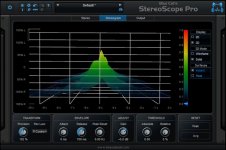
I've attached a screenshot of what the imaging looks like (the calibrations aren't relevant because I rotated the response display). The Y-Axis is frequency, the X-Axis is the stereo field. Imagine that the signal is moving
forward in time, away from you, and you're looking at it from the
rear. You can see the big spread at the lower frequencies.
What started me on this quest was working on a mix of a song by Chuck D (Public Enemy). He has an AMAZING, deep, full voice. With the right mic, he doesn't even need EQ. I wished my voice had some of that character! Well, this technique fills out my voice well in the low end. It may be coincidence, but I've gotten more compliments on my vocals since using this technique.


 That would be...me.
 Back to music.