• Hi and welcome to the Studio One & Studio Pro User Forum!

    Please note that this is an independent, user-driven forum and is not endorsed by, affiliated with, or maintained by Fender. Learn more in the Welcome thread!

Any Difference Between Automation and Clip Volume Fades?

Ken Morgan

Member
Simple question (I think). Is there any actual difference between automating a track's volume ups and downs and manipulating passages by separating loud parts using the scissor tool and bringing down (or up) the volume of pieces?

Clip gain vs clip volume, if you will. Old timers (ahem) used to differentiate between gain (electrical) and volume (loudness) - just wondering of StudioPro dropped the distinction much like PT and others.
 
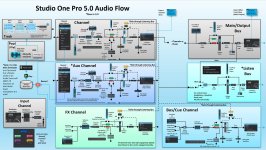
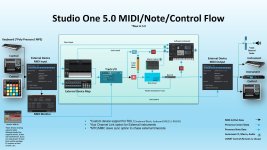
I've wondered about it, too. Found these images somewhere. Maybe they can help.
 

Attachments

  • Studio One 5.0 Audio Flow HD.jpg
    Studio One 5.0 Audio Flow HD.jpg
    331,6 KB · Views: 10
  • Studio One 5.0 MIDI Flow HD.jpg
    Studio One 5.0 MIDI Flow HD.jpg
    224,7 KB · Views: 9
That does right handily, thanks...I noticed that was was for Ver 5 - hoping that architecture still holds for SP8.

I first started using this method in Samplitude 6 with the flagship Sequoia offering 4 point implementation- they called it object oriented mixing, and it was (to me) a very intuitive was to do things. Most others caught up eventually but implementations varied.
 
Mainly, clip volume fades , or "clip gain" impact gain level. The initial level before reaching the channel faders.
Automation, as in volume automation will be the equivalent of moving your faders. Both impact volume, only gain being a little more critical for keeping a desired level passing through your channel.

They both have their uses, so explore what suits your needs. Speed in adjusting volumes, as well as adjusting sensitivity play a roll, so its one of those things best left exploring your own needs which will work best for you.

For example, gain adjustment could greatly impact a guitar level. So if the signal is too hot in one area, like a spike that is too high in level, it would be best served to reduce the clip gain at that spot to reduce that spike. If the signals were fairly consistant with plenty of headroom, and you needed to gain ride by moving a fader, then automation will be preferred. [Note: "gain ride" is often a poorly used term, as it's better suited to be called "level ride".]

There are no hard rules, but there are areas where you have to treat gain with a closer watch for headroom.

Automation will be preferred if you have the need to re adjust levels during a performance. Which can be more often. So its probably worth thinking of clip gain alterations as more surgically focused. And automation as more mix focused.
 
The key difference is that Clip Gain (Envelope) is before all track/channel processing where fader automation is after all track/channel processing. This affects channel processing that uses compression/expansion/limiting and it affects the sends to buses and sidechains.
 
Translating this to 'old world' thinking - SP acts much like a tape system in that using input channels or tracking with effects, what hits the track is akin to what hits a tape track, and any manipulations thereafter (in keeping with old world thinking) would be done with the SP mixer, inserts, sends, and automation.

The primary differences being the 'tape' tracks can be modified if need be...but careful management should be able to negate the need for much of anything after sounds are affixed to the track.

This makes so much sense. There are other DAW that don't follow this, and frankly not following this same sort of signal flow architecture confuses the hell out of me.

Thanks for the 'input' folks
 
Maybe also have a look at this as it's the best option to deal with louder/softer passages in recorded material. It looks cleaner than splitting and offers more 'volume shaping' options too. To compare with tape machines it's like riding the input gain with hindsight.
 
Is there any actual difference between automating a track's volume ups and downs and manipulating passages by separating loud parts using the scissor tool and bringing down (or up) the volume of pieces?
Hi Ken, one last diddy as my answer covered more of the 2nd part of your question. As for the above, slicing an event works fine on that same gain front, only just be aware slices require a zero cross fade to smooth out audible glitches. SO/SP will commonly prepare a smooth default zero cross-fade that works remarkably well. At times, if it doesnt prepare one, or you hear an audible glitch, highlight the two events and select [X]. This will cross fade for you. I will add that Studio One /Studio Pro have the best auto zero cross fades I've ever heard. It's still worth ensuring a zeeo cross fade occurs so nothing creeps in later by gain adjusting one event side over the other with no cross fade.

I go back to zero cross fading and sample manipulation with an original first gen Ensoniq Mirage, using Digidesign's Sound Designer. Giving away my age. 😃
 
Hi Ken, one last diddy as my answer covered more of the 2nd part of your question. As for the above, slicing an event works fine on that same gain front, only just be aware slices require a zero cross fade to smooth out audible glitches. SO/SP will commonly prepare a smooth default zero cross-fade that works remarkably well. At times, if it doesnt prepare one, or you hear an audible glitch, highlight the two events and select [X]. This will cross fade for you. I will add that Studio One /Studio Pro have the best auto zero cross fades I've ever heard. It's still worth ensuring a zeeo cross fade occurs so nothing creeps in later by gain adjusting one event side over the other with no cross fade.

I go back to zero cross fading and sample manipulation with an original first gen Ensoniq Mirage, using Digidesign's Sound Designer. Giving away my age. 😃

Yes, SO/SP has implemented crossfades well, but the hands down winner in that department IMO was Sequoia, with its 4 point crossfade. Far as I know, no one else has it.

4 point gives you complete control over the the outgoing fade beginning, curve, duration, and such, and the incoming fade's beginning, full signal, curve, duration, blend time, nearly everything involved in a cross fade. It really is an incredible tool. For the longest time, Sequoia was THE choice of major orchestral and mastering guys - they were the only ones that could afford it - much like Nuendo is priced out of existence for 98% of the Cubase user world.

Back to SO/SP - When doing my own stuff (most of what I do now) I generally track with light hardware compression so the amount of tweaking I need is negligible at best. I still fight the urge to slam the tape into the red though:cool:
 
Yes, SO/SP has implemented crossfades well, but the hands down winner in that department IMO was Sequoia, with its 4 point crossfade. Far as I know, no one else has it.
Very useful. I cant put my finger on it (more like ear on it) but Studio One seems to have some exception with ARA2 helping with some of the audio editing. As with cross fades, which have gotten better with most DAW's and audio editiors. Only, Studio One has some uncanny excellence with audio chord change capability. It simply cant be that good unless something in the form of ARA which has a wider window over editing is taking place. I continue to be impressed. On some upcoming song releases that I share here, I will be sure to mention how that went. Craig Anderton has commented on it as well. The results are pretty mind blowing. I get that the many other DAW's now have ARA2 as well, but I dont know that they are taking full advantage of its capability. Studio One/Pro has been better constructed around it. Thats my take, anyway. I have nothing else than the results to go by. (based on PT, and Logic comparisons)
 
Last edited:
Back
Top