• Hi and welcome to the Studio One & Studio Pro User Forum!

    Please note that this is an independent, user-driven forum and is not endorsed by, affiliated with, or maintained by Fender. Learn more in the Welcome thread!

8.2 Crashes when Instrument Track is created

That’s what @getatnard03 already confirmed. Plugins are working fine for him. It’s only external Instruments that are failing this way. Maybe some oversight when implementing MIDI 2 in the configuration files for external hardware. Who knows…

Edit: btw - you speak of “dragging in”. That’s what I suggested and seemingly works. According to the OP it’s the specific way of creating a new track via dialog, then selecting external instruments from the dropdown menu that causes the crash.
Yes exactly. I’m not saying my midi instruments won’t work, I’m saying when I create them the same way I have created them since v3 it crashes.
 
I don’t think you understanding or reading what I’m writing. I disconnected and turned off all of my midi devices and it still crashes.
Oh I am understanding very clear - especially when you said this:

"But I press T to create a new instrument track and select any one of my 15 keyboards and samplers via midi interface".

Stands to logical reason that if you are attempting to add an external that uses a MIDI interface - MIDI SHOULD play a role here - but if you have turned everything OFF and disconnected them - and it still crashes - then this is something else.

Matter of fact - I may go as far as saying that I (or anyone else) should be able to reproduce this - as long as we do not use external instruments - as that scenario should be exactly the same as disconnecting them.

VP
 
Oh I am understanding very clear - especially when you said this:

"But I press T to create a new instrument track and select any one of my 15 keyboards and samplers via midi interface".

Stands to logical reason that if you are attempting to add an external that uses a MIDI interface - MIDI SHOULD play a role here - but if you have turned everything OFF and disconnected them - and it still crashes - then this is something else.

Matter of fact - I may go as far as saying that I (or anyone else) should be able to reproduce this - as long as we do not use external instruments - as that scenario should be exactly the same as disconnecting them.

VP
The very next sentence was:

“As soon as I select, the program crashes. Even if I disconnect the midi interface and all of my instruments it still crashes when I create a new track. I have been using studio one since v3. This is clearly a 8.2 issue.”
 
This is clearly a 8.2 issue.”

No one is saying it's not an issue. Yet.

But now that you have told us it crashes without any instrument being present at all - some of us should be able to reproduce this.

If we can - it's a issue. If we can't then that is possibly something on your end.

VP
 
No one is saying it's not an issue. Yet.

But now that you have told us it crashes without any instrument being present at all - some of us should be able to reproduce this.

If we can - it's a issue. If we can't then that is possibly something on your end.

VP
Which is why I said :

“That's why I was posting to see if anyone was having that same issue”

When I said clearly it’s a 8.2 issue, I said it in context with me removing all of the midi devices and it still crashing. Yes that could be an issue on my end that no one else has, which is why I posted.
 
"When creating a new external instrument track, if I select an external instrument in the Add Tracks window before clicking OK"

As a test - if you choose just one of the instruments (located under “Instruments —> External Instruments“) - removed it completely from Studio Pro, exit the program, start it back up and then re-add this specific instrument and THEN select this re-added instrument into a new track - does that work?

VP
 
"When creating a new external instrument track, if I select an external instrument in the Add Tracks window before clicking OK"

As a test - if you choose just one of the instruments (located under “Instruments —> External Instruments“) - removed it completely from Studio Pro, exit the program, start it back up and then re-add this specific instrument and THEN select this re-added instrument into a new track - does that work?

VP
I’m not home but I will try it when I get home later.
 
As a test - if you choose just one of the instruments (located under “Instruments —> External Instruments“) - removed it completely from Studio Pro, exit the program, start it back up and then re-add this specific instrument and THEN select this re-added instrument into a new track - does that work?
Aaah, I think I get what you want to find out: If it breaks because the configs created with Studio OnePro <8.2 are somehow corrupted or are missing something that newly created configs include. :)
 
Aaah, I think I get what you want to find out: If it breaks because the configs created with Studio OnePro <8.2 are somehow corrupted or are missing something that newly created configs include. :)

If I had a nickel for everytime this happened to me....

Dependant on the program version - I have seen in-place upgrades "appear" to bring over existing device configs just fine one time and then botch them the next.

I remember one specific upgrade back in the v5 cycle where I could not even get my S-Series MKII to allow any key to be recognized as soon as I tried to use it in the new upgrade. Had to dump the instrument completely - re-add it right back in - and then it worked fine.

If the OP can just pick one of his 15 - dump it and add it back - if that does work - we are getting somewhere.

VP
 
"When creating a new external instrument track, if I select an external instrument in the Add Tracks window before clicking OK"

As a test - if you choose just one of the instruments (located under “Instruments —> External Instruments“) - removed it completely from Studio Pro, exit the program, start it back up and then re-add this specific instrument and THEN select this re-added instrument into a new track - does that work?

VP
So I deleted an instrument, restarted fender studio pro and added it back but it still crashed. I have a work around so it isn't deal breaking. I have a ticket submitted. I will follow up once I receive a response.
 
I uploaded my crash report into Claude. This is what it said

“This report points at a bug in Studio Pro 8.2 itself, not your Mios.


What it shows: The zip has three crash dumps, matching your three crashes tonight. All three crash in the same place, inside Studio Pro's own code on its main thread. Two are a null-pointer error (reading memory that doesn't exist) and one is a related memory error. The crashing code is called from Studio Pro's internal scripting engine, which is the part that runs interface windows like Add Track. That fits what you've seen.”
 
I'm getting crashes too in 8.2 when I create an instrument track using the "+" button and selecting to route the instrument track to a pre-existing instrument. The workaround is just to create an instrument track and then route it to the instrument I want.

Bit of a hassle but hopefully Fender will patch this bug soon because I'm sure it's happening to plenty of others too!
 
Windows.
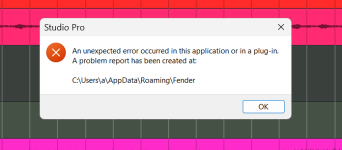
I am experiencing the same issue... Add track using "T" select External Instrument program freeze and issues the following notice!

Screenshot 2026-10-27 034727.png

Shut down through task manager is the only way out.

IMHO.
Disable LoopBe. No stream deck and things work as expected. To me this is pointing to Midi and LoopBe, perhaps the OP or others can check if the "T", insert track dialogue works as expected with LoopBe disabled?

This is just a guess but to my mind it's somehow related to Midi and might also be a Midi2 issue there are a lot of new balls being put into the mix ?
I have had issues with loopBe resetting free running LFO's with other software I run, so will not be surprised if others are seeing problems!

Kindest regards.
 
Last edited:
Windows.
I am experiencing the same issue... Add track using "T" select External Instrument program freeze and issues the following notice!

View attachment 4166

Shut down through task manager is the only way out.

IMHO.
Disable LoopBe. No stream deck and things work as expected. To me this is pointing to Midi and LoopBe, perhaps the OP or others can check if the "T", insert track dialogue works as expected with LoopBe disabled?

This is just a guess but to my mind it's somehow related to Midi and might also be a Midi2 issue there are a lot of new balls being put into the mix ?
I have had issues with loopBe resetting free running LFO's with other software I run, so will not surprised if others are seeing problems!

Kindest regards.
I'm not using LoopBe. I'm using just a normal third party drum machine vst and I'm getting the crash. Not sure if it's just with that particular vst or all vsts, but until it's fixed, will have to just create instrument tracks and then select the VST instead of doing it in the pop up window.

And to clarify, dragging and dropping a VST into the arrangement window works fine.
 
I'm not using LoopBe. I'm using just a normal third party drum machine vst and I'm getting the crash. Not sure if it's just with that particular vst or all vsts, but until it's fixed, will have to just create instrument tracks and then select the VST instead of doing it in the pop up window.

And to clarify, dragging and dropping a VST into the arrangement window works fine.
I believe the OP is pointing toward "External instruments" ?

I have just updated to V8.2 this evening and have yet to run a serious session, just checked this one as I use both a stream deck (LoopBe) and Hardware synths, so thought it best to check. Just my findings couldn't comment about any Vst's.

Kindest regards
 
I believe the OP is pointing toward "External instruments" ?

I have just updated to V8.2 this evening and have yet to run a serious session, just checked this one as I use both a stream deck (LoopBe) and Hardware synths, so thought it best to check. Just my findings couldn't comment about any Vst's.

Kindest regards
all's good my friend. Yes, the OP mentions External Instruments and I just wanted to add that it can also happen with regular VSTs in case more people read this post looking for a solution 🙃
 
I'm getting crashes too in 8.2 when I create an instrument track using the "+" button and selecting to route the instrument track to a pre-existing instrument. The workaround is just to create an instrument track and then route it to the instrument I want.

Confirmed:

1793103101857.png


  1. Start blank session
  2. Add Mai Tai to Track 1
  3. Click "+" button (upper left) or press "T"
  4. Select Instrument, give it a name
  5. Input - I selected my NI S-61 MKIII
  6. Output - Existing Instrument->Mai Tai

Crash as above.

VP
 
Revisited this again this morning and I don't know what I was doing in the early hours this morning.

Rebooted my puter and tried the External Instruments again all worked OK, for the life of me I cannot explain it... call it a senior moment.

@Vocalpoint glad you are on top of it my brain is fuddled! It cannot be LoopBe as I just checked it again !!!

please ignore any of my posts in this thread they do not help!

Regards to all.
 
Confirmed:

View attachment 4167

  1. Start blank session
  2. Add Mai Tai to Track 1
  3. Click "+" button (upper left) or press "T"
  4. Select Instrument, give it a name
  5. Input - I selected my NI S-61 MKIII
  6. Output - Existing Instrument->Mai Tai

Crash as above.

VP
Strange - followed your exact method, expecting to confirm a crash. No crash here. Input is my Nektar Impact GX61. Win11 latest revision
 
Strange - followed your exact method, expecting to confirm a crash. No crash here. Input is my Nektar Impact GX61. Win11 latest revision
Hmm. Ok - that is good info.

Something else is going on here then...more analysis...

VP
 
Back
Top