
-
Hi and welcome to the Studio One & Studio Pro User Forum!
Please note that this is an independent, user-driven forum and is not endorsed by, affiliated with, or maintained by Fender. Learn more in the Welcome thread!
You are using an out of date browser. It may not display this or other websites correctly.
You should upgrade or use an alternative browser.
You should upgrade or use an alternative browser.
8.2 Crashes when Instrument Track is created
- Thread starter getatnard03
- Start date
You also, it's all a bit woolly as to the cause?Just redid VP's method - using "T" instead of "+" and poof - crash. Confirm?
It's good folk are picking up on it tho', myself I'm a drag and drop kinda guy so not a biggie
Kindest regards.

AAV
Active member
Definitely strange.Hmm. Ok - that is good info.
Something else is going on here then...more analysis...
VP
AAV
Active member
Me too -You also, it's all a bit woolly as to the cause?
It's good folk are picking up on it tho', myself I'm a drag and drop kinda guy so not a biggie
Kindest regards.

Vocalpoint
Well-known member
First time for me as well - actually using that (revised) Add Track dialog.
I am 100% a drag and drop guy after 15+ years in this DAW. Would have never known about this until this test.
While I kinda do like the revision in the new Add Track - to load Track Presets - this revision clearly some issues if crashes are happening.
I am staying away from that until we get a (v8.2.1) maintenance release - which probably needs to be sooner than later.
VP
I am 100% a drag and drop guy after 15+ years in this DAW. Would have never known about this until this test.
While I kinda do like the revision in the new Add Track - to load Track Presets - this revision clearly some issues if crashes are happening.
I am staying away from that until we get a (v8.2.1) maintenance release - which probably needs to be sooner than later.
VP
Sebastian Holtzer
Active member
100%- which probably needs to be sooner than later.
VP


Luny
New member
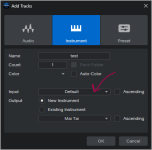
If you don’t change anything here, everything works without any issues.Confirmed:
View attachment 4167
- Start blank session
- Add Mai Tai to Track 1
- Click "+" button (upper left) or press "T"
- Select Instrument, give it a name
- Input - I selected my NI S-61 MKIII
- Output - Existing Instrument->Mai Tai
Crash as above.
VP
If you set different values, a failure occurs.
Attachments

Vocalpoint
Well-known member
Not seeing that here.If you don’t change anything here, everything works without any issues.
Left Input at Default - then changed Output to Existing Instrument - picked Mai Tai and crash city.
For me - does not matter what I change or do not change - it's going down in a heap.
VP

Alonso
New member
I also tried out some of the workflows mentioned here and sometimes it crashes, other times it doesn't.
So definitely the best way to avoid it, if you're creating instrument tracks and want to route them to an existing instrument, is to create the instrument track without changing anything in the pop up, and then changing the routing or inputs (or what have you) AFTER it's created
So definitely the best way to avoid it, if you're creating instrument tracks and want to route them to an existing instrument, is to create the instrument track without changing anything in the pop up, and then changing the routing or inputs (or what have you) AFTER it's created
Vocalpoint
Well-known member
Not only does this crash - because Studio Pro is also talking to my NI S-Series S61MKIII via Komplete Kontrol (DAW) control - when FSP goes south - the board stays in DAW mode too. Need to hard recycle it with the power switch.I've just gone through both VP's and Luny's workflows (twice) and singularly failed to provoke a crash!
I wonder if this is related to NI stuff in some way. Seems the Nektar guys cannot repro.
Something else is in common here for those of us that are crashing.
Also - with respect to the "rework" of that new Track dialog - is it just me or did this dialog actually have more utility in a prevous life where when selecting a new "instrument" track - I seem to remember being able to actually assign an instrument of mine from a dropdown?
Now it simply creates a bunch of empty instrument tracks - which to make them useful in any way - forces me to have to drag and drop an instrument ONTO one of these empty tracks anyway.
Which begs the question - why would anyone need this? Tons of fans of needing to create 10-20 empty instrument tracks in one go I guess?
VP
Last edited:

TimC340
Well-known member
I decided to restart SP and, on booting up again, the program tells me it failed to shut down properly - in Task Manager it was using around 1.5Gb of RAM sitting doing nothing (at least visually). The new sessions weren't created in the file system. I'm not on my studio rig (the weather has been too crap to go down the garden, though it's actually not too bad now!) and I don't have any NI hardware on this installation.
OK, restarted and tried again and this time I got the crash dialogue as soon as I changed the output selection. However, I cleared the dialogue box and tried twice more and each time the track opened successfully. I then shut down the program, was prompted to save as expected, and the program then hung up and failed to shut down. I'm letting it chunter on to see if it eventually realises it isn't wanted.
OK, restarted and tried again and this time I got the crash dialogue as soon as I changed the output selection. However, I cleared the dialogue box and tried twice more and each time the track opened successfully. I then shut down the program, was prompted to save as expected, and the program then hung up and failed to shut down. I'm letting it chunter on to see if it eventually realises it isn't wanted.
Luny
New member
This is a bug in Studio Pro 8.2.Not only does this crash - because Studio Pro is also talking to my NI S-Series S61MKIII via Komplete Kontrol (DAW) control - when FSP goes south - the board stays in DAW mode too. Need to hard recycle it with the power switch.
I wonder if this is related to NI stuff in some way. Seems the Nektar guys cannot repro.
Something else is in common here for those of us that are crashing.
Also - with respect to the "rework" of that new Track dialog - is it just me or did this dialog actually have more utility in a prevous life where when selecting a new "instrument" track - I seem to remember being able to actually assign an instrument of mine from a dropdown?
Now it simply creates a bunch of empty instrument tracks - which to make them useful in any way - forces me to have to drag and drop an instrument ONTO one of these empty tracks anyway.
Which begs the question - why would anyone need this? Tons of fans of needing to create 10-20 empty instrument tracks in one go I guess?
VP
I showed this in the previous message.
Nektar Panorama T6, Aruba cause a crash if you specify them as the MIDI input.
If the default input is used and the MIDI controller is not connected or is turned off, there are no crashes.
This is information for programmers.
Vocalpoint
Well-known member
This is information for programmers.
Cool - but there are no programmers round these parts. This needs to be reported up into the actual support systems.
Probably is already but lets remember - this is a peer to peer user forum with no official affiliation to Fender at all.
VP
TimC340
Well-known member
As Luny has seen the problem with their Nektar kit, and VP had seen it with his NI kit - and now I’ve seen it with both Nektar and NI, it definitely looks like a FSP issue. I’ll have a further look in the morning and once I’ve got a reliable workflow to prompt the crash, I’ll report it. However, it seems that a workaround isn’t too difficult.
Alonso
New member
FWIW I'm using an Arturia Keylab 61 mkII and I get the crash without selecting my controller as the input in the pop up window. All I do is select the output and point it to an existing instrument in my project.As Luny has seen the problem with their Nektar kit, and VP had seen it with his NI kit - and now I’ve seen it with both Nektar and NI, it definitely looks like a FSP issue. I’ll have a further look in the morning and once I’ve got a reliable workflow to prompt the crash, I’ll report it. However, it seems that a workaround isn’t too difficult.

I can reproduce this on Windows. Will report it to development.Confirmed:
View attachment 4167
- Start blank session
- Add Mai Tai to Track 1
- Click "+" button (upper left) or press "T"
- Select Instrument, give it a name
- Input - I selected my NI S-61 MKIII
- Output - Existing Instrument->Mai Tai
Crash as above.
VP
Luny
New member
This forum is associated with the developer.Cool - but there are no programmers round these parts. This needs to be reported up into the actual support systems.
Probably is already but lets remember - this is a peer to peer user forum with no official affiliation to Fender at all.
VP
Fender kicked the community of people who like Studio One out onto the street.
To communicate on the Fender website, you need to buy a ticket.
This forum is free, although there is a voluntary donation.
Increasing the number of Studio One users for program testing.
Vocalpoint
Well-known member
Not sure what this means. But ok.This forum is associated with the developer.
Fender kicked the community of people who like Studio One out onto the street.
To communicate on the Fender website, you need to buy a ticket.
This forum is free, although there is a voluntary donation.
Increasing the number of Studio One users for program testing.
VP