• Hi and welcome to the Studio One User Forum!

    Please note that this is an independent, user-driven forum and is not endorsed by, affiliated with, or maintained by PreSonus. Learn more in the Welcome thread!

Why Is Melodyne Doing This?

JBMusic

Active member
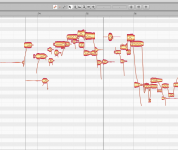
I'm using the "Edit With Melodyne" function like I always do but for some reason when I went to punch in on a part of an event I got this.....
Looks like double tracks which I don't want. Any help would be appreciated in telling me what I did wrong. It never did this before.
Thanks
John B
 

Attachments

  • melodyne er.png
    melodyne er.png
    121,6 KB · Views: 8
I can only guess you selected two events, or have some hidden selected event? But I'm sure you made certain one event was selected and not one event residing over another. Aso check original notes are not doubled. Otherwise, I got nuttin.
 
Probably you have to bounce the track with the punch-in first. Ara 'plug-ins' like Melodyne act on the files used on the track, not on what you actually see on the track. Then the altered files are returned to S1/SP to replace the original files. So yeah, two files.
 
Back
Top