• Hi and welcome to the Studio One User Forum!

    Please note that this is an independent, user-driven forum and is not endorsed by, affiliated with, or maintained by PreSonus. Learn more in the Welcome thread!

User Template Management

THW

Member
My list of templates in the "user" template list on starting up a new project has gotten quite long over the years with different projects, experiments, and versions of S1. I'm wondering if there is a way I could better organize this list. I know I can move templates around in the file explorer, but I am a little concerned about moving templates to a new folder and creating an issue if I were to then try and open up an old project. I wonder if I made a subfolder within the templates folder, called "archived" if it would remove those older or less used templates from the user list without interfering with opening old projects?

Ideally, I'd like to clean up the number of templates I have in my "user" list, or at least be able to arrange the list in an order I'd prefer. It would be a great feature to be able to click and drag the order of templates. I'd want to put my current "master" template at the top of the list. The only way I can see to do that now would be by changing the template file name to include a number (I think it is the lower the digit, the higher up in the list). It's a very minor inconvenience having to scroll through my user list of templates to get to the one I'm after...I don't have a strict naming convention for templates (I probably should), nor do I have song ideas (I also probably should...but also know I'm not alone in that regard either lol! I do have my 2026 songs folder ready to go though!!)

Curious if anyone has thoughts on this.

Best,
THW
 
My list of templates in the "user" template list on starting up a new project has gotten quite long over the years with different projects, experiments, and versions of S1. I'm wondering if there is a way I could better organize this list. I know I can move templates around in the file explorer, but I am a little concerned about moving templates to a new folder and creating an issue if I were to then try and open up an old project. I wonder if I made a subfolder within the templates folder, called "archived" if it would remove those older or less used templates from the user list without interfering with opening old projects?

Ideally, I'd like to clean up the number of templates I have in my "user" list, or at least be able to arrange the list in an order I'd prefer. It would be a great feature to be able to click and drag the order of templates. I'd want to put my current "master" template at the top of the list. The only way I can see to do that now would be by changing the template file name to include a number (I think it is the lower the digit, the higher up in the list). It's a very minor inconvenience having to scroll through my user list of templates to get to the one I'm after...I don't have a strict naming convention for templates (I probably should), nor do I have song ideas (I also probably should...but also know I'm not alone in that regard either lol! I do have my 2026 songs folder ready to go though!!)

Curious if anyone has thoughts on this.

Best,
THW
I like to count things and make lists, which I suppose is an ADHD/OCD activity, and it includes keeping a running rhythm pattern with my feet and, of course, touch-typing, which is a useful skill but also is ADHD/OCD.

Making lists is like making outlines; and the key to outlining is that you need at least to have pairs, where for example if there is a Roman numeral "I", then there should be a "II".

When I first started doing software engineering, I got a job doing COBOL programming; but, even though I have a Computer Science degree, I knew nothing about COBOL programming; yet I realized (a) it was important to look busy and (b) everything in COBOL was procedures that were performed; so I would start a new program with something like the following:

PERFORM 000-INITIAL-START
PERFORM 010-INITIAL-START-SUB-000
.
.
.
PERFORM 100-PRIMARY-PROCEDURE
PERFORM 110-SECONDARY PROCEDURE

and so forth . . .

Then I would fill the first procedure with sub procedures:

PERFORM 000-INITIAL-START-SUB-001
PERFORM 000-INITIAL-START-SUB-002

I was able to look busy for days without actually doing any real work; but eventually the outline of the COBOL program would be so "complete" that it became easy to start focusing on doing things like adding, subtracting, and so forth.

Since there were daily quotas in those days for programmers (now called "software engineers" and "developers"), I always had good quota numbers and managers often remarked on what a good worker I was. 🤪

Yet, at least until I started learning how COBOL worked, I mostly was just creating, expanding, and enhancing outlines.

This strategy works nicely when you are focusing on organizing thoughts and idea; and I like to use a mind-mapping application called "SimpleMind Pro", which (a) is available for the Mac and Windows and (b) is affordable.

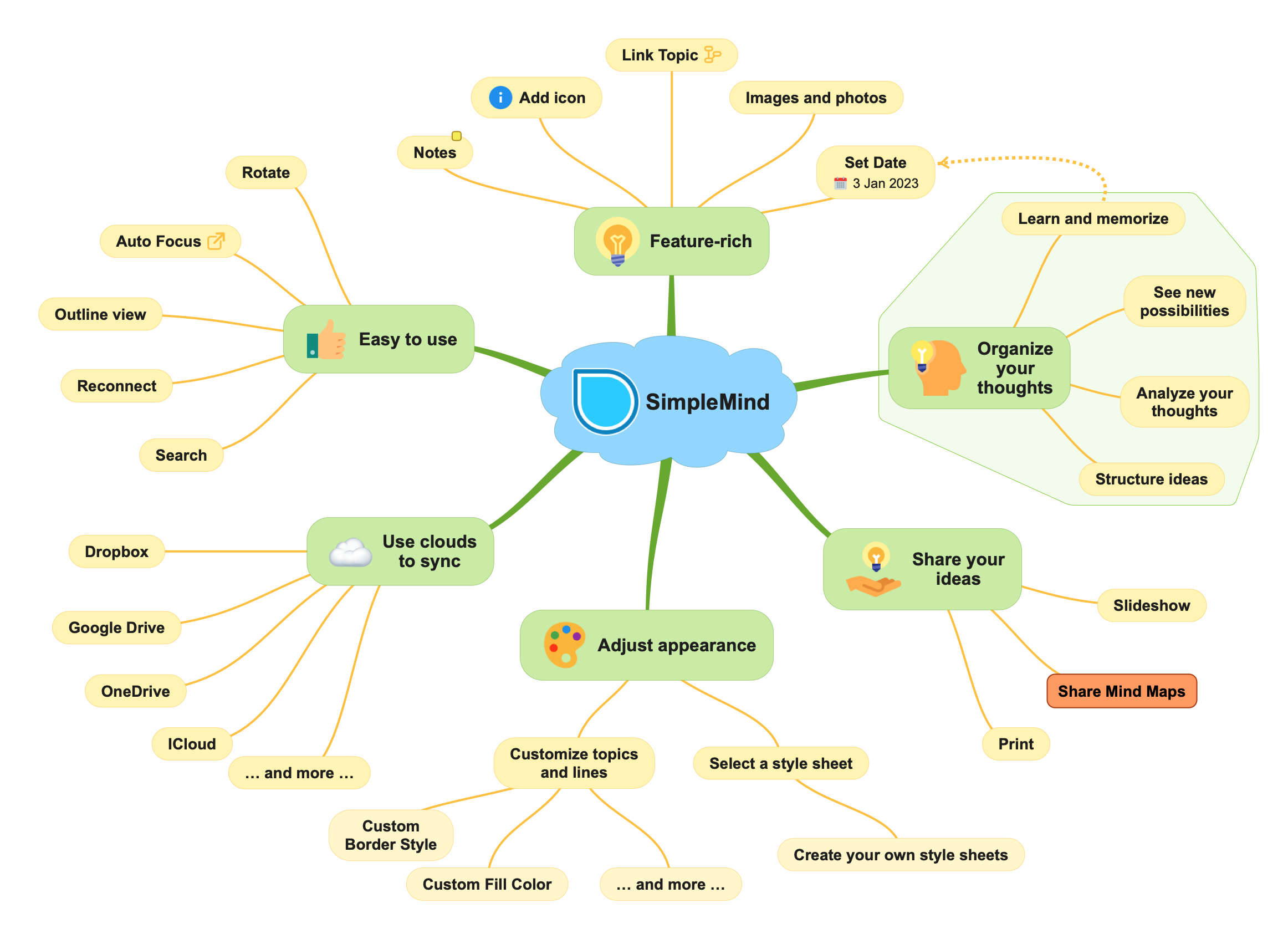
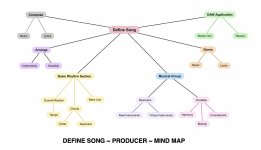
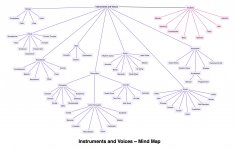
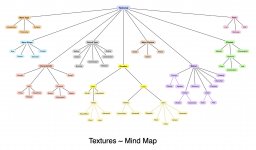
These are a few of the mind-maps from my ongoing books on "The Art of Digital Music Production" and are useful for visualizing lists and groups of various things that are categorized.

STRATEGY FOR STUDIO ONE TEMPLATES

Since you already have a set of templates and do not want to cause everything to stop working, you can start a new system and once it's perfected, you can start using it.

The overall structure for data in macOS and Windows is based (a) on {folders, subfolders, files} for macOS and (b) on {directories, subdirectories, and files} for Windows.

You can start by creating mind-maps to explore different ways to organize and categorize instruments, voices, and effects, as well as musical genres, styles, and so forth.

When that is working nicely, you can create a corresponding hierarchy of folders, subfolders, and files, where the files will be Studio One templates and might even be ".song" subfolders themselves. This also can include text files with information about what the various Studio One templates do.

Even when you include a virtual festival of world instruments, at a high-level instruments are grouped or categorized by the way they produce sounds, where one system groups instruments this way and is called the Hornbostel-Sachs System {Idiophones, Membranophones, Chordophones, Aerophones, Electrophones}.

(1) Idiophones are instruments that make sound by vibrating themselves, like cymbals and bells

(2) Membranophones are instruments that make sounds via stretched membranes like drums.

(3) Chordophones are instruments that make sounds by vibrating strings like guitars, concert harps, and grand pianos.

(4) Aerophones are instruments that make sounds by vibrating columns of air like pipe organs, flutes, oboes, and voices (singing).

(5) Electrophones are instruments that make sound electronically and via computer software like synthesizers and VSTi virtual instruments.

When doing digital music production using Studio One, everything ultimately is an Electrophone once it is recorded as audio on Audio Tracks.

I also like the strategy of grouping and organizing by VSTi virtual instruments, where a few popular instruments are {SampleTank, Kontakt, Opus, UVI Workstation, Falcon, and so forth}. In this strategic variation, the idea is to create a template with one instance of each of the VSTi virtual instruments you have in your collection and then to enable one when you need it, followed by cloning it to create a new instance.

This is what I do for a basic drumkit, where instead of trying to fit everything onto as few staves as possible--which is vastly cluttered and is a big mess--I put each drum, cymbal, and Latin percussion instrument on its own staff. I like to do headphone mixes where sounds move from place to place; so I usually have two kick drums and three snare drums, each on its own staff. If I need more, then I create more staves, but always one instrument per staff.

For reference, EW ComposerCloud+ (EastWest) and Sonic Pass (UVI) are available as monthly subscriptions and have everything arranged and grouped by various countries, musical genres, styles, and so forth, which makes them an excellent way to get a sense of pretty much everything that can be part of what I call the "New Modern Orchestra" or perhaps the "21st Century Orchestra", where songs can be constructed using subsets of thousands and perhaps millions of tones and textures, especially when you consider every possible sound a synthesizer can make.

You might want to explore Asian, Indian, Persian, Turkish, and Middle Eastern instruments, which in EW ComposerCloud+ are organized in the "Ra" and "Silk" collections, as well as in other related collections.

World Suite 3 (UVI) has similar types of groupings where there are subsets of six instruments in various genres, styles, and tempos; and the subsets can be used as ensembles and actually play themselves or can be used as singleton instruments, which is the way I use them for things like shakers, maracas, cowbells, and so forth.

It's a bit mind-boggling at first, but after a while (a) it starts making sense and (b) you can organize sounds by tone and textures rather than by countries, genres, styles, and so forth.

You can make mind-maps of everything, including different types and categories of harmony.


Attachments

  • 9-SW-Producer-Define-Song-Mind-Map.jpg
    9-SW-Producer-Define-Song-Mind-Map.jpg
    147,4 KB · Views: 7
  • 26-SW-Instruments-and-Voices-Mind-Map.jpg
    26-SW-Instruments-and-Voices-Mind-Map.jpg
    246,7 KB · Views: 6
  • 10-SW-Textures-Mind-Map.jpg
    10-SW-Textures-Mind-Map.jpg
    207,3 KB · Views: 7
  • 59-SW-Characteristics-of-Harmony-Mind-Map.jpg
    59-SW-Characteristics-of-Harmony-Mind-Map.jpg
    146,9 KB · Views: 7
Last edited:
  • Like
Reactions: THW
Short answer:

I know I can move templates around in the file explorer, but I am a little concerned about moving templates to a new folder and creating an issue if I were to then try and open up an old project. I wonder if I made a subfolder within the templates folder, called "archived" if it would remove those older or less used templates from the user list without interfering with opening old projects?
No, none of this should be a problem. The template files (which are essentially song files with different extensions) are only accessed when you start a new song. The new song is basically (simplified, but still...) a copy of the template. You can safely create an "archive" folder within the templates/v5 / v6 / v7 folder and move outdated templates to this folder.

I'd want to put my current "master" template at the top of the list. The only way I can see to do that now would be by changing the template file name to include a number (I think it is the lower the digit, the higher up in the list).
Renaming shouldn't be a problem either. Here is how it works:

templates-xml.png


Each template consists of multiple files. To change just the display title, you can open the [your-template-name].songtemplate file in a text editor and change the Document:Title. This will be the title that appears in the list and by adding a prefix, you can change the order.

I hope that helps.
 
I like to count things and make lists, which I suppose is an ADHD/OCD activity, and it includes keeping a running rhythm pattern with my feet and, of course, touch-typing, which is a useful skill but also is ADHD/OCD.

Making lists is like making outlines; and the key to outlining is that you need at least to have pairs, where for example if there is a Roman numeral "I", then there should be a "II".

When I first started doing software engineering, I got a job doing COBOL programming; but, even though I have a Computer Science degree, I knew nothing about COBOL programming; yet I realized (a) it was important to look busy and (b) everything in COBOL was procedures that were performed; so I would start a new program with something like the following:

PERFORM 000-INITIAL-START
PERFORM 010-INITIAL-START-SUB-000
.
.
.
PERFORM 100-PRIMARY-PROCEDURE
PERFORM 110-SECONDARY PROCEDURE

and so forth . . .

Then I would fill the first procedure with sub procedures:

PERFORM 000-INITIAL-START-SUB-001
PERFORM 000-INITIAL-START-SUB-002

I was able to look busy for days without actually doing any real work; but eventually the outline of the COBOL program would be so "complete" that it became easy to start focusing on doing things like adding, subtracting, and so forth.

Since there were daily quotas in those days for programmers (now called "software engineers" and "developers"), I always had good quota numbers and managers often remarked on what a good worker I was. 🤪

Yet, at least until I started learning how COBOL worked, I mostly was just creating, expanding, and enhancing outlines.

This strategy works nicely when you are focusing on organizing thoughts and idea; and I like to use a mind-mapping application called "SimpleMind Pro", which (a) is available for the Mac and Windows and (b) is affordable.

These are a few of the mind-maps from my ongoing books on "The Art of Digital Music Production" and are useful for visualizing lists and groups of various things that are categorized.

STRATEGY FOR STUDIO ONE TEMPLATES

Since you already have a set of templates and do not want to cause everything to stop working, you can start a new system and once it's perfected, you can start using it.

The overall structure for data in macOS and Windows is based (a) on {folders, subfolders, files} for macOS and (b) on {directories, subdirectories, and files} for Windows.

You can start by creating mind-maps to explore different ways to organize and categorize instruments, voices, and effects, as well as musical genres, styles, and so forth.

When that is working nicely, you can create a corresponding hierarchy of folders, subfolders, and files, where the files will be Studio One templates and might even be ".song" subfolders themselves. This also can include text files with information about what the various Studio One templates do.

Even when you include a virtual festival of world instruments, at a high-level instruments are grouped or categorized by the way they produce sounds, where one system groups instruments this way and is called the Hornbostel-Sachs System {Idiophones, Membranophones, Chordophones, Aerophones, Electrophones}.

(1) Idiophones are instruments that make sound by vibrating themselves, like cymbals and bells

(2) Membranophones are instruments that make sounds via stretched membranes like drums.

(3) Chordophones are instruments that make sounds by vibrating strings like guitars, concert harps, and grand pianos.

(4) Aerophones are instruments that make sounds by vibrating columns of air like pipe organs, flutes, oboes, and voices (singing).

(5) Electrophones are instruments that make sound electronically and via computer software like synthesizers and VSTi virtual instruments.

When doing digital music production using Studio One, everything ultimately is an Electrophone once it is recorded as audio on Audio Tracks.

I also like the strategy of grouping and organizing by VSTi virtual instruments, where a few popular instruments are {SampleTank, Kontakt, Opus, UVI Workstation, Falcon, and so forth}. In this strategic variation, the idea is to create a template with one instance of each of the VSTi virtual instruments you have in your collection and then to enable one when you need it, followed by cloning it to create a new instance.

This is what I do for a basic drumkit, where instead of trying to fit everything onto as few staves as possible--which is vastly cluttered and is a big mess--I put each drum, cymbal, and Latin percussion instrument on its own staff. I like to do headphone mixes where sounds move from place to place; so I usually have two kick drums and three snare drums, each on its own staff. If I need more, then I create more staves, but always one instrument per staff.

For reference, EW ComposerCloud+ (EastWest) and Sonic Pass (UVI) are available as monthly subscriptions and have everything arranged and grouped by various countries, musical genres, styles, and so forth, which makes them an excellent way to get a sense of pretty much everything that can be part of what I call the "New Modern Orchestra" or perhaps the "21st Century Orchestra", where songs can be constructed using subsets of thousands and perhaps millions of tones and textures, especially when you consider every possible sound a synthesizer can make.

You might want to explore Asian, Indian, Persian, Turkish, and Middle Eastern instruments, which in EW ComposerCloud+ are organized in the "Ra" and "Silk" collections, as well as in other related collections.

World Suite 3 (UVI) has similar types of groupings where there are subsets of six instruments in various genres, styles, and tempos; and the subsets can be used as ensembles and actually play themselves or can be used as singleton instruments, which is the way I use them for things like shakers, maracas, cowbells, and so forth.

It's a bit mind-boggling at first, but after a while (a) it starts making sense and (b) you can organize sounds by tone and textures rather than by countries, genres, styles, and so forth.

You can make mind-maps of everything, including different types and categories of harmony.


Hey thanks for sharing! I can see these mind maps as a helpful tool... in a way like scriviner is to word processing. I look forward to taking a closer look.
 
Short answer:


No, none of this should be a problem. The template files (which are essentially song files with different extensions) are only accessed when you start a new song. The new song is basically (simplified, but still...) a copy of the template. You can safely create an "archive" folder within the templates/v5 / v6 / v7 folder and move outdated templates to this folder.


Renaming shouldn't be a problem either. Here is how it works:

View attachment 2515

Each template consists of multiple files. To change just the display title, you can open the [your-template-name].songtemplate file in a text editor and change the Document:Title. This will be the title that appears in the list and by adding a prefix, you can change the order.

I hope that helps.
This is great and exactly what I want to do, but was hesitant to start moving and and possibly renaming templates. Am looking forward to cleaning up that folder. I appreciate the detailed explanation and instructions. Thank you!
 
I suppose it might make sense for me to take the time to read the Studio One Reference Manual, but I tend to avoid technical product documentation.

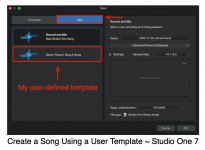
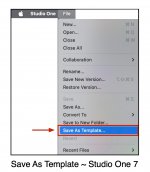
Now that there is a conversation specifically about "Studio One Templates", I did a bit of what I call "scouting around" and discovered the "Save As Template . . . " menu item on the "File" menu.

This is the way to create and save user templates in Studio One so they are choices when you start Studio One, all of which was news to me until this conversation.

I have been creating Studio One templates for years; but I did it by saving a Studio One ".song" to a folder in macOS that I created and maintained, which might have a name like "SW Templates" and would have ".song" projects I could open and then do an immediate "Save As . . ." to create a new song based on the respective template.

Doing it this way appears to have a few advantages, perhaps first and foremost is that you can do it any time you want to start a new song without needing to exit and then to restart Studio One to get the "official" list of templates--at least on the Mac.

You also can do this in Studio One; but you need to close the current song to get the startup choices, which I suppose makes a bit of sense and is not super complex.

Yet, I like the idea; and it's something I did in NOTION, where it was a bit easier and more logical; since on the Mac there is a "package" for each application and it has a folder named "Resources" where the XML list of NOTION templates is kept. If you are bold, then you can modify this XML list and add your own custom templates to the official NOTION templates, and they appear on the NOTION menu as selectable items any time you want to start a new NOTION score; but this travels with a gnarly problem, which is that installing a new version of NOTION installs the factory list of official NOTION templates and any user-defined templates you created are gone, unless you saved a copy of them and can add them to the official NOTION templates, which mostly is a software engineering activity.

I looked for where the "official" user-defined Studio One templates might be stored on the Mac, but did not find anywhere that looked to be useful; and the Studio One template items I found had references to what look to be GUIDS, hence are for internal Studio One use.

SUMMARY

I am able to do everything I need to do with Studio One; and over the years I have devised a set of what I think are super easy ways to do what I need to do--all generally without needing to resort to reading and studying the Studio One Reference Manual.

Some of my strategies and techniques can appear to be a bit beyond vastly stupid; but they work nicely when the primary goal is to focus on making music rather than messing with computer stuff and complex music theory.

I have a university degree in Computer Science and focused on software engineering for decades; so I can mess with computer stuff, but I prefer to focus on making music.

For example, here in the sound isolation studio I do everything with soprano treble staves--other than Realivox Blue (RealiTone), my favorite virtual female soprano, since selecting her phonetic scripts requires using keystrokes that reside on the bass clef staff.

I use Studio One transposition to tell a staff that its notes are to be played (a) as notated or (b) one or two octaves lower or higher than notated, where for example (1) for bass and most drums, I set the transposition to two-octaves lower than notated and (2) for guitar I usually specify one-octave lower than notated, although it depends on the VSTi virtual instrument and the pitch range of its samples.

This is the direct consequence of learning only the soprano treble staff when I was in a liturgical boys choir and it's being the only staff which for me is intuitive and I can sight-sing. I consider (a) there are 12 notes and 10 or so octaves, which is easier for me to understand intuitively and use than (b) messing with 120 notes, which basically are 12 notes spread specifically over 10 octaves.

For me, there are 12 notes, and they can be low, medium, or high, which is the octave aspect.

I do everything in the key of C Major or A minor; and specify sharps and flats when they are needed; and I usually do everything in 4/4 time, although I will use 3/4, 5/4, and other time signatures if it makes everything easier.

Another thing I do is peg all the channel volume sliders to 0dB and then use a handful of compressor-limiters to set the volume levels precisely, which (a) is easier to see, (b) is more precise, and (c) makes the channel volume sliders function as absolute volume level indicators.

Some of this certainly can appear to be stupid or ignorant; but this lets me keep everything as simple as possible.

This is a song I am developing, and at present I am focused on what I call "sparkling" it, which is adding short in-and-out instrument phrases, noises, voices, and whatever comes to mind, which is based on Michael Jackson's signature song "Billie Jean" having over 150 "sparkles" which are there by design and intent, hence I hypothesize must be an important aspect of the formula for a hit song.

[NOTE: This is mixed for listening with studio-quality headphones, and the "sparkles" are louder and more dominant so I can focus on fine-tuning and mixing them. ]

To view this content we will need your consent to set third party cookies.
For more detailed information, see our cookies page.
 

Attachments

  • SW-User-Defined-Template.jpg
    SW-User-Defined-Template.jpg
    133,1 KB · Views: 7
  • SW-Studio-One-New-Song-Pane.jpg
    SW-Studio-One-New-Song-Pane.jpg
    189,8 KB · Views: 8
  • SW-Studio-One-Save-As-Template.jpg
    SW-Studio-One-Save-As-Template.jpg
    104,1 KB · Views: 7
Last edited:
Notion hasn't been NOTION since NOTION Music was acquired by PreSonus in 2013. The last version update, Notion 6.0, was released in August 2016 and the last sub-point update, Notion 6.8.2, was released in August 2021 - pretty much as Fender took over the company. There's unlikely to be any more updates to the desktop app; the bones of the program have been incorporated into Studio One, and the mobile app has taken on the mantle, though I question how useful that is to most Studio One users. I moved on to Dorico, which gets a lot more love!
 
Notion hasn't been NOTION since NOTION Music was acquired by PreSonus in 2013. The last version update, Notion 6.0, was released in August 2016 and the last sub-point update, Notion 6.8.2, was released in August 2021 - pretty much as Fender took over the company. There's unlikely to be any more updates to the desktop app; the bones of the program have been incorporated into Studio One, and the mobile app has taken on the mantle, though I question how useful that is to most Studio One users. I moved on to Dorico, which gets a lot more love!

I prefer the way Studio One does music notation, and it's easier for using using VSTi virtual instruments than NOTION was.

NOTION is more focused upon creating sheet music, which is not something I need to do.

For reference, I was using NOTION for music notation and ReWire for playing the VSTi virtual instruments; but the Propellerheads (now Reason Studios) dropped ReWire support and the major Digital Audio Workstation (DAW) applications followed suit.

PreSonus added music notation to Studio One; and it's elegant for playing VSTi virtual instruments. :)
 
[...] You also can do this in Studio One; but you need to close the current song to get the startup choices, which I suppose makes a bit of sense and is not super complex. [...]
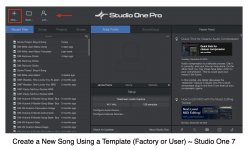
Why not use the 'Home' button? It gives direct acces to the templates available by default or user..
home.png
 
Why not use the 'Home' button? It gives direct acces to the templates available by default or user..View attachment 2520
It works! :)

I never needed to do it, so I never took the time to explore.

I suppose it's a bit surprising, but I don't know what most of the stuff on the Tool Palette at the top of the GUI does, where the "Tool Palette" is what I call the horizontal bar where your arrow points to the "Home" button.

Mostly, I use the arrow and the razor when editing audio clips, which is something I do frequently.

If it's necessary for something I need to do, then I explore and discover how to do it; but otherwise I use a very small subset of what Studio One can do.

I use the Edit window for music notation, and I specify flats and sharps when needed per measure; but I do not use articulations, styles, and all that stuff.

Explained another way, I use Studio One as if it were a magnetic tape machine, mixing board, rack for effects, and music notation to play the VSTi virtual instruments. It does all that stuff, and that mostly is what I need and want to do.

I use some but not all of the music notation Symbols, and I use tuplets for syncopation. Cut, copy and paste are favorites.

I use what I call the "Track Lanes" to do the analog of magnetic tape editing, which is very nice.

I use the Mixing Board for what a real mixing board in a recording studio does; and I use the Browser to find VSTi virtual instruments.

There are a few other things I use routinely, but not so many.

The general strategy is to focus on making music while minimizing the computer stuff.

The computer stuff is interesting; but for example, I prefer to focus on the timing of snare drum rimshots and other music stuff.

The sample song "SW Sparkles v2" shows everything I use (see above); and it's highly focused. :)

I also make backups of everything frequently, since I don't like to lose stuff if the electric service stops.

I usually save the Studio One ".song'" every five minutes or sooner; and I have USB flash drives and LaCie external hard drives for making additional copies of work in progress and historical stuff.

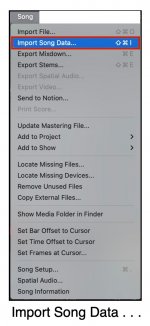
On a related note for this topic, since I have a folder where I keep "do it yourself (DIY)" templates, which are just ".song" folders done via "Save As . . . ", if I need to use something I did previously, I can import it into the current Studio One ".song", which is easy to do with things in any previous Studio One song.

Can you do that with "official" Studio One managed user-defined templates?

I have no idea; but I can do it with my DIY user-defined templates strategy; and it's something I use every so often when for example there is an existing instrument or audio clip I want to use, although sometimes I use Audacity to create standalone audio clips.

Perhaps I worked on the tone and texture of a snare drum in a previous song and want to use it in the current song. I can do this easily by importing it from the previous song into the current song; and this is something Studio One does very nicely.

The only requirement is that I know where the previous song is located, which I usually know.

P. S. On the music notation side, I do everything in the default key signature (C Major, which is the same as A minor); and I use the default time signature, which is 4/4, although there are songs where it's easier to use another time signature. You will observe that I specify sharps for each measure when needed (flats if there is a real horn section to avoid them having secret meetings and demanding everything be in Bâ™­ or F); and I do this because using key signatures other than C Major and A minor requires me to remember, for example, that what looks like "Middle C" actually is C#, which avoids having to specify flats and sharps but requires an extra level of awareness, because what the music notation looks like is not what it actually is in an absolute sense. In other words, if I want to use C#4, then I add a sharp symbol. Then it's obvious and does not require me to remember stuff and to do mental transpositions. It is exactly what it looks like it is, so for me it's not confusing and does not require me to remember stuff. This also is the reason I do everything possible with soprano treble staves, since among other things I cannot remember whether bass clef notes are a whole-step higher or lower, so I have to stop and try to remember, which might take a minute or longer unless I have consumed a lot of very strong coffee. Yet, after playing real bass for over half a century, I know the names and locations of the actual notes and frets but in my simple system where there are a grand total 12 notes spread over 10 octaves so that the 12 notes can be low pitch, middle pitch, or high pitch, which is straightforward and easy to use in real-time on the fly.
 

Attachments

  • SW-Import-Song-Data-Menu-Item.jpg
    SW-Import-Song-Data-Menu-Item.jpg
    113,6 KB · Views: 4
  • SW-Import-Song-Data-Dialog-Box.jpg
    SW-Import-Song-Data-Dialog-Box.jpg
    134,1 KB · Views: 5
Last edited:
Short answer:


No, none of this should be a problem. The template files (which are essentially song files with different extensions) are only accessed when you start a new song. The new song is basically (simplified, but still...) a copy of the template. You can safely create an "archive" folder within the templates/v5 / v6 / v7 folder and move outdated templates to this folder.


Renaming shouldn't be a problem either. Here is how it works:

View attachment 2515

Each template consists of multiple files. To change just the display title, you can open the [your-template-name].songtemplate file in a text editor and change the Document:Title. This will be the title that appears in the list and by adding a prefix, you can change the order.

I hope that helps.
Gotta love the short answer! :ROFLMAO:
 
Following @Lukas recommendations I was able to clean up my lengthy list of user templates and drill down to a handful that I routinely use. Thanks man!

This is a nice quality improvement for me!

Saving templates once I finished a project became part of my routine early on and the habit has stuck. My preference is always to start a project with some basic folders/routing/plugins I know I'll use...it really saves time and keeps me in a creative flow if I'm lucky enough to be in one at the time. And because I have explored or worked on variety of genres using Studio One, overtime I've ended up with this ridiculous number of user templates.

Now my user template list is under 10...to include a blank template w/ some basic routing, a few genre or library specific, one for recording, sound design, and a larger "master" orchestral template (most tracks load disabled).

When paired with macros and track presets -- it's a workflow I'm very happy with.
 
Back
Top