
-
Hi and welcome to the Studio One & Studio Pro User Forum!
Please note that this is an independent, user-driven forum and is not endorsed by, affiliated with, or maintained by Fender. Learn more in the Welcome thread!
You are using an out of date browser. It may not display this or other websites correctly.
You should upgrade or use an alternative browser.
You should upgrade or use an alternative browser.
Solved Unable to create a support ticket
- Thread starter coro
- Start date

Gerran
Active member
Too bad. You are trying to add the ticket straight from the website https://my.presonus.com/support/open while logged into your myPreSonus account I assume? I have no further suggestions, sorry. I hope you'll be able to solve it soon!
OP
OP

coro
Active member
indeed from there.Too bad. You are trying to add the ticket straight from the website https://my.presonus.com/support/open while logged into your myPreSonus account I assume? I have no further suggestions, sorry. I hope you'll be able to solve it soon!
But there must be a way to get in touch with them
@Lukas Is there any Presonus employee here in the forums by any chance?

Vocalpoint
Well-known member
Can tell with 100% certainty that logging a ticket does not require any Microsoft sign-in whatsoever.indeed from there.
But there must be a way to get in touch with them
@Lukas Is there any Presonus employee here in the forums by any chance?
Where ever you are coming into your Presonus account - it is not the right spot.
I just did a hard logout of my account and then did the following:
Then...
And finally...
No muss. No fuss.
VP
OP
OP
coro
Active member
Thanks for chiming in VP, that's what I've done so far (opened 3 tickets since January without issues) but when I go from here I get the first error shown in my opening post and the following login point it recommends (from MyPresonus website) takes me to that unexpected Microsoft account request.Can tell with 100% certainty that logging a ticket does not require any Microsoft sign-in whatsoever.
Where ever you are coming into your Presonus account - it is not the right spot.
I just did a hard logout of my account and then did the following:
View attachment 1832
Then...
View attachment 1833
And finally...
View attachment 1834
No muss. No fuss.
VP
Vocalpoint
Well-known member
Thanks for chiming in VP, that's what I've done so far (opened 3 tickets since January without issues) but when I go from here I get the first error shown in my opening post and the following login point it recommends (from MyPresonus website) takes me to that unexpected Microsoft account request.
Well - this:
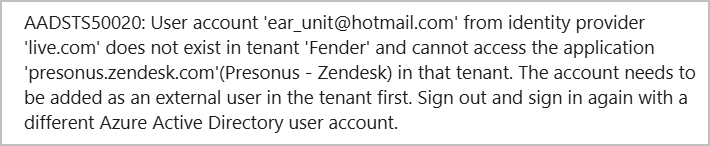
tells me that you are trying to log into presonus.zendesk.com AS "ear_unit@hotmail.com" - which is guaranteed to fail as that address is the internal Presonus helpdesk URL and you do not have an account there.
My guess is that you are either logged into your workstation with an MS account or starting somewhere that is passing your credentials for reasons unknown.
Depending on your browser (all my examples above used MS Edge) - I would suggest you open a "private" session (to avoid loading any extensions or anything else that might interfere) and enter this URL:
Studio One Pro+
And report back.
You may also consider cleaning your browser cache right to the wood so nothing in the cache can influence a login.
What OS and browser are you using BTW?
VP
Attachments

OP
OP
coro
Active member
Thank you both!
Tried every step
- cleared cache on Chrome to the wood
- private Chrome page
- copy/pasted the URL
- logged in with Presonus account (using my gmail mail which is the one associated with it - no Microsoft)
- created a ticket
But still get this error

and If I click OK this is what happens
- takes me to the FAQ page of the Presonus website
- I login so I can create a support ticket
- takes me to the same URL you shared
- I see I'm already logged in and I click to "access Zendesk"
- and here it does that Microsoft thing
and I'm blocked XD
But before this I've already tried to clear the cache before, try with Firefox, same thing. I basically tried everything I could think of lol
Obvs it's on my end but I have no idea what it could be and that's why I was trying to get in touch with them in another way or see if some Presonus employee was here in the forums.
Tried every step
- cleared cache on Chrome to the wood
- private Chrome page
- copy/pasted the URL
- logged in with Presonus account (using my gmail mail which is the one associated with it - no Microsoft)
- created a ticket
But still get this error
and If I click OK this is what happens
- takes me to the FAQ page of the Presonus website
- I login so I can create a support ticket
- takes me to the same URL you shared
- I see I'm already logged in and I click to "access Zendesk"
- and here it does that Microsoft thing
and I'm blocked XD
But before this I've already tried to clear the cache before, try with Firefox, same thing. I basically tried everything I could think of lol
Obvs it's on my end but I have no idea what it could be and that's why I was trying to get in touch with them in another way or see if some Presonus employee was here in the forums.
Vocalpoint
Well-known member
What's the network scenario over there? Wi-Fi? Ethernet? VPN on line? Router rules?
And this whole sequence:
Who/what exactly IS "ear_unit@hotmail.com" and why are these creds being referenced constantly?
Are you using these on your workstation someplace?
VP
And this whole sequence:
- Takes me to the FAQ page of the Presonus website
- I login so I can create a support ticket
- takes me to the same URL you shared
- I see I'm already logged in and I click to "access Zendesk"
- and here it does that Microsoft thing
Who/what exactly IS "ear_unit@hotmail.com" and why are these creds being referenced constantly?
Are you using these on your workstation someplace?
VP

tpittman
Active member
If you have not tried a different browser like Lukas suggests, please do so. Sometimes it does make a differenceDid you try the same in a different browser?
VP.Well - this:
View attachment 1836
tells me that you are trying to log into presonus.zendesk.com AS "ear_unit@hotmail.com" - which is guaranteed to fail as that address is the internal Presonus helpdesk URL and you do not have an account there.
My guess is that you are either logged into your workstation with an MS account or starting somewhere that is passing your credentials for reasons unknown.
Depending on your browser (all my examples above used MS Edge) - I would suggest you open a "private" session (to avoid loading any extensions or anything else that might interfere) and enter this URL:
Studio One Pro+
my.presonus.com
And report back.
You may also consider cleaning your browser cache right to the wood so nothing in the cache can influence a login.
What OS and browser are you using BTW?
VP
Reading this thread makes me wonder if this is a DNS lookup fail/confusion ?
Also this titbit from Wiki might give some idea what is happening...

Microsoft Entra ID - Wikipedia
Best of regards.
Vocalpoint
Well-known member
Reading this thread makes me wonder if this is a DNS lookup fail/confusion ?
Also this titbit from Wiki might give some idea what is happening...
Microsoft Entra ID - Wikipedia
en.wikipedia.org
There is something very strange going on here - and I do believe it'a credentials issue or something a tad deeper.
The OP is passing these bizarre credentials for some reason and it is not helping his case.
My next step for OP to head over here:
Control Panel\User Accounts\Credential Manager
And see what is listed - and ice anything that looks Presonus related - like these:
And then try this sequence again.
I once had the same sort of issue with Universal Control last year. My Presonus credentials got stale after months of time so I logged out of UC, ditched the credentials(as above) and relogged into Presonus and all has been well since then.
VP
OP
OP
coro
Active member
ear_unit is my PC's email account .. it's my very first email evah (if you know what ear unit actually was you get a big prize XD) from the the very early days when I first got a pc back in early 2000's.What's the network scenario over there? Wi-Fi? Ethernet? VPN on line? Router rules?
And this whole sequence:
This feels wrong on a bunch of levels - like direct access to Zendesk. I think Presonus has listed some incorrect (or very untested) instructions - starting with that FAQ page. Espeically the part where it is somehow grabbing these "ear_unit@hotmail.com" credentials and trying to use them in a meaningful way.
- Takes me to the FAQ page of the Presonus website
- I login so I can create a support ticket
- takes me to the same URL you shared
- I see I'm already logged in and I click to "access Zendesk"
- and here it does that Microsoft thing
Who/what exactly IS "ear_unit@hotmail.com" and why are these creds being referenced constantly?
Are you using these on your workstation someplace?
VP
But as you can guess I don't use it anymore since I'm on google since 2006 or something.
I'm Ethernet, Fiber. But again I've already opened 3 tickets early this year and never had an issue. One thing worth mentioning is that a month ago my original Windows user got corrupted and had to make a new one. There's a slight chance that it might have something to do with it. What I have no clue.
@coro
Bit of a long shot and I admit I am guessing here, but if you are experiencing login issues with other sites, or web pages failing to load see below?
It might be worth flushing your DNS Cache... the YT video explains how to do it and it's relatively painless.
Hope you can get it sorted.
Regards to all
Bit of a long shot and I admit I am guessing here, but if you are experiencing login issues with other sites, or web pages failing to load see below?
It might be worth flushing your DNS Cache... the YT video explains how to do it and it's relatively painless.
Hope you can get it sorted.
Regards to all
